

Employee authenticating into a secure corporate network on a laptop with VPN, Wi‑Fi, and cloud access icons
Authentication Network Security Guide

When someone connects to your company VPN from a coffee shop, joins the office wireless network, or opens Salesforce—there's an invisible gatekeeper checking their ID. That gatekeeper is authentication, and it's probably the most underestimated piece of your security puzzle.
Here's the problem: stolen credentials caused 61% of data breaches in 2023 according to Verizon's Data Breach Investigations Report. Attackers don't need sophisticated zero-day exploits when they can just walk through the front door with a phished password.
This guide breaks down how authentication actually protects networks, which methods work best for different scenarios, and—most importantly—where your current setup might be leaving doors unlocked.
What Is Authentication in Network Security
Think of authentication as your network's ID checkpoint. Before anyone touches a file server, cloud application, or database, the system asks: "Prove you're really John Smith from accounting."
The proof comes in different forms. Sometimes it's a password you memorized. Other times it's a fingerprint scan, a physical security key, or a digital certificate your laptop carries. The authentication system checks that proof against its records—if everything matches, the door swings open. Mismatch? You're staying outside.
Now, people constantly mix up three related concepts: authentication, authorization, and accounting. They're connected but do completely different jobs.
Authentication answers one question: "Is this person who they claim to be?" You prove your identity with credentials, biometrics, or cryptographic certificates.
Authorization kicks in after authentication succeeds. It decides "What can this verified person actually access?" Your identity might be confirmed, but that doesn't automatically mean you can view everyone's salary information. Authorization policies draw those boundaries. The receptionist and CFO both authenticate to the same network—authorization determines why one sees the visitor log while the other reviews financial statements.
Accounting creates the paper trail. It logs when you logged in, which systems you touched, what files you opened, when you disconnected. This data feeds compliance audits, security investigations, and troubleshooting. Someone deleted critical files at 3 AM? Accounting logs show exactly which authenticated account did it.
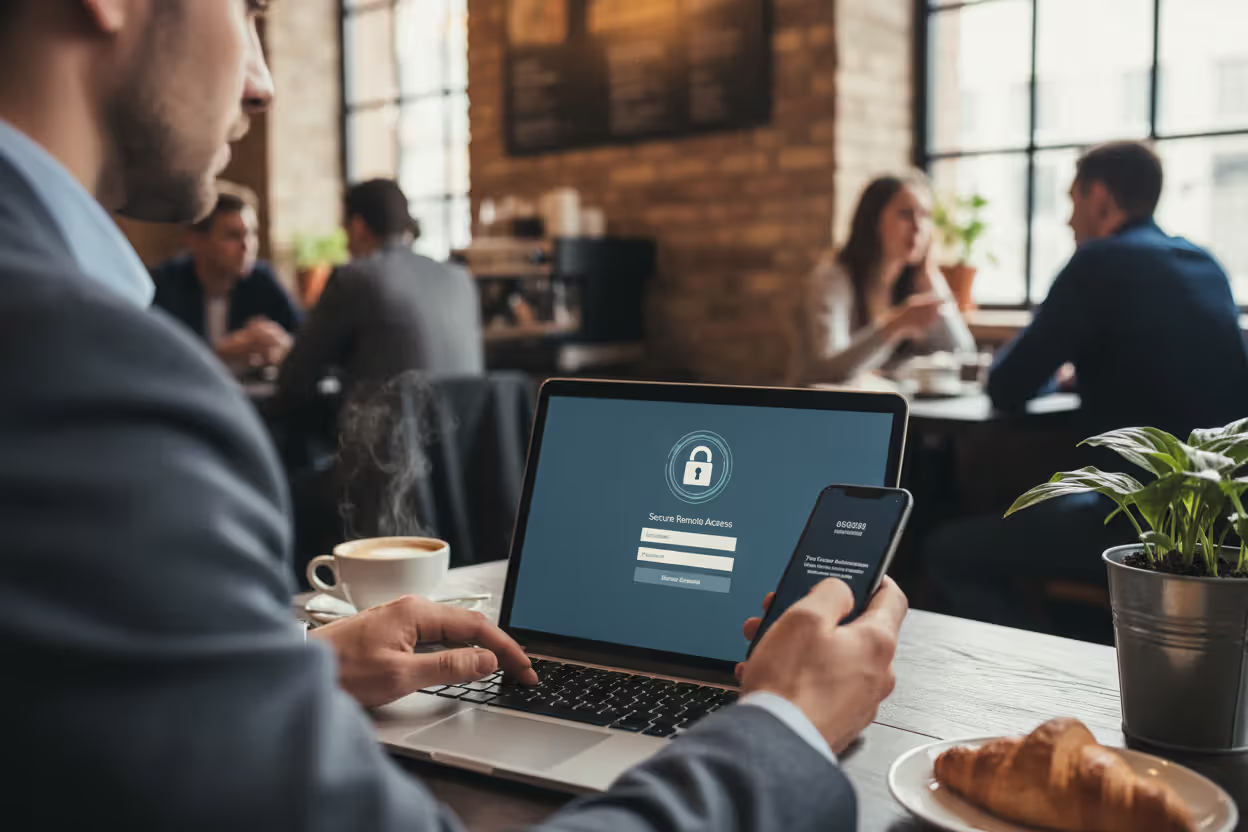
Author: Calvin Roderick;
Source: elegantimagerytv.com
Here's where people trip up: they think authentication and authorization are the same thing. They're not. Airport security illustrates the difference perfectly. TSA checks your driver's license and boarding pass to confirm you're Jane Doe (authentication). Your boarding pass then determines whether you can board the flight to Denver versus the one heading to Miami (authorization). Two separate checks, two different purposes.
Weak authentication creates easy targets. Attackers who grab valid credentials can waltz into your network pretending to be legitimate users. Default passwords that never got changed? No password requirements on administrator accounts? Those aren't small oversights—they're open invitations for ransomware gangs and data thieves.
How Authentication Network Security Works
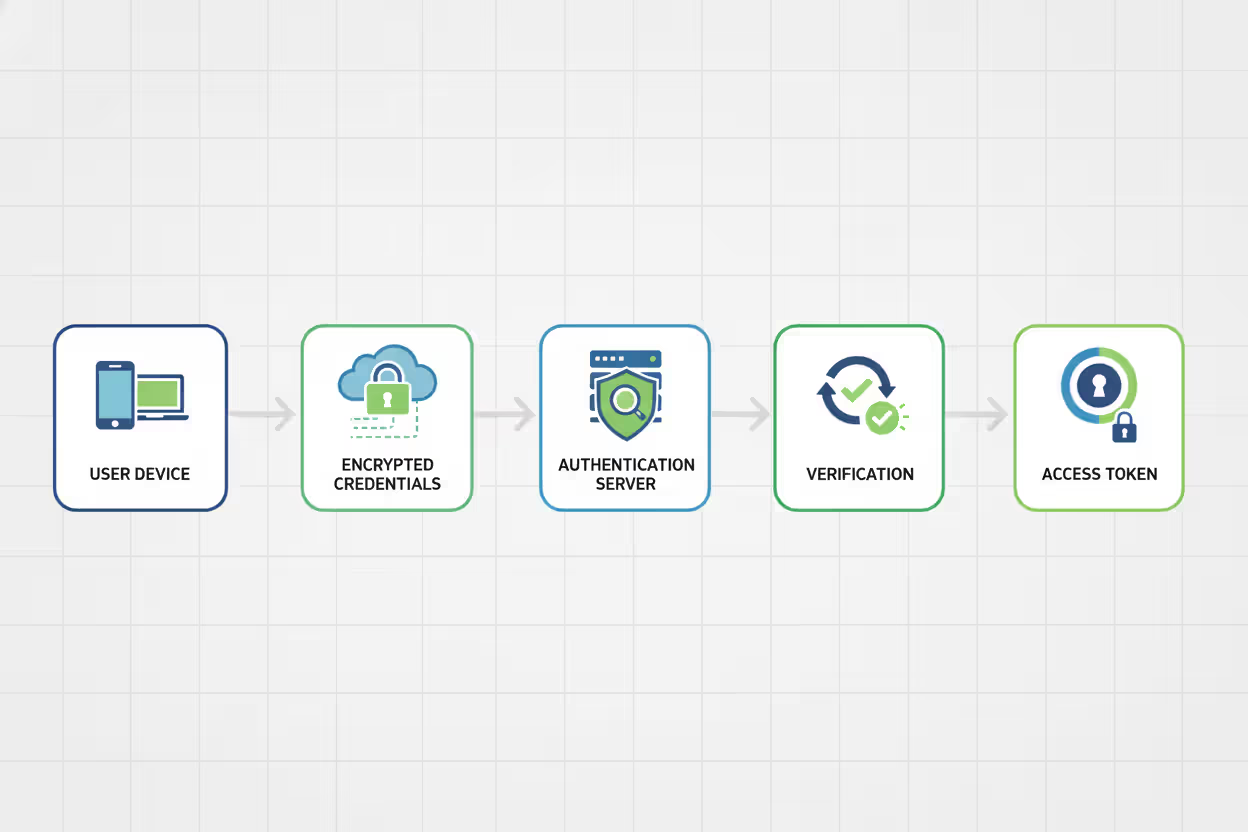
Authentication follows a predictable pattern regardless of whether you're logging into Office 365 or connecting to a corporate switch. The specifics change, but the basic flow stays consistent.
Step 1: The Identity Claim
You launch your VPN client, and it prompts for credentials. Maybe you type username plus password. Maybe your laptop automatically presents a digital certificate. Maybe you press your thumb to a fingerprint reader. Whatever form it takes, you're claiming an identity and offering proof. Smart systems encrypt this information before sending it anywhere—otherwise attackers sniffing network traffic can grab credentials in transit.
Step 2: Routing to the Verification Authority
Your credentials travel to whatever system handles authentication decisions. In Windows shops, that's often an Active Directory domain controller. Network equipment typically uses RADIUS servers. Cloud apps might send you to Okta, Azure AD, or another identity provider. These authentication authorities maintain the master list of valid accounts and their associated credentials.
Step 3: Verification Happens
The authentication system checks your proof against its records. For passwords, servers don't store your actual password (at least they shouldn't). They store a cryptographic hash—a one-way mathematical scramble. When you submit your password, the server applies the same hash function and compares results. Matching hashes mean correct password.
Digital certificates get verified through public key cryptography—the server confirms the certificate's digital signature using the certificate authority's public key. Biometric systems run fuzzy matching algorithms because your fingerprint never lands on the sensor exactly the same way twice.
Step 4: Decision Time
The authentication authority sends back its verdict. Success generates an access token, session cookie, or cryptographic ticket proving you're authenticated. Failure returns an error that blocks your connection. Well-configured systems count failed attempts—three wrong passwords might lock the account for 30 minutes, shutting down automated guessing attacks.
Step 5: Session Established
Once authenticated, you get a session token or ticket that proves your validated status. This eliminates constant re-authentication—imagine typing your password before every email you send. These sessions include expiration timers ranging from minutes to hours. Eventually they expire and force fresh authentication.
Some protocols like Kerberos get more elaborate. Kerberos issues time-stamped tickets encrypted with shared secrets. Even if attackers capture network traffic and extract a Kerberos ticket, that ticket expires quickly and can't be replayed later. The encryption prevents tampering with the ticket contents.
Authentication servers represent critical single points of failure. When they go down, nobody gets in anywhere—business stops. That's why enterprises run redundant authentication clusters. If the primary domain controller crashes, secondary controllers seamlessly handle authentication requests. High availability matters more for authentication than almost any other infrastructure component.
Author: Calvin Roderick;
Source: elegantimagerytv.com
Types of Authentication Methods Used in Networks
Choosing an authentication approach means weighing security needs against user frustration and deployment costs. Each option brings different strengths and pain points.
Single-Factor Authentication
Single-factor authentication relies on exactly one proof element. The overwhelming majority of single-factor deployments use passwords—you provide a username and matching password.
Passwords stick around because they're dead simple. Everyone understands them. No special hardware required. But they create massive security holes. People pick terrible passwords like "Password123" or recycle the same password across 50 different websites. When LinkedIn or Yahoo suffers a breach, attackers test those stolen credentials everywhere. Suddenly your corporate network is vulnerable because an employee reused their LinkedIn password.
PINs represent another single-factor option. While ATMs combine PINs with physical cards (making them multi-factor), some systems use PIN-only authentication for phone unlocks or application access.
Security questions ("What's your mother's maiden name?") technically count as single-factor authentication. They're terrible for primary authentication because answers often appear in public records or Facebook profiles. They work better as account recovery mechanisms than front-line defense.
Single-factor authentication can't withstand credential theft. Once attackers phish your password or extract it from a breach database, they become you. There's no second check, no additional hurdle. Current security standards universally reject password-only protection for anything holding sensitive data.
Author: Calvin Roderick;
Source: elegantimagerytv.com
Multi-Factor Authentication (MFA)
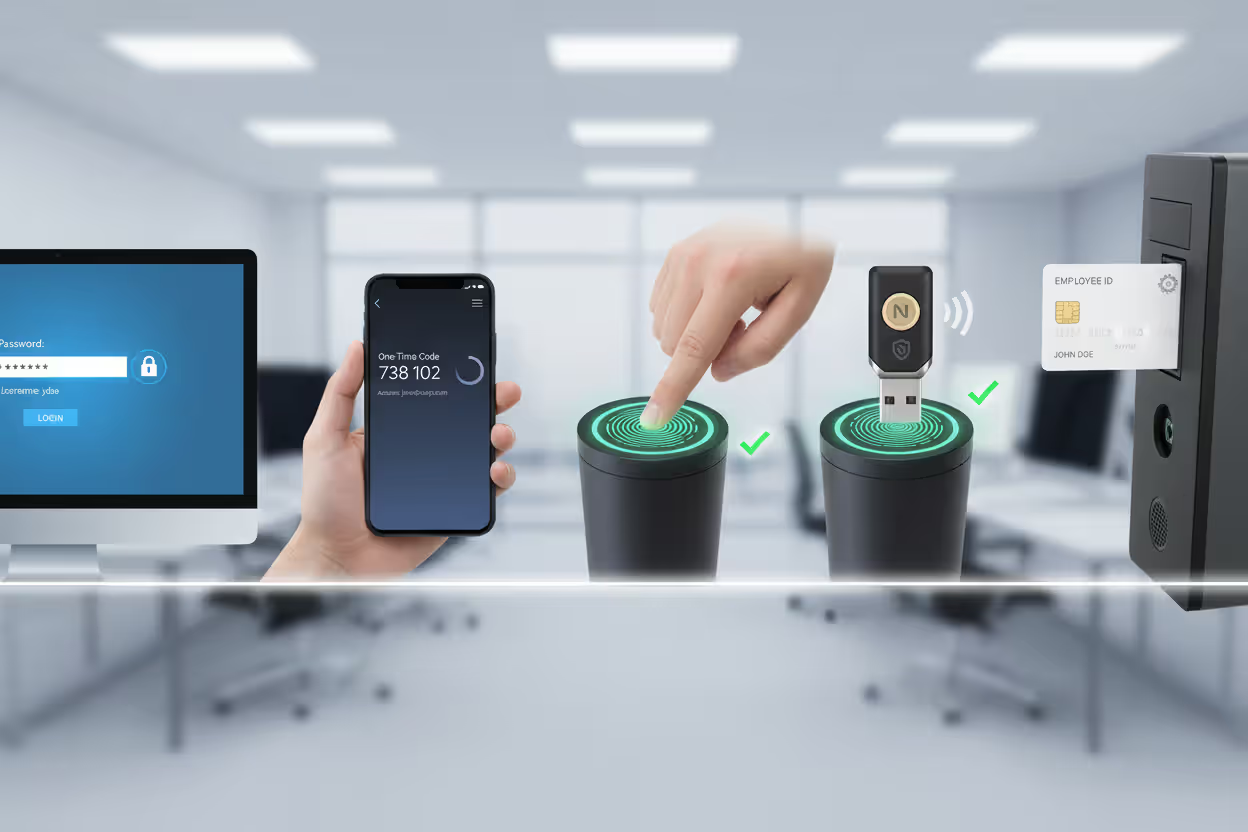
Multi-factor authentication requires combining two or more different credential categories:
- Knowledge factors: Information stored in your brain—passwords, PINs, security question answers
- Possession factors: Physical items you carry—smartphones, hardware tokens, smart cards, USB security keys
- Inherence factors: Biological characteristics—fingerprints, facial structure, iris patterns, voice prints
Most MFA setups pair passwords with time-based one-time passwords generated by apps like Google Authenticator or Microsoft Authenticator. You enter your memorized password, then type a six-digit code that refreshes every 30 seconds. Attackers who phish your password hit a wall at the second factor.
SMS-based MFA texts verification codes to registered phone numbers. It's significantly better than password-only authentication, though SMS faces vulnerabilities from SIM-swapping attacks. Attackers call mobile carriers pretending to be you, convince customer service to port your number to a new SIM card, then receive your authentication codes.
Push notification MFA sends authentication prompts straight to registered mobile apps. You tap "Approve" or "Deny" when the notification appears. This improves usability compared to manually typing codes, and displays contextual information—login location, device type, timestamp—helping you spot unauthorized attempts.
Hardware security keys like YubiKey or Google Titan Security Key provide phishing-resistant authentication. These physical USB or NFC devices implement FIDO2/WebAuthn protocols that cryptographically verify the authentication server's identity before responding. Even if attackers create perfect replicas of your company's login page, the security key refuses to cooperate because the server domain doesn't match.
MFA effectiveness is backed by real numbers. Microsoft's research found multi-factor authentication blocks 99.9% of automated account compromise attacks. That modest inconvenience of entering a second factor delivers enormous security dividends.
Biometric and Certificate-Based Authentication
Biometric authentication uses your unique biological or behavioral characteristics for identity verification. Fingerprint scanners, facial recognition cameras, iris scanners, and voice analysis systems eliminate memorizing passwords entirely.
Modern smartphones already embed this technology—Face ID or fingerprint unlocking is biometric authentication. Enterprises increasingly deploy biometrics for both physical building access and computer login. Properly designed systems don't store actual fingerprint images or face photos. They create mathematical templates that enable comparison while preserving privacy if databases get stolen.
Biometric systems juggle two competing error rates. False acceptance rate (FAR) measures how often the system incorrectly authenticates imposters. False rejection rate (FRR) measures how often legitimate users get incorrectly denied. Security-critical deployments optimize for extremely low FAR, accepting higher FRR (more frustrated legitimate users). Convenience-focused systems seek balance.
Certificate-based authentication leverages digital certificates issued by trusted certificate authorities for identity proof. Each certificate bundles a public key with identity information, digitally signed by the issuing CA. During authentication, users or devices present certificates. Servers validate the CA's signature and confirm the certificate hasn't been revoked.
Smart cards embed digital certificates in physical cards containing cryptographic processors. You insert the card into a reader and enter a PIN unlocking the private key. This possession-plus-knowledge combination creates robust two-factor authentication.
Client certificates authenticate non-human entities too. Service accounts, automated scripts, IoT devices, and API integrations use certificate-based authentication. This eliminates password management headaches for system accounts while providing cryptographically stronger security than any password could deliver.
Common Authentication Protocols and Standards
Network authentication depends on standardized protocols defining how credentials get exchanged, verified, and managed across different systems and vendors.
Kerberos authenticates through tickets rather than constantly transmitting passwords across networks. Developed at MIT and heavily deployed in Windows Active Directory, Kerberos involves three parties: the client requesting access, the target service, and a Key Distribution Center (KDC) issuing cryptographic tickets.
Clients first authenticate to the KDC and receive a Ticket Granting Ticket (TGT). When accessing specific services, clients present the TGT to obtain service-specific tickets. These tickets prove client identity to services without exposing passwords. Tickets expire quickly and include encryption preventing replay attacks. Kerberos demands synchronized clocks—time drift exceeding five minutes causes authentication failures.
LDAP (Lightweight Directory Access Protocol) standardizes how systems query and modify directory information. While LDAP primarily functions as a directory protocol, it's commonly used for authentication by querying directory services like Active Directory or OpenLDAP. Applications perform LDAP bind operations, submitting usernames and passwords to directory servers for validation.
RADIUS (Remote Authentication Dial-In User Service) centralizes authentication for network access despite its dial-up-era name. Modern RADIUS handles authentication for VPN connections, wireless networks, and managed switches. RADIUS servers receive authentication requests from network devices, validate credentials against backend databases or directories, then return accept or reject responses. RADIUS simultaneously handles authorization by returning policy attributes like VLAN assignments or bandwidth throttles.
TACACS+ (Terminal Access Controller Access-Control-System Plus) is Cisco's protocol offering separated authentication, authorization, and accounting functions. Unlike RADIUS, TACACS+ encrypts entire packets rather than only password fields, improving security. Network administrators commonly encounter TACACS+ when managing routers, switches, and firewall configurations.
SAML (Security Assertion Markup Language) enables single sign-on across web applications. SAML uses XML-formatted messages to exchange authentication and authorization data between identity providers (IdPs) and service providers (SPs). Users authenticate once to their IdP, which then issues SAML assertions proving user identity to multiple SPs. This eliminates maintaining separate credentials for each application.
OAuth 2.0 establishes an authorization framework commonly used for delegated access. Though technically not an authentication protocol, OAuth lets users grant third-party applications limited access to protected resources without revealing passwords. For example, a photo-editing app can access your Google Drive files after you grant permission through Google's authentication flow. OAuth issues temporary access tokens with defined permission scopes.
OpenID Connect extends OAuth 2.0 by adding authentication capabilities—it introduces an identity layer returning authenticated user information. Contemporary web and mobile applications increasingly use OpenID Connect for single sign-on, letting users authenticate through existing Google, Microsoft, or GitHub accounts instead of creating new credentials.

Author: Calvin Roderick;
Source: elegantimagerytv.com
Real-World Authentication Network Security Examples
Authentication protects network access across countless scenarios. Here's how it actually works in common situations.
VPN Authentication
Remote employees connecting to corporate networks through VPNs must authenticate before establishing encrypted tunnels. A typical workflow combines traditional credentials with additional verification. The employee launches FortiClient or Cisco AnyConnect, enters username and password, then approves a push notification delivered to their smartphone. The VPN gateway communicates with backend RADIUS servers validating credentials and retrieving policy rules determining which internal systems the authenticated user can reach.
Some organizations implement certificate-based VPN authentication requiring client devices to present valid digital certificates from the company's internal certificate authority. This device-level authentication prevents network access even when attackers steal legitimate user credentials through phishing.
Wi-Fi Network Access
Wireless networks use authentication to prevent unauthorized devices from connecting. Home networks typically deploy WPA2 or WPA3 using pre-shared keys—basically passwords required for network connection. While simple, PSK authentication has limitations: sharing the passphrase with guests grants them identical access as family members, and rotating the passphrase requires reconfiguring every connected device.
Enterprise wireless deployments implement WPA2-Enterprise or WPA3-Enterprise, integrating with RADIUS infrastructure for individual user authentication. Each employee supplies personal credentials when joining the network, and backend RADIUS servers validate against directory services. This approach provides individual accountability and enables immediate access revocation when employment ends.
Corporate Single Sign-On Systems
Large organizations deploy SSO platforms letting employees authenticate once and access multiple applications without repeated credential entry. An employee logs into their workstation each morning using Active Directory credentials. Throughout the day, accessing Confluence, Gmail, Workday, and Salesforce requires no additional logins because SAML or OpenID Connect protocols facilitate transparent authentication.
The centralized identity provider maintains authenticated sessions and generates assertions or tokens proving user identity to each connected application. This streamlines user experience by eliminating repetitive authentication while strengthening security through centralized policy enforcement and consistent MFA application.
Cloud Service Authentication
SaaS platforms like Microsoft 365, AWS, and Workday authenticate users before providing cloud-hosted resource access. Organizations configure these platforms for federated authentication, establishing trust relationships with on-premises identity providers. Employees authenticate against familiar corporate directories, and identity providers transmit SAML assertions to cloud platforms.
Cloud platforms additionally support programmatic authentication for API access. Automated systems use API keys, OAuth tokens, or cloud-native identity mechanisms like AWS IAM roles for authentication. These programmatic credentials demand rigorous protection—exposed API keys in public GitHub repositories have caused countless security breaches.
Common Authentication Vulnerabilities and How to Prevent Them
Zero trust architectures treat authentication as a continuous process rather than a one-time gate check. Organizations can no longer rely on perimeter security—we must validate every access request regardless of where it originates. The shift toward continuous authentication, repeatedly confirming identity throughout entire sessions instead of only at initial login, represents where network defense is heading. Multi-factor authentication has moved from nice-to-have to mandatory baseline for any organization serious about defending against current threat actors
— Dr. Rebecca Chen
Authentication remains heavily targeted by attackers exploiting both technical weaknesses and human mistakes.
Password Attacks
Brute force attacks systematically test every possible password combination until finding the correct one. Dictionary attacks use lists containing common passwords and predictable variations. Credential stuffing attacks deploy username/password pairs harvested from previous breaches, exploiting widespread password reuse.
Effective defenses include enforcing strong password policies mandating minimum length (at least twelve characters), character variety (mixing uppercase, lowercase, numbers, symbols), and blocking passwords appearing in breach databases. Deploy progressive account lockout temporarily disabling accounts after repeated failed attempts. Multi-factor authentication makes stolen passwords useless without the second factor. Consider passwordless authentication using FIDO2 security keys or biometric flows.
Phishing and Social Engineering
Attackers distribute deceptive emails or construct fake websites mimicking authentic login pages. Unsuspecting users willingly submit credentials to attacker-controlled systems. Advanced phishing campaigns target specific individuals (spear phishing) using personalized messages appearing to originate from trusted colleagues or familiar services.
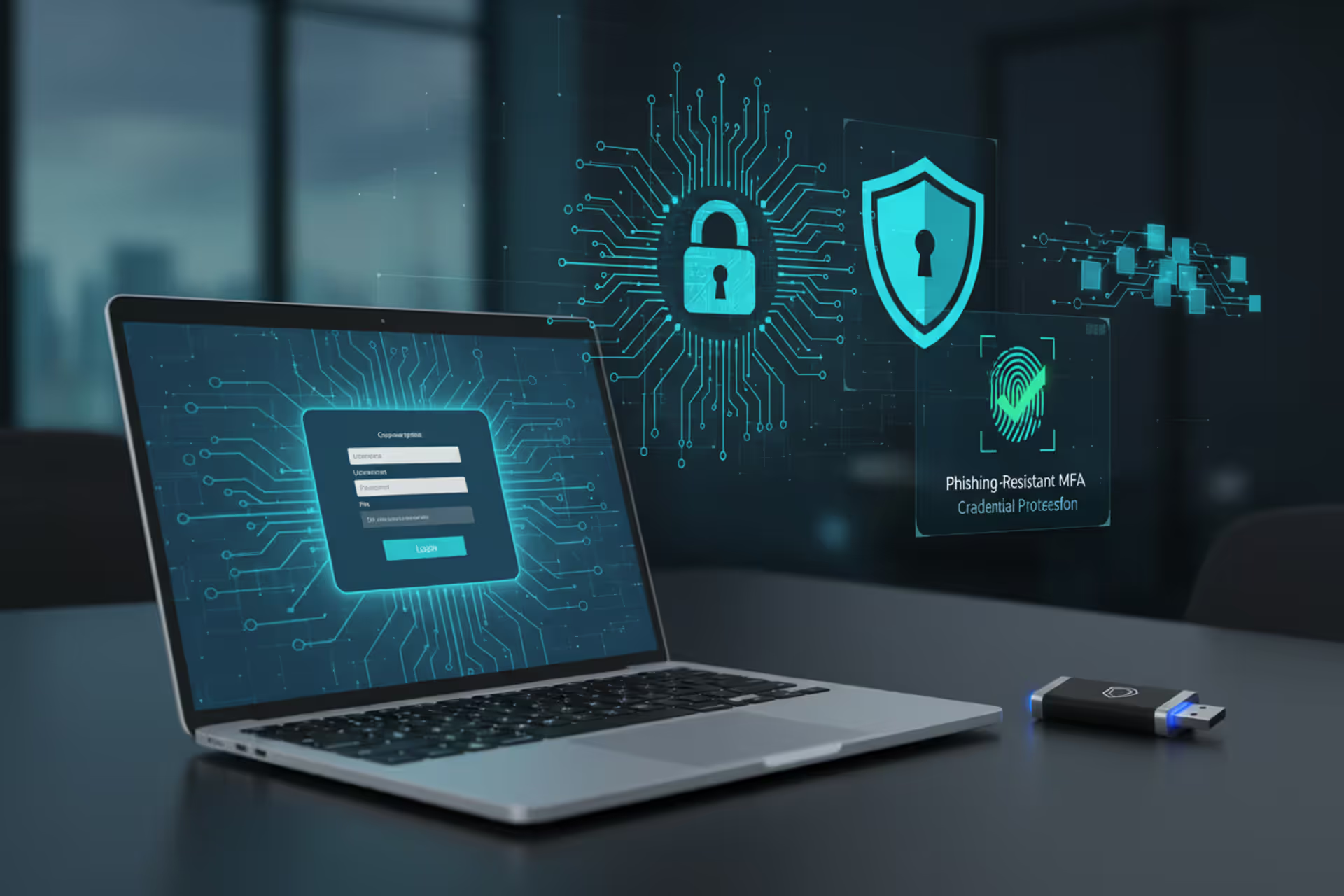
Defense requires ongoing user education about identifying suspicious communications and verifying website authenticity before entering credentials. Technical defenses include email security gateways filtering phishing attempts, browser warnings flagging known malicious sites, and phishing-resistant MFA technologies like FIDO2 hardware keys that cryptographically validate authentication server identity.
Man-in-the-Middle Attacks
Attackers position themselves between users and authentication infrastructure, capturing credentials during transmission. This succeeds on compromised networks or through DNS poisoning and ARP spoofing techniques.
Protection demands encrypting all authentication communications using current TLS versions. Validate certificate authenticity and consider certificate pinning for critical applications. Require VPN usage when connecting from untrusted networks. Deploy network behavior analytics detecting anomalous traffic patterns.
Session Hijacking
After successful authentication, attackers steal session tokens or cookies demonstrating authenticated status. Possessing these tokens lets attackers impersonate authorized users without ever learning their passwords.
Countermeasures include configuring secure, HTTP-only cookies inaccessible to JavaScript code, implementing aggressive session timeouts forcing re-authentication, binding sessions to client IP addresses or device fingerprints, and encrypting session identifiers. Monitor for suspicious patterns like simultaneous sessions from geographically impossible locations.
Credential Stuffing at Scale
Attackers leverage botnets testing millions of stolen credentials against target systems. These automated campaigns succeed against accounts reusing compromised passwords from other services.
Defense strategies involve implementing rate limiting restricting authentication attempts per IP address, deploying CAPTCHA challenges distinguishing automated bots from human users, monitoring for unusual authentication volumes, and subscribing to threat intelligence feeds blocking requests from identified malicious sources. Require MFA for privileged accounts so stolen passwords alone can't grant access.
Weak Protocol Implementations
Legacy authentication protocols like NTLM and basic authentication transmit credentials in weakly protected or plaintext formats. Misconfigured systems might accept obsolete protocols for backward compatibility, introducing exploitable vulnerabilities.
Remediation requires disabling deprecated protocols and mandating contemporary standards. Transition from NTLM to Kerberos in Windows environments. Replace basic authentication with OAuth or certificate workflows. Conduct regular authentication configuration audits identifying and eliminating weaknesses.
Authentication Method Comparison
| Method | Security Level | User Experience | Implementation Cost | Where It's Used | Main Vulnerabilities |
| Password Only | Low | Simple and fast | Inexpensive | Older systems, basic apps, internal tools | Easily phished, stolen in breaches, guessable, reused across sites |
| Password + One-Time Code | High | Requires extra step | Moderate expense | Corporate networks, cloud apps, remote access | SIM swapping, lost devices, sophisticated phishing |
| Biometric Scan | Moderate to High | Quick and convenient | Expensive hardware | Smartphones, building entry, workstation login | Fake fingerprints, recognition errors, templates can't be reset |
| Digital Certificate | Very High | Transparent after setup | Expensive infrastructure | System accounts, admin access, device authentication | Stolen certificates, compromised private keys, CA breaches |
Frequently Asked Questions About Authentication Network Security
Authentication establishes the foundational access control layer preventing unauthorized parties from penetrating network perimeters and reaching sensitive resources. The shift from basic password-based authentication toward multi-factor and biometric approaches reflects the advancing threat landscape where credential theft and automated attacks have made single-factor authentication dangerously inadequate.
Organizations constantly balance security requirements against user experience expectations and operational budgets. MFA and certificate-based authentication deliver superior security but demand more sophisticated infrastructure and comprehensive user training. The right approach depends on what you're protecting and how much risk you'll accept.
Successful authentication security requires attention across multiple dimensions: selecting appropriate authentication technologies, deploying proven protocols like Kerberos and RADIUS, defending against common vulnerabilities through technical controls and security awareness training, and maintaining systems through regular security assessments and timely updates.
As network boundaries expand encompassing remote workforces, cloud services, and IoT ecosystems, authentication challenges grow increasingly complex. Zero trust architectures continuously verifying identity throughout sessions rather than granting prolonged trust after initial authentication represent where modern security thinking is headed.
Start by evaluating your current authentication setup, identifying vulnerabilities like password-only access protecting critical systems or unencrypted credential transmission. Prioritize deploying MFA for high-value systems and privileged user accounts. Develop documented incident response procedures addressing authentication failures and suspected credential compromises. Regular validation through penetration testing and red team assessments helps surface vulnerabilities before hostile actors exploit them.
Strong authentication network security won't eliminate every risk, but it substantially raises attacker costs, forcing them toward more sophisticated and detectable techniques beyond simply guessing passwords or replaying stolen credentials.
Related Stories

Read more

Read more



The content on this website is provided for general informational and educational purposes only. It is intended to explain concepts related to cybersecurity awareness, online threats, phishing attacks, and data protection practices.
All information on this website, including articles, guides, and examples, is presented for general educational purposes. Cybersecurity risks and protection strategies may vary depending on individual behavior, technology usage, and threat environments.
This website does not provide professional cybersecurity, legal, or technical advice, and the information presented should not be used as a substitute for consultation with qualified cybersecurity professionals.
The website and its authors are not responsible for any errors or omissions, or for any outcomes resulting from decisions made based on the information provided on this website.