

Network security access control concept with analyst monitoring user and device permissions
Network Security Access Control Guide

Every week, cybercriminals launch roughly 1,200 attacks against typical organizations. Here's what's scary: most breaches don't require sophisticated hacking. Attackers simply walk through digital doors that should've been locked. They exploit weak access controls—systems that fail to properly verify who's connecting and what they should reach.
Think of network security access control as your organization's bouncer, security guard, and key manager rolled into one. It's the framework that decides whether Sarah from accounting can pull up last quarter's financials, whether a contractor's laptop can connect to your development servers, or whether that smart thermostat in the conference room should communicate with your customer database (spoiler: it shouldn't).
What Is Network Security Access Control?
Network security access control is your defensive system for regulating which people, devices, and applications can interact with specific parts of your computing infrastructure. The system confirms identities, checks credentials against policies, then either opens the gate or slams it shut.
Here's the fundamental concept: restrict access to confidential data and mission-critical systems so only authorized entities can reach them—and only when they genuinely need to. Picture this process happening thousands of times daily. An employee authenticates to check email. A partner company's API calls your inventory system. An executive's tablet syncs with SharePoint. Each request triggers evaluation against your security rulebook.
Why does this matter? Consider what happens without proper access controls. Your network becomes a free-for-all. Any device plugged into an ethernet jack gets full network privileges. A single compromised laptop—maybe infected through a phishing email—suddenly provides attackers with pathways to your financial records, customer data, and intellectual property. That intern who joined last week? Without access controls, they could potentially browse the CEO's confidential correspondence. The coffee shop's guest WiFi tablet could theoretically communicate with your industrial control systems.
Author: Alyssa Norwood;
Source: elegantimagerytv.com
Organizations deploy access control for tangible reasons beyond the obvious security benefits. You're protecting confidential information from exposure. You're preventing unauthorized people from modifying critical data. You're keeping systems available by blocking malicious actors from launching disruption attacks. And you're establishing accountability—creating detailed records of who accessed which resources and when.
Compliance requirements force many organizations to implement rigorous access controls whether they'd planned to or not. Healthcare providers must satisfy HIPAA's strict requirements around patient information protection. Any business processing credit cards faces PCI DSS mandates restricting who can view cardholder details. Public companies navigate SOX requirements governing financial system access. Miss these requirements and you're looking at substantial fines, legal headaches, and remediation costs that dwarf the investment in proper controls.
Security is not a product, but a process
— Bruce Schneier
How Network Security Access Control Works
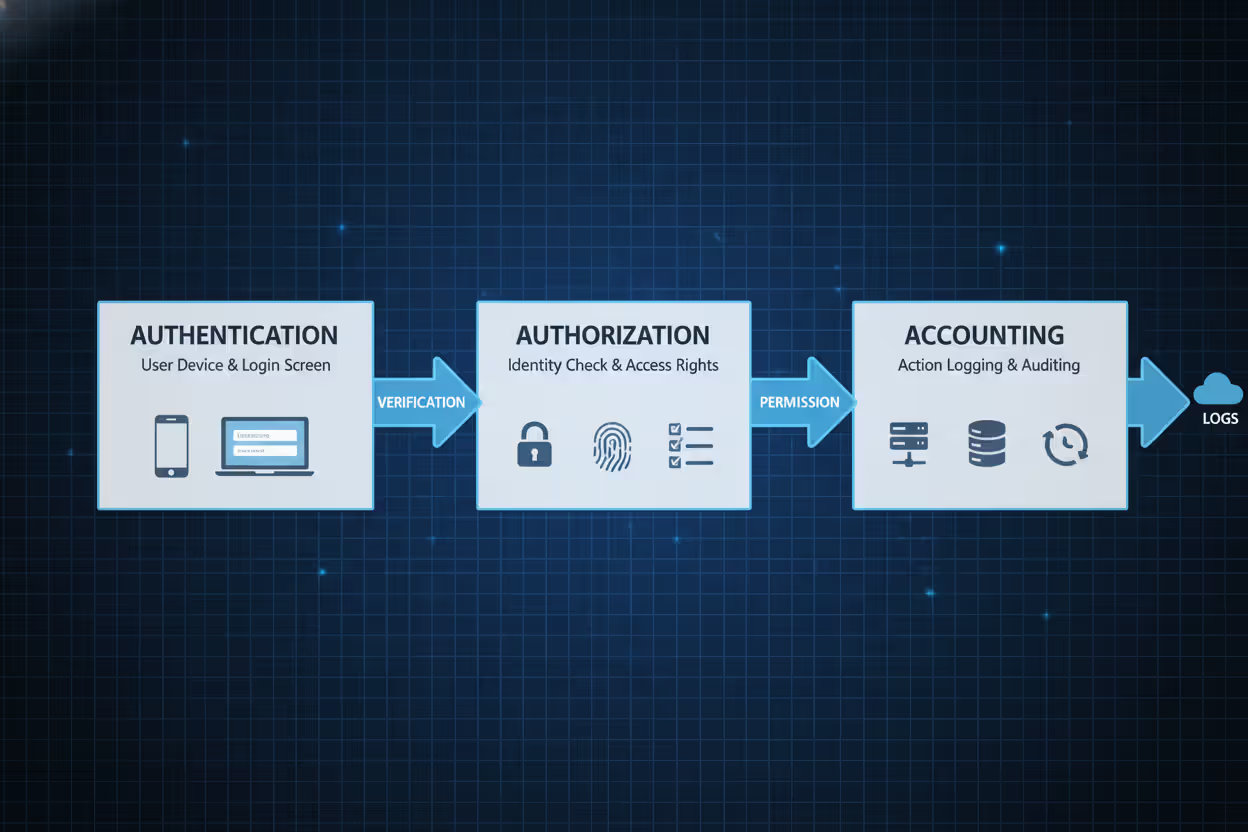
The AAA framework—Authentication, Authorization, and Accounting—powers network access control. These three stages process every connection attempt from initial request through final logout.
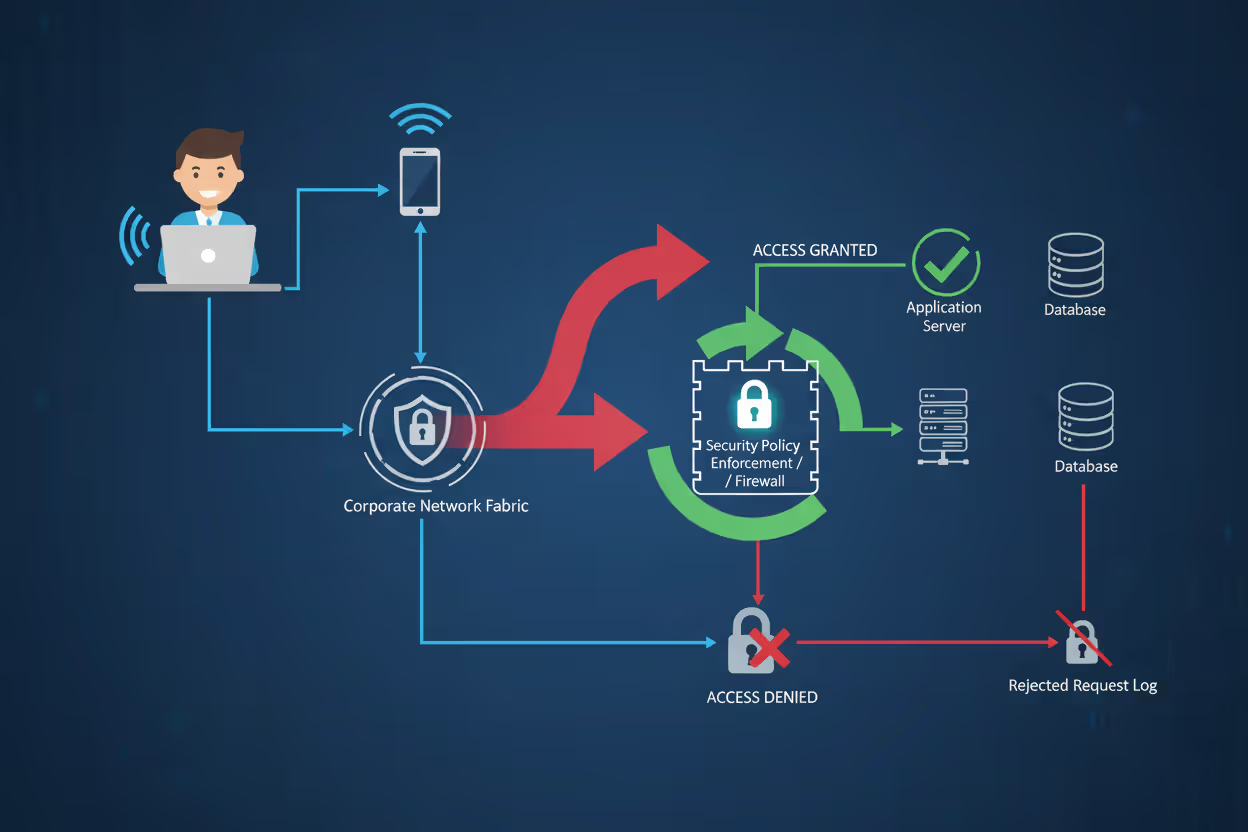
Authentication proves identity. When someone attempts connecting to your network, the system immediately challenges them: prove you're actually you. Traditionally, this meant passwords. Modern security demands more—combining multiple proof types. You might enter a password (something you know), then confirm via smartphone app (something you have), possibly adding a fingerprint scan (something you are). An employee logging in from the office at 9 AM enters their credentials and gets instant access. That same employee attempting login from an unusual country at 3 AM? The system demands additional verification or blocks the attempt entirely.
Authorization defines boundaries. Successfully proving your identity doesn't automatically grant access to everything. The system now checks what you're permitted to do. Authorization engines compare your identity against resource policies. Maybe you're a marketing analyst who can read customer demographics but can't modify records. Perhaps you're a database administrator with elevated privileges for schema changes but zero access to HR payroll data. The system evaluates your role, group memberships, contextual factors, then matches these against the resource you're requesting.
Author: Alyssa Norwood;
Source: elegantimagerytv.com
Accounting maintains records. Every authentication attempt, authorization decision, resource access, and user action gets logged. These audit trails serve multiple critical functions. Security teams analyze them to spot potential breaches. Investigators review them after incidents. Compliance auditors examine them to verify policy enforcement. Administrators study them to understand usage patterns and optimize policies.
Here's the complete workflow:
- A user or device initiates a connection request
- The authentication system challenges for credentials
- The user submits their authentication factors
- The system validates these credentials against its identity database
- The authorization engine retrieves this user's permission profile
- The system compares the requested resource against these permissions
- Access gets approved or blocked based on policy evaluation
- The accounting system records this entire transaction
- If approved, the user interacts with allowed resources
- When the session ends, accounting creates a final activity record
This entire sequence completes in milliseconds, yet involves complex evaluation. Modern systems don't just verify identity—they assess context. What time is it? Where's the connection originating? What's the device's security posture? Which network segment? What's the current threat level? That employee accessing email from headquarters at midday sails through. The same person connecting from an unrecognized country at 3 AM triggers enhanced verification or outright denial.
Types of Network Security Access Control Models
Four main models govern access control implementation. Each offers distinct tradeoffs between security strength, operational flexibility, and administrative complexity.
| Model | Definition | Use Cases | Advantages | Limitations |
| Mandatory Access Control (MAC) | The system enforces rigid access rules based on security classifications that users cannot override | Military installations, classified government agencies, high-security research facilities | Maximum security strength, prevents information leakage to lower clearance levels | Extremely rigid structure, intensive administrative requirements, minimal operational flexibility |
| Discretionary Access Control (DAC) | Individual resource owners determine who receives access to their files and systems | Small business networks, collaborative workgroups, file-sharing environments | Highly flexible, simple implementation, users control their own resources | Weakest security model, inconsistent policy enforcement, vulnerable to user errors |
| Role-Based Access Control (RBAC) | Access rights get assigned to organizational roles rather than individual users | Enterprise corporations, healthcare facilities, financial institutions, government agencies | Scales efficiently, mirrors organizational structure, simplifies permission auditing | Roles multiply over time, handles exceptions poorly, can become complex |
| Attribute-Based Access Control (ABAC) | Access decisions evaluate multiple attributes from users, resources, and environmental context | Cloud platforms, dynamic environments, organizations with complex policy requirements | Extremely granular control, context-aware decisions, highly adaptable | Complex implementation, requires extensive planning, difficult to troubleshoot |
Mandatory Access Control (MAC) enforces rigid policies that users cannot circumvent. The system assigns classification labels to everything—people, processes, files, databases. Access only happens when the requester's clearance level meets or exceeds the target's classification. Someone with "Secret" clearance cannot access "Top Secret" documents regardless of their job function or claimed need. MAC actively prevents information from leaking to lower classification levels, making it essential for military and classified government environments but far too restrictive for typical commercial operations.
Discretionary Access Control (DAC) hands control to individual resource owners. If you create a document, you decide who can read, edit, or delete it. Most traditional operating systems use this model for file permissions—owners set access rights as they see fit. DAC maximizes flexibility but creates significant security vulnerabilities. Users frequently grant overly broad access permissions, share credentials with colleagues, or forget to revoke permissions when they're no longer needed. A single careless employee can inadvertently expose confidential data to unauthorized individuals.
Role-Based Access Control (RBAC)
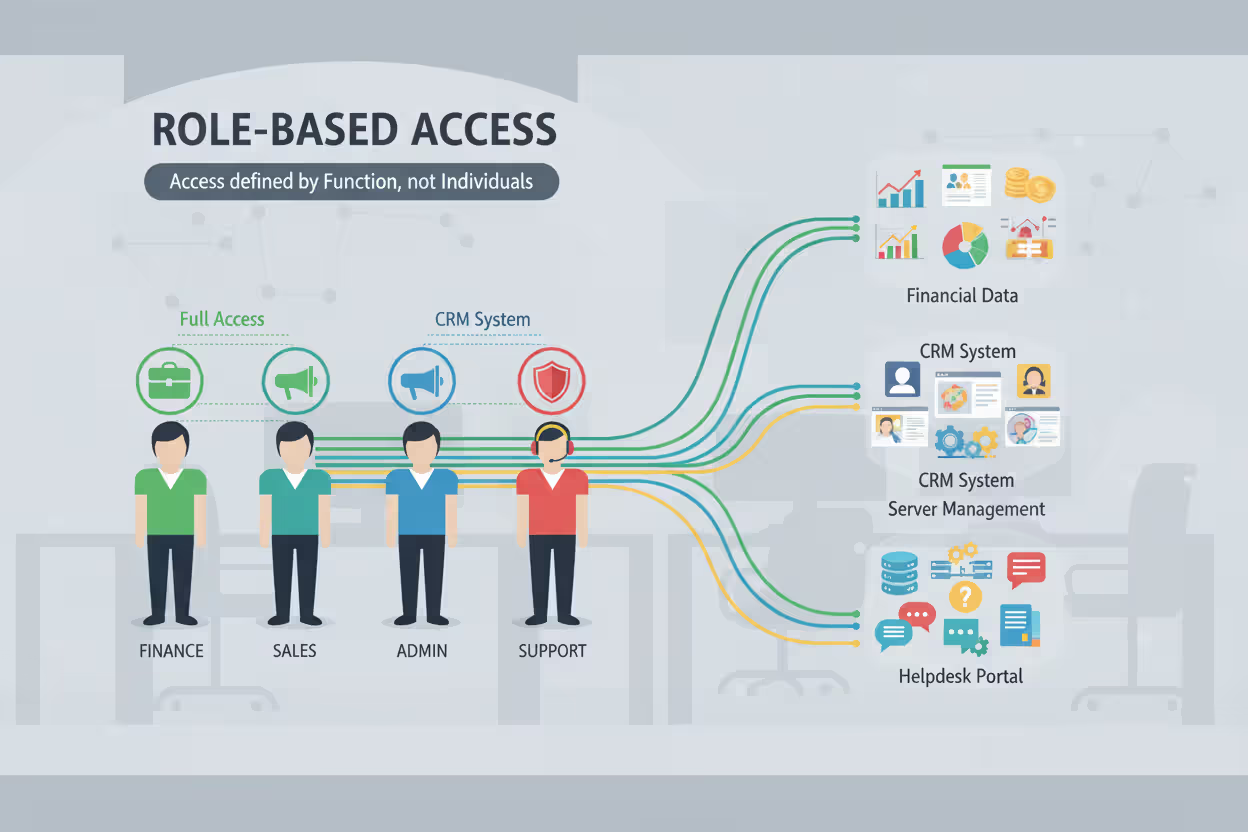
RBAC connects permissions to job functions rather than individual people. Organizations define roles matching their structure—accountant, sales representative, system administrator, customer service agent—then assign appropriate permissions to each role. Users receive access by joining roles. When someone joins your sales team, IT adds them to the "Sales Representative" role, instantly granting access to your CRM platform, pricing databases, and customer contact information.
This approach scales beautifully in larger organizations. Rather than managing permissions individually for 10,000 employees, you maintain perhaps 50 well-defined roles. Business requirements change? Update a role's permissions once, and hundreds of users receive adjusted access instantly. If you need to restrict access to a particular application, removing that permission from the relevant role affects all members immediately.
The trouble starts as companies grow and evolve. Roles begin proliferating to handle special cases. You start with "Software Engineer" but soon find yourself creating "Senior Software Engineer," "Contract Software Engineer," "Engineer - West Coast Office," "Engineer - Special Projects Team," and "Engineer - Customer Implementations." This role explosion recreates the very complexity RBAC was supposed to eliminate. Additionally, RBAC handles temporary access poorly—what about that engineer who needs database access for just one week? It struggles with cross-functional projects where team members need permissions outside their normal role.
Author: Alyssa Norwood;
Source: elegantimagerytv.com
Attribute-Based Access Control (ABAC)
ABAC evaluates numerous attributes simultaneously to reach access decisions. Rather than asking "which role does this person hold?" ABAC considers "does this person's combination of characteristics satisfy our policy requirements?" These attributes span user properties (department, clearance level, employment type, hire date), resource characteristics (classification level, data owner, sensitivity rating, creation date), and environmental conditions (time of day, geographic location, network segment, current threat level).
An ABAC policy might specify: "Allow access to quarterly financial reports when user.department equals 'Finance' AND user.level equals 'Manager' AND current.time is between 06:00 and 18:00 AND connection.network equals 'Corporate' AND device.encryption_status equals 'active'." This granular approach handles complex scenarios that simpler models simply cannot accommodate.
ABAC particularly shines in cloud environments where resources and users constantly change. A newly hired employee's attributes—their department, job level, office location—automatically determine their access without anyone manually granting permissions. ABAC policies can incorporate real-time risk intelligence, blocking access attempts when threat feeds indicate active compromise campaigns originating from specific countries or IP ranges.
The implementation challenge with ABAC is substantial. Organizations must identify all relevant attributes, maintain accurate attribute databases across systems, design comprehensive policy sets, and conduct extensive testing. A single misconfigured attribute can grant excessive access to unauthorized users or lock out legitimate employees. ABAC demands sophisticated policy engines and considerable upfront planning, making it most suitable for large enterprises with mature security programs and dedicated resources.
Common Network Security Access Control Methods and Technologies
Multiple technologies work together to enforce access policies across modern network infrastructures. Most organizations deploy several complementary methods in layered defensive architectures.
Firewalls function as primary network gatekeepers. Next-generation firewalls inspect traffic at the application layer, enforcing policies based on user identity, specific applications, and content inspection. Instead of merely blocking port 443, modern firewalls permit specific users to access particular applications while denying others—even when all requests originate from identical network segments. Your firewall might allow the finance department to reach accounting software while blocking everyone else, creating application-level segmentation.
Virtual Private Networks (VPNs) extend access control to remote connections. Remote workers must authenticate to the VPN gateway before accessing internal resources. The gateway verifies credentials, evaluates device security compliance, then establishes an encrypted tunnel. VPN policies can dramatically restrict which resources remote users can reach. A contractor's VPN connection might provide access only to specific project servers, not your entire corporate network. An executive traveling internationally might face additional authentication requirements beyond normal office access.
Network Access Control (NAC) solutions verify device health before permitting network connections. When a laptop connects to your wireless network or plugs into an ethernet jack, NAC software examines whether it meets security requirements: current antivirus signatures, recent security patches, approved software versions, proper configuration settings. Devices failing compliance checks get quarantined to a restricted network segment with access only to remediation resources—update servers, help desk ticketing, security tool downloads. After the device updates and passes inspection, NAC grants full network access.
802.1X authentication controls access at individual network ports. This IEEE standard requires devices to authenticate before the network switch even activates the port. An unauthorized person plugging a laptop into an ethernet jack gets nothing—the port remains administratively disabled until valid credentials are provided. 802.1X works across both wired and wireless networks, preventing rogue devices from silently joining your infrastructure.
Multifactor authentication (MFA) hardens access control by requiring multiple identity proofs. Passwords alone provide terrible security—they're guessable, stealable, phishable, and frequently reused across multiple sites. MFA adds additional verification: a code from a smartphone authenticator app, a physical hardware token, a biometric scan, or a push notification requiring user approval. Even when attackers steal passwords through phishing campaigns, they cannot access resources without that second authentication factor.
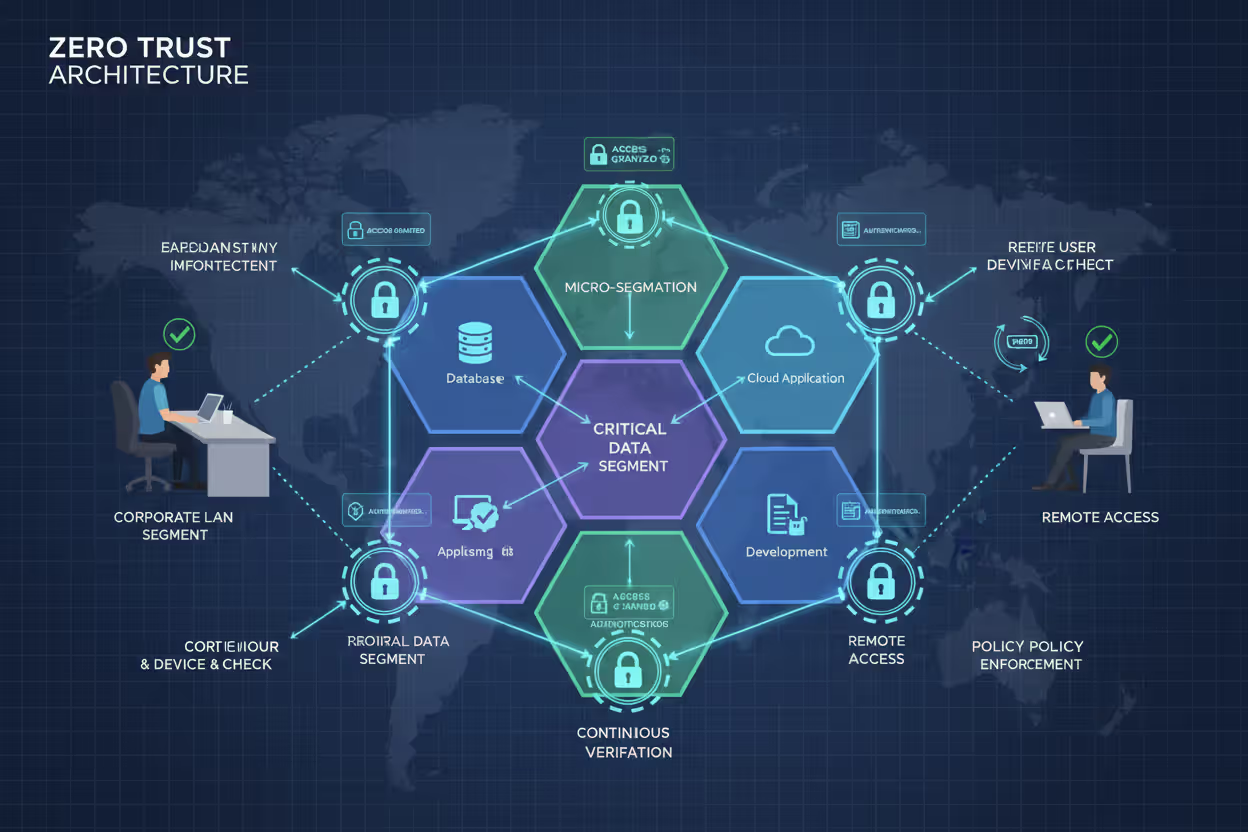
Zero Trust Architecture fundamentally rethinks access control philosophy. Traditional security models assumed everything inside your network perimeter was trustworthy—employees, devices, applications. Zero Trust operates on the assumption of breach, verifying every access request regardless of where it originates. An employee connecting from inside your headquarters building faces identical authentication and authorization requirements as someone connecting remotely from a coffee shop. Zero Trust implementations use micro-segmentation, creating small security zones around sensitive resources. Accessing each zone requires separate authentication and authorization, dramatically limiting lateral movement if attackers compromise one system.
Author: Alyssa Norwood;
Source: elegantimagerytv.com
Identity and Access Management (IAM) platforms centralize access control administration. IAM systems maintain user identity records, manage authentication processes, enforce authorization policies, and provide single sign-on across numerous applications. When an employee leaves your organization, disabling their IAM account instantly revokes access across all connected systems—email, file shares, business applications, development tools. IAM platforms also automate user provisioning, granting new employees appropriate access based on their department and job function.
Privileged Access Management (PAM) tools specifically secure administrative accounts. These high-privilege accounts pose enormous risk if compromised—an attacker with domain administrator credentials can wreak unlimited havoc. PAM solutions vault administrative credentials in encrypted repositories, require approval workflows for privileged access, record all administrative sessions for audit review, and automatically rotate passwords regularly. When an administrator needs elevated privileges, they request temporary credentials through the PAM system, which grants time-limited access that automatically expires.
Network Security Access Control Examples in Practice
Real-world implementations demonstrate how organizations apply access control concepts to protect diverse environments.
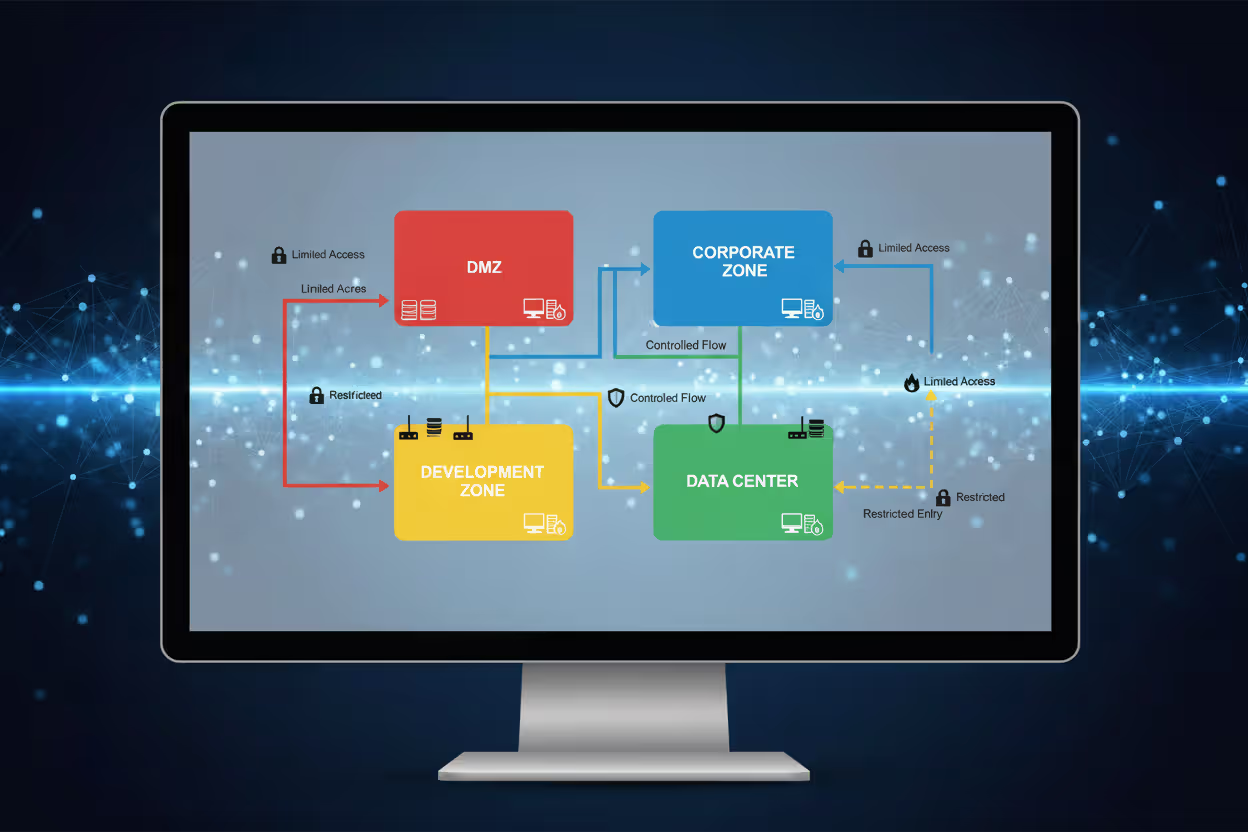
Corporate network segmentation: A financial services firm divides its network infrastructure into distinct security zones. The DMZ hosts public-facing web applications with carefully limited internal access. The corporate zone contains employee workstations running productivity applications. The data center zone houses critical databases and core business applications. The development zone isolates testing and staging environments. Access control policies strictly prevent movement between zones. A compromised web application server cannot communicate with production databases. Software developers cannot access live customer data in production systems. Each zone boundary requires fresh authentication and authorization checks, creating multiple defensive barriers an attacker must breach.
Remote worker access: A manufacturing company supports approximately 2,000 remote employees across sales, engineering, and support functions. Workers must first authenticate using multifactor verification before establishing VPN connections. The VPN gateway queries the NAC system to verify device security compliance—checking for antivirus updates, operating system patches, and firewall configuration. Non-compliant devices receive severely restricted access to update servers only. Devices passing compliance checks establish VPN connections, but access remains restricted based on job function. Production engineers can reach manufacturing execution systems and quality databases. Sales personnel access CRM platforms and email but cannot reach engineering CAD systems or production networks. The company implemented application-aware access control, ensuring even authenticated VPN users cannot access resources beyond their job requirements.
Guest Wi-Fi isolation: A hospital provides wireless internet access for patients, visitors, and family members. The wireless infrastructure enforces complete isolation. Guest devices cannot communicate with each other—preventing peer-to-peer attacks—and cannot access any internal hospital networks. All traffic routes directly to the internet through a separate gateway with no pathways to internal systems. Access control policies explicitly block common internal targets: RFC 1918 private address ranges, medical device networks, electronic health record systems, pharmacy platforms. Guests receive internet access for web browsing, video calls, and communication but maintain absolute isolation from hospital operations. The system additionally rate-limits bandwidth per device and blocks known malicious domains to prevent abuse.
Healthcare data protection: A regional medical center implements role-based access control aligned with HIPAA's strict privacy requirements. Physicians can view complete medical records only for patients under their direct care. Nurses access records only for patients currently assigned to their unit or shift. Billing specialists see financial and insurance information but cannot view clinical notes or test results. Quality improvement administrators access de-identified statistical data stripped of personal identifiers. The access control system meticulously logs every record access, creating comprehensive audit trails for compliance verification. Emergency access procedures allow providers to override restrictions and access any patient record during life-threatening situations, but these "break-glass" events trigger immediate security team notifications and mandatory incident reviews. Attribute-based policies incorporate contextual factors: healthcare providers can only access patient records during their scheduled work shifts unless emergency override is explicitly invoked.
Author: Alyssa Norwood;
Source: elegantimagerytv.com
Common Mistakes When Implementing Access Control
Even well-designed implementations frequently fail due to predictable errors.
Overly permissive default policies undermine security from the start. Administrators often grant broad access initially, planning to tighten restrictions later as they better understand requirements. That "later" rarely materializes. The principle of least privilege demands the opposite approach: begin with minimal access, then grant additional permissions only when demonstrated business need justifies them. A newly hired employee should receive only the absolute minimum access required for their first-day orientation. Additional permissions get granted incrementally as specific job tasks require them.
Neglecting regular access reviews allows permission accumulation. Employees gather additional access over time as they join different projects, change roles, request temporary access that becomes permanent, and inherit permissions from colleagues. Few organizations systematically review and revoke unnecessary permissions. An employee who transferred from the sales department to marketing eighteen months ago likely still retains all their original sales system access. Implement quarterly access reviews verifying each user's current permissions align with their actual job responsibilities. Automated tools can flag obvious anomalies: users with access to systems nobody else in their department uses, accounts with permissions granted years ago but never actually exercised, users with contradictory role assignments.
Poor credential management completely undermines access controls. Shared accounts eliminate accountability—audit logs cannot identify which specific person performed an action. Default passwords on network equipment create known entry points for attackers. Credentials stored in spreadsheets, sticky notes, or unencrypted text files bypass every access control you've implemented. Service accounts with non-expiring passwords and excessive privileges represent extremely high-value attack targets. Organizations must enforce unique accounts per individual user, mandate genuinely strong passwords (length matters more than complexity), require regular password rotation specifically for privileged accounts, and secure service account credentials in encrypted vaults.
Ignoring mobile devices and IoT creates enormous blind spots. Access control policies designed primarily for traditional laptops and desktop computers frequently don't adequately address smartphones, tablets, wearables, and IoT devices. An employee's personal smartphone might access corporate email without enforced encryption, screen locks, or mobile device management controls. Smart building systems, security cameras, HVAC controllers, and industrial sensors connect to networks using default credentials with zero access restrictions. Comprehensive access control must encompass all device types, applying appropriate security policies based on device classification, ownership status, and risk profile.
Failing to update access rules as business evolves creates misalignment. Your company acquires a competitor, and suddenly merged employees need access to newly integrated systems. A new cloud application launches, requiring updated policies controlling who can use it. An organizational restructuring changes department boundaries and reporting relationships, but role definitions remain frozen in their original state. Access control isn't a one-time implementation project—it's an ongoing program requiring regular updates maintaining alignment with business changes.
Insufficient logging and monitoring prevents detecting access control failures. Comprehensive logging of authentication attempts, authorization decisions, and resource access creates visibility into what's actually happening. Monitoring these logs for anomalies—unusual failed login patterns, atypical access requests, privilege escalation attempts—enables early threat detection. Many organizations diligently collect massive volumes of logs but never analyze them. Security information and event management (SIEM) platforms can automate analysis, generating alerts on suspicious activities like users accessing resources from geographically impossible locations within short timeframes or downloading unusually large data volumes.
Frequently Asked Questions About Network Security Access Control
Network security access control ultimately determines whether your security program delivers genuine protection or merely creates the illusion of safety. Effective implementation requires selecting appropriate models for your specific environment—RBAC for stable organizational access patterns, ABAC for complex scenarios requiring granular control, zero trust principles for protecting critical resources. Deploy complementary technologies that enforce policies consistently across your infrastructure. Most importantly, treat access control as a continuous program rather than a completed project—regularly review permissions, promptly update policies when business requirements change, and vigilantly monitor for anomalies indicating policy violations or potential compromises. Organizations maintaining this ongoing discipline build resilient security architectures that protect valuable assets while enabling productive business operations. The investment in proper access control delivers substantial returns through reduced breach risk, simplified compliance, and confidence that network resources remain accessible exclusively to those genuinely authorized to use them.
Related Stories

Read more

Read more




The content on this website is provided for general informational and educational purposes only. It is intended to explain concepts related to cybersecurity awareness, online threats, phishing attacks, and data protection practices.
All information on this website, including articles, guides, and examples, is presented for general educational purposes. Cybersecurity risks and protection strategies may vary depending on individual behavior, technology usage, and threat environments.
This website does not provide professional cybersecurity, legal, or technical advice, and the information presented should not be used as a substitute for consultation with qualified cybersecurity professionals.
The website and its authors are not responsible for any errors or omissions, or for any outcomes resulting from decisions made based on the information provided on this website.