

Cybersecurity least privilege concept with controlled digital access
Cybersecurity Least Privilege Guide

Think of least privilege as the digital equivalent of giving someone just enough keys to do their job—not the entire master set. In security terms, you're limiting what any single user, program, or system can access to exactly what they need. Nothing extra.
Why does this matter? Picture a company where everyone from interns to executives has admin rights to everything. Sounds convenient, right? Until someone clicks a sketchy email attachment. Now that malware has the same all-access pass its victim did.
The cybersecurity least privilege basics come down to containing damage before it spreads. When you restrict access properly, a compromised account becomes a dead end for attackers. They might break into a user profile, but they hit walls immediately—can't reach financial records, can't modify system configurations, can't jump sideways into other networks.
Real numbers back this up. Verizon's 2025 breach report showed that 34% of successful privilege escalation attacks happened because someone had permissions they shouldn't have had. That's over a third of breaches that proper access control could've prevented.
Here's a practical comparison. Company A gives all their developers full production database access "for emergencies." Company B gives developers read-only access, with write permissions available through a 30-minute approval process. Which company survives a developer laptop theft without sweating? Company B sleeps fine—those stolen credentials can barely view anything, let alone change it.
The underlying assumption flips traditional thinking. Instead of "everyone gets access unless we specifically remove it," you start with "nobody gets anything unless we specifically grant it." Trust becomes something you assign deliberately, not hand out by default.
How Cybersecurity Least Privilege Works
Let's break down how cybersecurity least privilege works at the technical level. Three layers handle the heavy lifting: authentication confirms who you are, authorization decides what you can do, and auditing tracks everything you actually did.
Step one happens when you log in. Multi-factor authentication checks your password and a second proof point—maybe a text code or biometric scan. You've cleared the "are you really you?" hurdle.
Next comes the authorization gauntlet. The system compares your identity against its rulebook. On Linux, that's file permissions and sudo configurations. Windows checks Group Policy Objects and Active Directory groups. Cloud platforms consult IAM policies. Each environment has its own enforcement mechanism, but they share a philosophy: deny by default.
This "default deny" approach matters more than it sounds. Legacy systems often worked backwards—grant broad access, then restrict specific things. Modern implementations flip that script. Unless something explicitly says "yes, this user can perform this action," the answer is automatically "no."
Contextual factors add another screening layer. Even if your account technically has permission, the system might require additional verification for risky operations. Deleting a production database? That triggers a second approval requirement or time-limited token, even for DBAs who technically could execute the command.
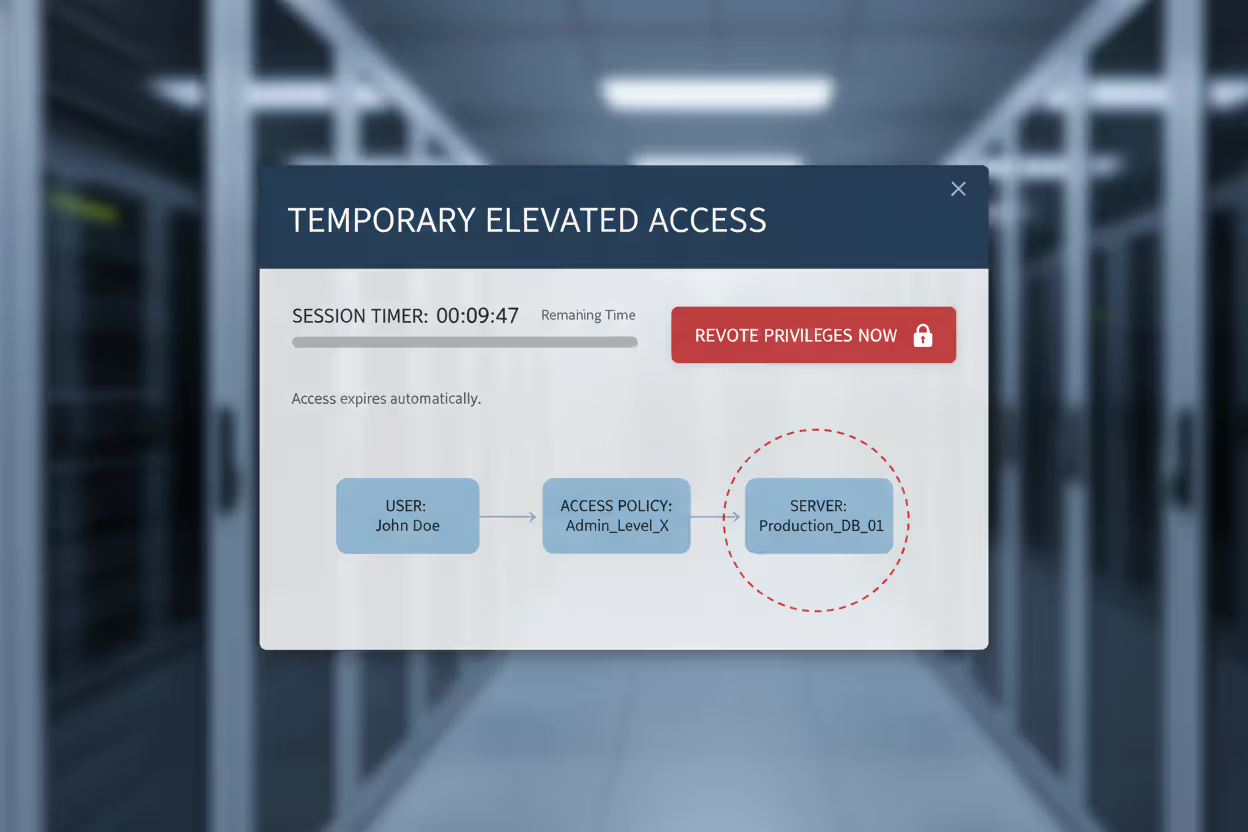
How cybersecurity least privilege explained through session controls: temporary elevation lets users punch above their weight for specific tasks. A network engineer needs firewall access for two hours to push a config change. The system grants elevated permissions, counts down the clock, then automatically revokes them. No permanent admin access sitting around waiting to be exploited.
Modern privilege management treats access like a rental car, not ownership. You get the keys when needed, return them when done. The shorter that window stays open, the smaller the target attackers can hit.
Author: Trevor Kingsland;
Source: elegantimagerytv.com
Key Components of Least Privilege Access
Several mechanisms work together to make least privilege actually function at scale. You can't just flip a switch—you need interconnected systems handling different aspects of access control.
RBAC (Role-Based Access Control) bundles permissions into job-appropriate packages. Instead of manually configuring access for each person, you create role templates: "Marketing Coordinator," "Senior Developer," "Financial Analyst." Each role comes preloaded with relevant permissions. When Sarah joins as a developer, you assign her the developer role. She instantly inherits the right access profile without anyone manually checking dozens of permission boxes.
The efficiency shows when people change positions. Jason moves from junior to senior developer? Switch his role assignment. His old permissions disappear, new ones activate. No risk of forgetting to revoke something from his previous position because the role handles everything.
Just-in-Time access attacks the "standing privilege" problem. Traditionally, admins kept elevated access 24/7, even though they needed it maybe 10% of the time. JIT flips this—users request temporary elevation when they need it. The system grants higher permissions for a specific window (maybe 15 minutes, maybe 2 hours), then automatically pulls them back. That firewall admin only has elevated access during actual firewall maintenance, not while browsing Twitter at lunch.
Escalation prevention monitors for unauthorized privilege grabs. These controls watch for anomalies: a standard account suddenly trying to modify system files, or a service account accessing resources it's never touched before. Modern endpoint detection systems flag these patterns instantly. Some automatically terminate suspicious sessions before damage happens.
Session management enforces time boxes and contextual requirements. Your privileged session might timeout after 20 minutes of inactivity. Location-based rules might permit certain actions only from the office network, blocking them from remote connections. Every command typed during elevated sessions gets logged—creating an audit trail you can replay if questions arise later.
These components work best when layered together. RBAC handles everyday permissions, JIT manages temporary elevation, escalation prevention catches abuse attempts, and session controls add time and context boundaries. No single mechanism delivers full protection, but the combination covers most attack vectors.
Cybersecurity Least Privilege Examples in Practice
Abstract security principles make more sense when you see them deployed in real environments. Here are cybersecurity least privilege examples showing how this works across different scenarios.
Enterprise Network Example
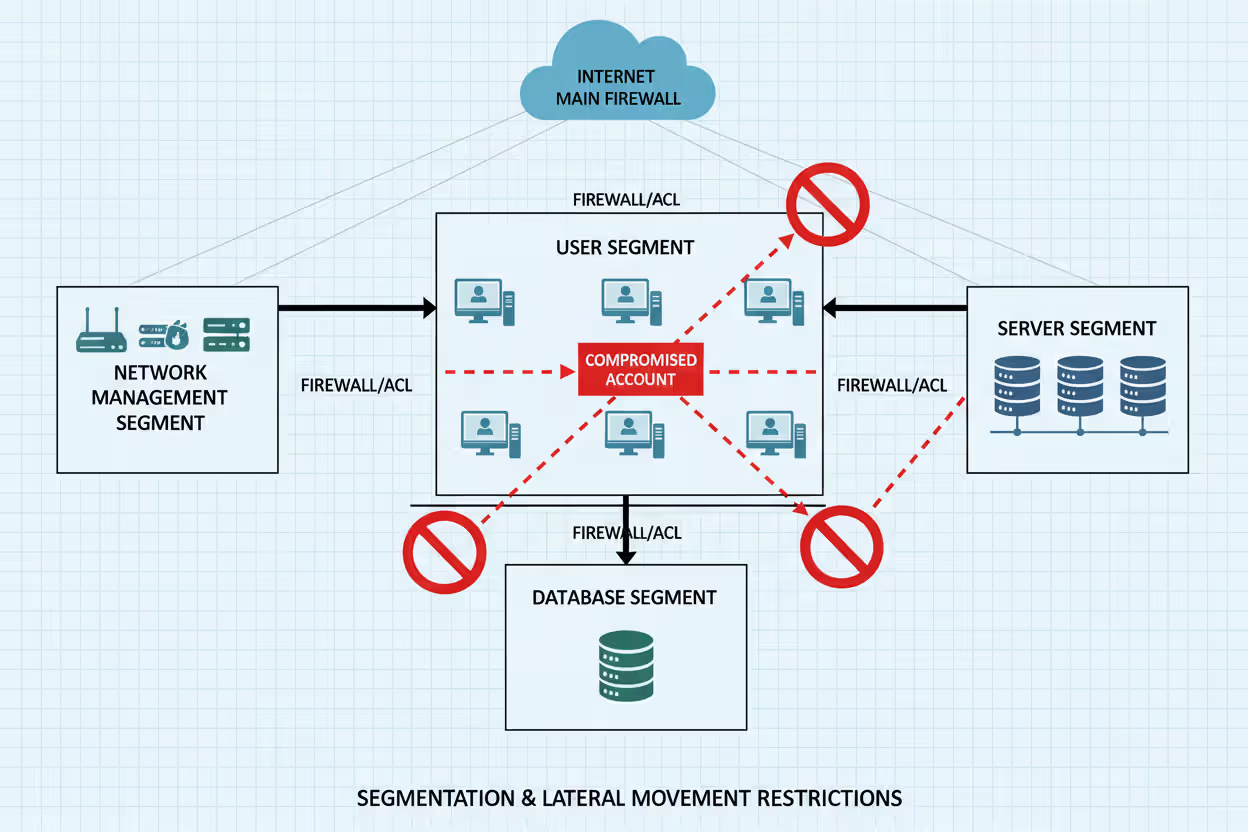
A financial services firm realized their IT department operated with zero restrictions. Every technician had domain admin rights "to work efficiently." Then they got serious about access control.
The restructure created distinct tiers. Help desk staff received exactly two permissions: reset passwords and unlock accounts. That's it. System administrators could manage servers but touched no financial data. Database administrators had zero access to network devices—completely separate swim lanes.
Three months later, a help desk employee fell for a phishing scam. The attacker who compromised those credentials expected to own the network. Instead, they found themselves trapped in the narrowest permission box imaginable. They could reset some passwords—worthless without knowing which accounts to target. They couldn't reach customer data, install anything on servers, or touch network gear. The "breach" affected exactly six password resets before getting detected. What could've been a disaster turned into a minor incident report.
Author: Trevor Kingsland;
Source: elegantimagerytv.com
Cloud Infrastructure Example
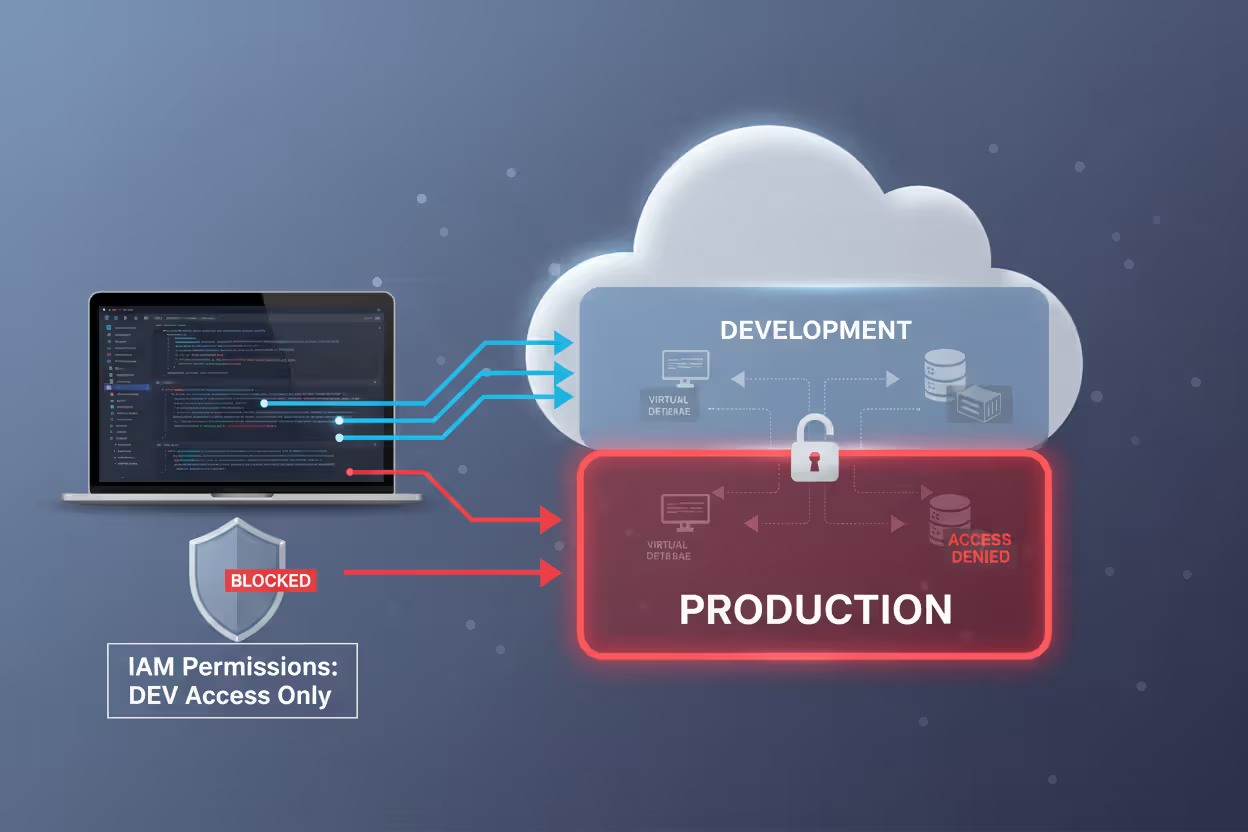
A software company migrating to AWS implemented least privilege from day one. Developers got IAM roles that allowed launching EC2 instances—but only in dev subnets, only specific instance types, nothing else. They couldn't modify S3 bucket policies, change VPC settings, or even view production account resources.
Production deployments ran through CI/CD pipelines with their own service roles. These roles had write access to production but accepted commands exclusively from the build system. Individual developer credentials couldn't reach production at all, regardless of how loudly someone asked.
When a developer's laptop disappeared from a conference, the security team barely blinked. Those stolen credentials couldn't touch production systems. The thief had access to... development sandboxes. The company rotated the compromised credentials, filed an insurance claim for the laptop, and moved on. No customer impact, no breach notification, no regulatory headaches.
Author: Trevor Kingsland;
Source: elegantimagerytv.com
Database Access Example
A healthcare provider handling patient records built granular database controls. Billing staff saw patient names, insurance details, and account balances—nothing clinical. Nurses accessed medication records and vital signs, but only for patients currently assigned to them. Doctors viewed and modified clinical data for their own patients.
Administrative operations like schema modifications or bulk exports required approval workflows. When a researcher needed aggregated data for a study, they submitted a formal request explaining the purpose. An automated system granted 48-hour read-only access to anonymized datasets, then automatically revoked it. This satisfied HIPAA requirements while enabling legitimate research work.
The system blocked a curious billing clerk who tried accessing celebrity patient records. Their account had no business reason to view those charts, so the system denied the query and logged the attempt. The compliance team had a conversation with the employee before it became a breach.
Implementing Least Privilege in Your Organization
Moving from theory to practice requires a structured rollout that doesn't break everything on day one. Here's how to actually make this happen.
Audit your current mess first. Export every user account, group membership, and permission assignment you can find. Active Directory, cloud IAM, databases, applications—dump it all. Most organizations discover shocking results. Contractors from 2019 with active admin accounts. Interns who somehow have domain admin. Service accounts running with full system privileges because someone couldn't figure out the minimum required permissions.
This baseline shows the gap between where you are and where you need to be. It's usually embarrassing. That's fine—you can't fix what you don't measure.

Author: Trevor Kingsland;
Source: elegantimagerytv.com
Map roles to actual work, not org charts. Interview people about what they do daily. What systems do they touch? What actions do they perform? Track usage patterns for a month if possible. You'll find that people use maybe 20% of their assigned permissions regularly. Another 30% gets used occasionally. The remaining 50%? Pure bloat that accumulated over years.
Build role definitions around that core 20%, with escalation paths for the occasional stuff. If someone needs extra access twice a year, give them a request process rather than permanent permissions they'll rarely use.
Phase the rollout, or face a revolt. Flipping everyone to restrictive access overnight creates chaos and enemies. Pick one department or one system class as a pilot. Non-critical environments work great—start with dev/test before touching production. Monitor access denials closely. When legitimate work gets blocked, adjust policies quickly.
This phased approach gives you room to refine role definitions based on actual feedback rather than guesswork. You'll iterate several times before getting it right.
Build frictionless request workflows. Users need a clear path to request temporary elevation or additional permissions. If your process requires three approval levels for a five-minute task, people will find workarounds. Use ticketing systems that integrate with identity platforms—automated approvals for common requests, human review for unusual ones.
Speed matters here. A request that takes two days to approve trains users to request standing access instead, defeating the whole purpose.
Deploy enforcement tools, not just policies. Writing documents doesn't restrict anything. You need technical controls. Privileged Access Management platforms broker connections to sensitive systems. Just-in-time access tools grant and revoke permissions automatically. Session recording captures every command during elevated access.
Choose tools that fit your environment. Enterprises might need commercial PAM solutions. Smaller shops might get by with open-source identity management and cloud-native access controls.
Review access quarterly minimum. Schedule regular recertification where managers verify their team's permissions still match current job responsibilities. Automated tools should flag anomalies: dormant accounts with active permissions, users with conflicting permission combinations, accounts that haven't logged in for 90 days.
Security teams should review privileged session logs for unusual patterns. That DBA who suddenly accessed HR databases at 2am? That deserves investigation.
Common Least Privilege Mistakes and How to Avoid Them
Even well-intentioned security teams trip over these predictable problems.
The convenience trap catches everyone. Granting admin rights "because figuring out exact permissions is too hard" saves 30 minutes today while creating months of security debt tomorrow. The time investment upfront pays dividends later. Use tools that log access denials—they show exactly what permissions actually get used versus what seems convenient. That data-driven approach beats guessing every time.
Permission accumulation sneaks up slowly. Someone transfers from marketing to engineering, gains developer access, but nobody removes their marketing permissions. Three job changes later, they have access to everything across the company. Combat this through regular recertification—quarterly beats annually. Automated systems can flag users whose permission sets don't match their current job profile in HR systems.
Documentation gaps create mysteries. Six months pass and nobody remembers why the backup service account has read access to HR databases. Future auditors can't evaluate whether that access remains justified. Document the business justification for every non-standard permission grant, especially service accounts and cross-department access. When someone asks "why does this exist?" you should have an answer in seconds.
Monitoring blind spots hide abuse. You've carefully restricted permissions but don't track when they're used. An attacker who steals a limited account will test boundaries—attempting privilege escalation, probing lateral movement paths. Without monitoring, these reconnaissance activities stay invisible until something breaks. Deploy user and entity behavior analytics that learn normal patterns for each account, then alert on deviations.
The service account oversight kills you. Organizations meticulously control human access while leaving application service accounts with godlike permissions. That web app running with database owner rights? That's a massive risk if someone exploits the application. Apply least privilege to non-human identities too—service accounts need only the specific permissions their application functions require, not blanket admin access.
Least Privilege vs. Other Access Control Models
| Access Control Approach | Security Strength | Complexity Level | Where It Works Best | How Hard to Deploy |
| Least Privilege | Very High - minimizes damage from any compromise | Moderate - requires detailed mapping but manageable | Universal foundation for all environments | Moderate - needs permission analysis and ongoing maintenance |
| Role-Based Access Control (RBAC) | High - effective for organizations with clear job functions | Low to Moderate - straightforward once roles are defined | Companies with stable, defined positions | Low to Moderate - role creation is easy but maintenance requires attention |
| Attribute-Based Access Control (ABAC) | Very High - enables context-aware decisions using multiple data points | High - requires sophisticated policy engines | Dynamic environments where access depends on multiple changing factors | High - needs attribute infrastructure and complex policy creation |
| Privileged Access Management (PAM) | Very High - specifically protects high-risk administrative accounts | Moderate to High - specialized tools with learning curves | Administrative and privileged account protection | Moderate to High - dedicated tools but clear implementation frameworks |
Understanding these relationships clarifies your implementation strategy. Least privilege is the overarching principle—the "what" you're trying to achieve. RBAC, ABAC, and PAM are mechanisms—the "how" you implement it. Mature security programs blend approaches: RBAC handles everyday permissions, PAM secures administrative accounts, ABAC makes sensitive data decisions based on context.
Least privilege isn't just a technical control—it's a fundamental shift in how we think about trust in computing environments. Every permission granted represents potential attack surface. Organizations that embrace least privilege as a core principle rather than a compliance checkbox demonstrate security maturity that directly translates to resilience against modern threats
— Dr. Ron Ross
Frequently Asked Questions About Least Privilege
Least privilege transforms security from abstract theory into concrete protection against real-world attacks. Restricting access to actual requirements instead of imagined "might need someday" scenarios shrinks your attack surface dramatically and boxes in damage when breaches occur.
Implementation requires upfront work—auditing existing access, defining sensible roles, deploying technical controls, building governance processes. The return appears when compromised credentials lead nowhere, or when misconfigured applications can't reach sensitive systems because they lack those permissions.
Treat this as an ongoing security program, not a one-time project. Quarterly reviews catch permission accumulation, monitoring systems detect misuse, continuous refinement improves the balance between security and operational efficiency. Organizations that weave least privilege into their security culture rather than treating it as a compliance task build real resilience against evolving threats.
Start small if your organization isn't ready for a full rollout. Pick one system, one team, or one account class. Document current permissions, define minimum requirements, implement controls, measure results. Success in a limited scope builds momentum and organizational buy-in for broader deployment. The real question isn't whether you'll implement least privilege—it's whether you'll deploy it before the next breach exploits excessive permissions you haven't restricted yet.
Related Stories

Read more

Read more




The content on this website is provided for general informational and educational purposes only. It is intended to explain concepts related to cybersecurity awareness, online threats, phishing attacks, and data protection practices.
All information on this website, including articles, guides, and examples, is presented for general educational purposes. Cybersecurity risks and protection strategies may vary depending on individual behavior, technology usage, and threat environments.
This website does not provide professional cybersecurity, legal, or technical advice, and the information presented should not be used as a substitute for consultation with qualified cybersecurity professionals.
The website and its authors are not responsible for any errors or omissions, or for any outcomes resulting from decisions made based on the information provided on this website.