

Worried person at laptop with warning popups, dark scammer silhouette in background
How to Know if a Website Is a Scam?

Content
Content
Last year, digital scammers walked away with $12.5 billion from American victims. That number grows every quarter.
You've found what looks like the deal of the century. Your mouse hovers over the checkout button. But something nags at you—should you actually trust this site?
Most fraudulent shopping operations reveal themselves through predictable mistakes. I'll walk you through the same analysis techniques that fraud investigators rely on when examining suspicious websites. No technical expertise required—just a quarter-hour and willingness to question what you're seeing.
These scam patterns show up repeatedly across thousands of fake sites. Learn to recognize them once, and you'll spot them everywhere.
Common Red Flags That Reveal Scam Websites
Fraudulent operations display warning signals through visual presentation and information gaps that legitimate businesses would never tolerate.
Unprofessional Design and Layout
Real companies invest thousands in professional branding and consistent design systems. When a site hits you with three different fonts on the homepage, a pixelated logo that looks stretched, or color schemes that clash violently—that's your first warning. Pay attention to product images too. Scammers steal photos from legitimate retailers, sometimes leaving the original watermarks visible. I once reviewed a "discount electronics" site where half the laptop images still showed Amazon's logo in the corner.
Grammar and Spelling Errors
One or two typos? That happens to everyone. But sentences like "We providing best quality for most cheap price" or "Contact to us for questions about ship" tell a different story. Criminal operations frequently use automated translation tools that mangle basic English grammar. Professional retailers employ native speakers or experienced editors because polished communication builds trust with customers.
Missing or Vague Contact Information
Legitimate businesses provide working phone numbers, verifiable street addresses, and email addresses using their company domain (@companyname.com). Scammers hide behind free Gmail accounts or anonymous contact forms. When they bother listing an address, verify it through Google Maps or similar services. You'll often discover their "corporate headquarters" is actually a residential apartment, vacant lot, or random office building where no such business operates.
Unrealistic Promises and Pricing
MacBook Pro for $89? Front-row concert tickets at 85% off retail? Your instincts are screaming for good reason. Criminals exploit bargain-hunting behavior because great deals override critical thinking. Cross-check prices against authorized retailers. Legitimate clearance sales rarely exceed 60-70% off, even during major events. Stores going out of business don't offer 90% discounts on current-generation products.
Pressure Tactics and Urgency
Countdown timers shouting "ONLY 47 MINUTES LEFT!" or "Just 1 remaining!" create artificial urgency. Real stores do run limited-time promotions, absolutely. Scam sites weaponize this psychology because rushed customers ask fewer questions. Test this: reload the page. Did that "47 minutes" timer reset to 47 minutes again? You just caught them in a blatant lie.
Absent or Fake Social Media Footprint
Companies running legitimate operations maintain active social platforms with genuine customer interaction. Scam operations either skip social media completely or maintain obvious fake profiles—20,000 followers but zero engagement, no customer photos, no replies to questions. Check their Instagram or Facebook page. Do you see real people posting pictures of products they received? Does the company respond to customer questions and handle complaints publicly? Empty profiles with purchased followers expose the fraud immediately.

Author: Calvin Roderick;
Source: elegantimagerytv.com
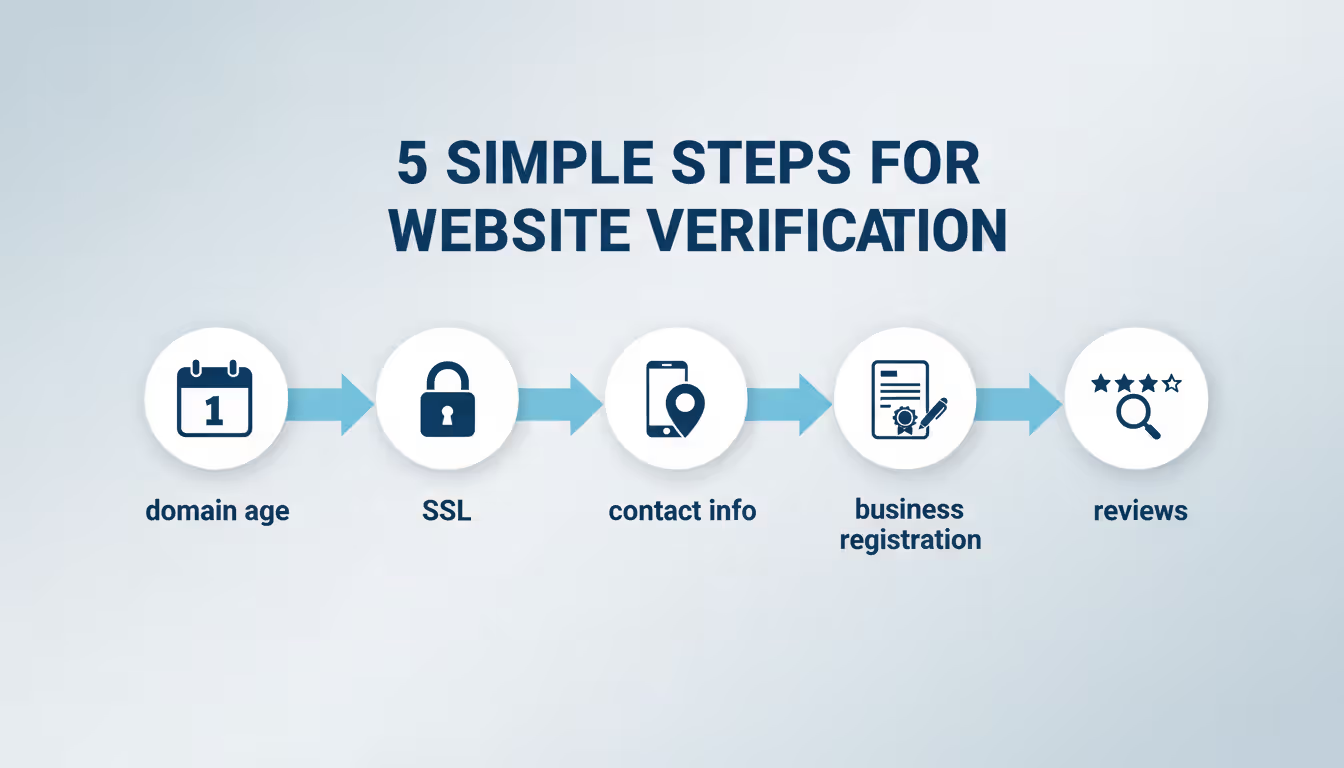
How to Check if a Website Is Legitimate in 5 Minutes
You can verify most websites faster than making your morning coffee. Here's my exact process.
Step 1: Verify Domain Age (30 seconds)
WHOIS lookup tools show when someone registered a domain name. Established businesses typically maintain websites that have existed for years. That "trusted retailer" with a domain registered three weeks ago? Red flag doesn't begin to describe it. Scammers abandon domains every few months when complaints pile up, then launch fresh ones to escape their reputation.
Step 2: Confirm SSL Certificate (15 seconds)
Click the padlock icon next to your browser's address bar. Valid certificates display the company name and issuing authority. Here's what matters though—SSL only encrypts data during transmission. It doesn't verify the business itself is legitimate. Criminals obtain SSL certificates as easily as honest merchants do nowadays.
Step 3: Validate Contact Information (90 seconds)
Pick up your phone and dial their number. Does someone professional answer with the company name, or does it ring forever? Look up their street address on Google Maps. You should see an actual business location—not someone's house or empty property. Send them a pre-purchase question by email. Real retailers respond within 24 hours.
Step 4: Research the Business Registration (90 seconds)
Search the company name with "registered business" plus their stated location. Your state maintains searchable databases through the Secretary of State office—these show legitimate registered companies. When businesses claim Delaware or Wyoming incorporation but have zero registration records, that's a massive warning.
Step 5: Investigate Reviews and Complaints (90 seconds)
Google the company name alongside "scam" or "complaints." Check BBB, Trustpilot, and consumer forums. A few negative experiences among hundreds of satisfied customers? That's normal business. But repeated patterns—packages never arriving, fake merchandise, vanishing customer support—tell you everything you need to know.
Author: Calvin Roderick;
Source: elegantimagerytv.com
Website Security Features Every Safe Site Should Have
Understanding essential security elements helps you separate protected platforms from dangerous or fraudulent ones.
HTTPS Encryption
Every legitimate shopping site uses HTTPS, which displays a padlock in your address bar. This scrambles information traveling between your device and their server, preventing interception. But here's the catch—HTTPS has become universal now. Even scam sites implement it routinely. It's necessary but not sufficient for confirming legitimacy.
Trust Badges and Security Seals
Look for recognized badges like Norton Secured, McAfee Secure, or payment processor logos from Visa and Mastercard. Scammers display fake badges constantly, so test them. Click on the badge. Authentic seals link to verification pages confirming the security certification. Fake badges either don't work or redirect to unrelated pages.
Secure Payment Gateways
Trustworthy retailers process payments through established names like PayPal, Stripe, Square, or major credit card networks. You'll see these brands during checkout. Never wire money, send cryptocurrency, or use peer-to-peer apps (Venmo, Zelle) when buying from unfamiliar sellers. These payment methods offer zero fraud protection—exactly why criminals prefer them.
Comprehensive Privacy Policy
Real websites publish detailed privacy policies explaining data collection practices, storage methods, and sharing policies. These documents usually span several pages and reference specific regulations like CCPA or GDPR. Scam operations skip privacy policies entirely or post vague, generic statements clearly copied from other sites.
Clear Return and Refund Policies
Professional online stores specify return windows, refund procedures, and customer obligations. Fraudulent sites avoid specifics or create nearly impossible return conditions like "All sales final" or "Returns accepted within 7 days of order placement"—meaning from when you ordered, not when the item arrives, making returns practically impossible.
Warning Signs in Website URLs and Domain Names
The web address itself frequently exposes criminal intent before you even view the homepage.
Misspellings and Character Substitutions
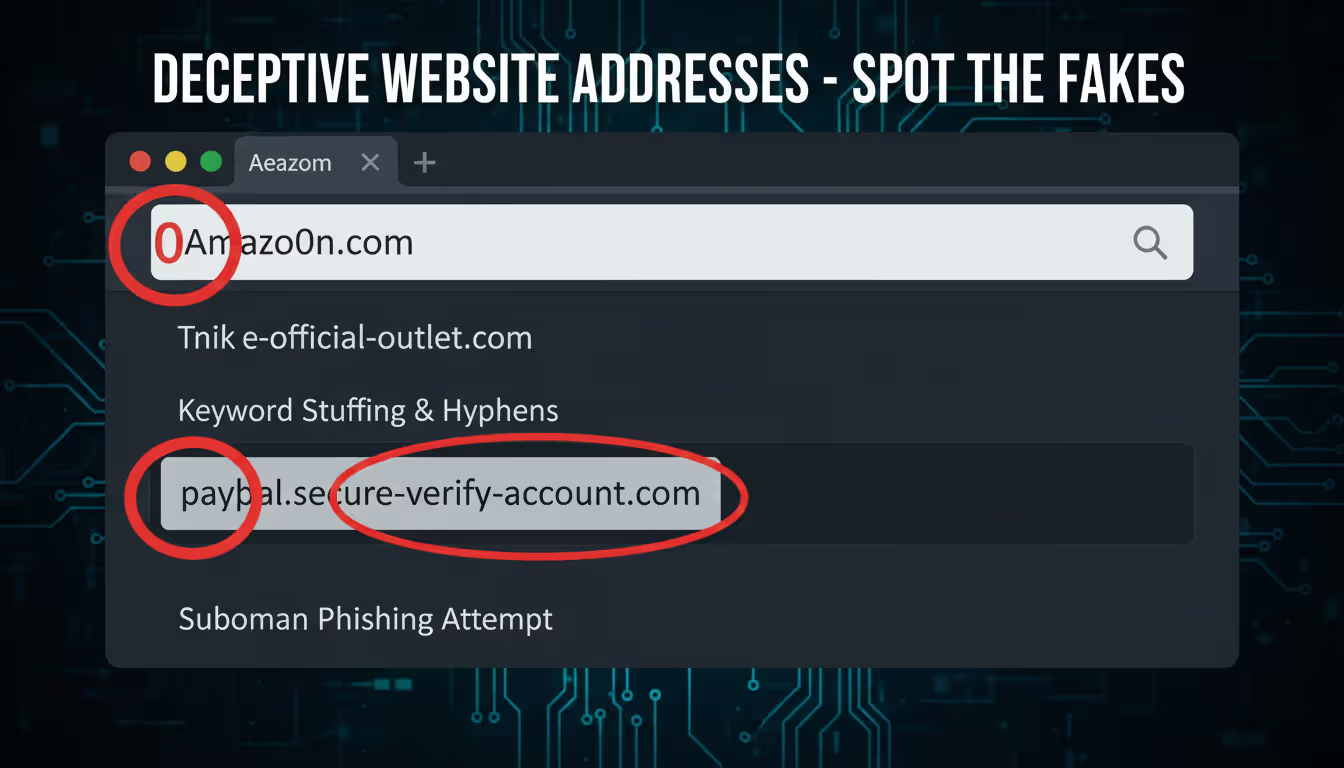
Criminals register domains that mimic famous brands: "Amaz0n.com" (zero replacing O), "Tarqet.com," or "Applle.com." This typosquatting technique catches people who mistype addresses or don't notice subtle changes. Examine spelling carefully, character by character.
Suspicious Domain Extensions
Many legitimate international businesses use country extensions (.co.uk, .ca, .de). But question unfamiliar extensions on sites claiming U.S. operations: .xyz, .top, .club, or .online. Criminals favor these because they're cheap and abundant. When a "United States retailer" operates from .ru (Russia) or .cn (China) domains, that demands explanation.
Extra Words or Hyphens
Authentic brands own their exact domain names without add-ons. Shopping at "nike-official-outlet.com" instead of "nike.com"? You're not dealing with Nike. Scammers add words like "official," "outlet," "store," "shop," or "sale" to suggest affiliation with genuine brands they don't actually represent.
Shortened or Redirect Links
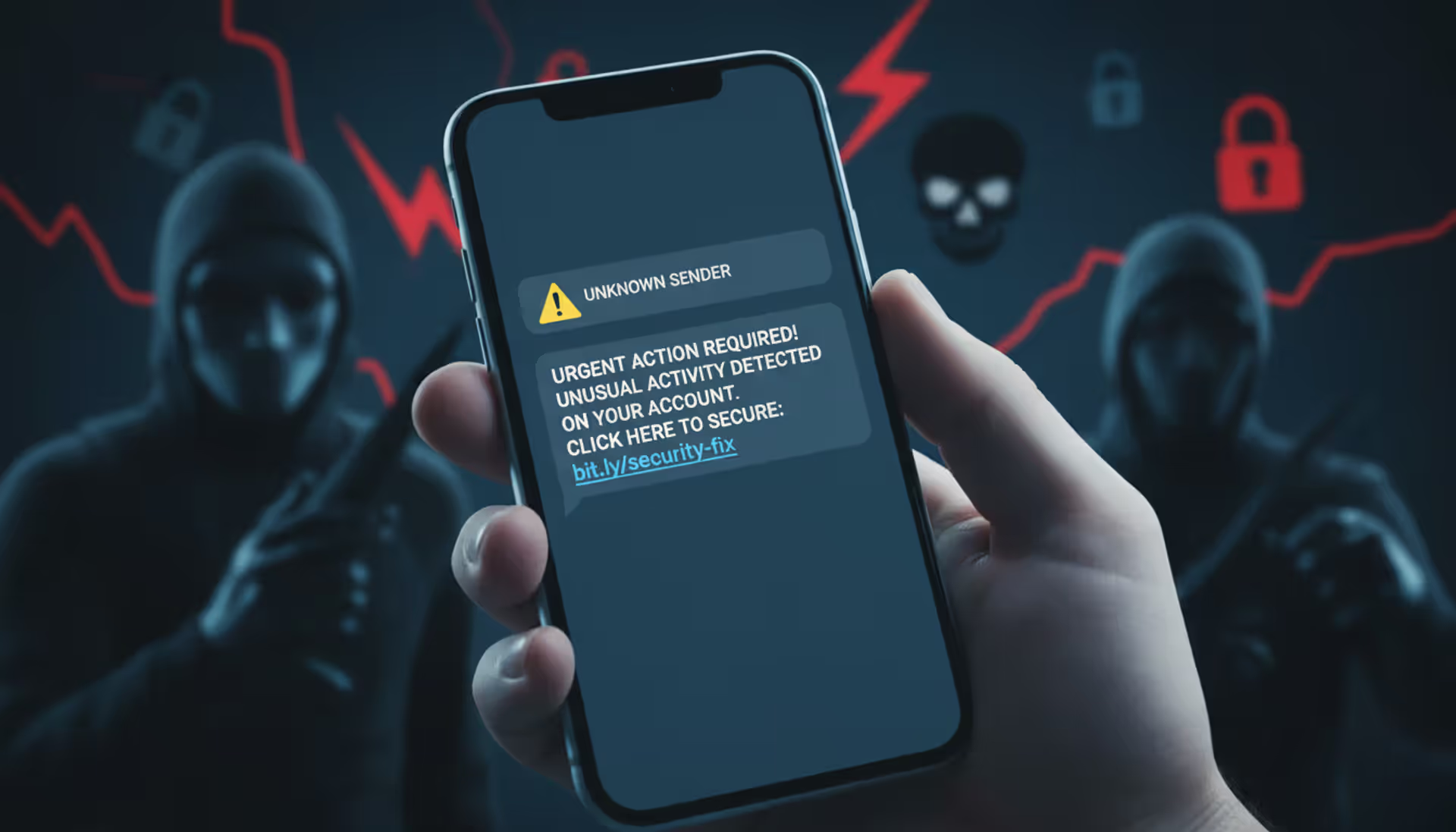
Treat bit.ly, tinyurl, or similar shortened URLs with extreme caution, especially in emails or social media ads. These hide the actual destination. Hover your cursor over links before clicking to see the complete URL. Can't preview where it leads? Don't click it.
Copycat Subdomains
A URL reading "paypal.secure-verify-account.com" isn't PayPal—it's "secure-verify-account.com" pretending to be PayPal through subdomain manipulation. The real domain is everything immediately before the extension (.com, .net, etc.). Everything before that represents subdomains controlled by whoever owns the actual domain.
Author: Calvin Roderick;
Source: elegantimagerytv.com
What to Do If You Think You've Found a Scam Website
Discovering fraudulent operations before losing money is ideal, but you have options either way.
If You Haven't Purchased Yet
Document everything carefully. Screenshot the suspicious site including URLs, product pages, and contact sections. File reports with the FBI's IC3 division, Federal Trade Commission, and submit the site through Google's Safe Browsing system. Your documentation helps protect future victims and supports takedown operations.
If You've Already Entered Payment Information
Call your credit card company or bank right now. Explain the situation and request they block the transaction or initiate a chargeback. Credit cards provide stronger fraud protection than debit cards—you're typically liable for zero fraudulent charges when reported quickly. With debit cards, your liability depends on how fast you report it.
Change passwords immediately for any accounts using those credentials. Criminals test stolen login combinations across multiple platforms looking for password reuse. Enable two-factor authentication on financial accounts, email, and social media.
Monitor Your Accounts
Review bank and credit card statements daily for two weeks, then weekly for three months. Fraudsters sometimes run small test charges before attempting larger theft. Set up transaction alerts through your financial institution for immediate notification of any activity.
File Official Reports
Beyond federal IC3 and FTC complaints, contact your state attorney general's consumer protection division. If you paid through PayPal or another platform, file disputes through those services within their deadlines—usually 60-180 days maximum.
Warn Your Network
Share your experience on social platforms, review sites, and relevant online communities. Your warning might save someone else from identical victimization. Stick to facts: include the website URL, what happened, and when.
Tools and Resources to Verify Website Safety
The sophistication level of fraudulent websites has increased dramatically over recent years. Scammers now invest in professional-appearing designs, valid SSL certificates, and even fake customer service operations that answer phones. Your best defense combines healthy skepticism with systematic verification processes. When something feels off, trust that instinct and investigate thoroughly before purchasing
— Dr. Sarah Chen
These free resources help you investigate questionable websites quickly and thoroughly.
WHOIS Lookup Services
ICANN Lookup and DomainTools expose domain registration dates, registrant details (unless privacy-protected), and nameserver information. Recent registration combined with expensive inventory suggests fraud. Legitimate operations rarely launch selling high-ticket items from brand-new domains.
Google Safe Browsing
Visit google.com/safebrowsing/report and enter any URL to check it against Google's database of identified dangerous sites. This system tracks phishing operations, malware distributors, and confirmed scam websites. You can report suspicious sites through the same interface.
Better Business Bureau (BBB.org)
Search the business name and claimed location. BBB profiles show accreditation status, customer feedback, complaint records, and resolution rates. While BBB accreditation isn't mandatory for legitimacy, patterns of unresolved complaints expose problematic operators.
Trustpilot and Sitejabber
These independent platforms collect customer experiences. Read beyond star ratings—examine detailed feedback for patterns. Multiple complaints about non-delivery, counterfeit goods, or unreachable customer service signal serious problems. Watch for suspicious positive reviews too: generic enthusiasm, repetitive language across reviews, or accounts with only single reviews.
ScamAdviser
This analyzer evaluates websites using multiple data sources including domain age, server location, transparency indicators, and user feedback. It generates trust scores and highlights specific concerns. While not perfect, it provides useful quick assessment.
URLVoid and VirusTotal
These services scan URLs against numerous security databases simultaneously. They identify malware, phishing schemes, and blacklisted domains. VirusTotal is particularly thorough, checking URLs against 70+ security vendors at once.
Reverse Image Search
Upload product photographs to Google Images or TinEye. When identical images appear across dozens of websites or trace back to different retailers, you've caught the scammer stealing content. Legitimate merchants use original photography or properly licensed stock imagery.
Quick Website Safety Checklist
| Safety Feature | What to Look For | Red Flag If Missing |
| SSL Certificate | HTTPS in URL with working padlock; certificate shows company name | HTTP only; broken padlock; certificate errors or browser warnings |
| Contact Information | Working phone number, verifiable physical address, email using company domain | Only contact form; free email like Gmail; fake or residential address |
| Return Policy | Specific timeframes (30+ days typical); detailed process; reasonable conditions | Vague language; "all sales final"; unrealistic windows like 7 days from order date |
| Payment Methods | Major credit cards accepted; PayPal available; recognized processors; multiple options | Wire transfer only; cryptocurrency only; peer-to-peer apps; unusual payment demands |
| Domain Age | At least 1+ years for established operations; age matches claimed company history | Created within past 3-6 months; registration hidden through privacy services |
| Grammar Quality | Professional copywriting; consistent voice; minimal errors | Widespread typos; awkward sentences; obvious machine translation |
| Pricing | Competitive yet realistic; comparable across legitimate retailers | 70%+ below market rates; deals appearing impossibly good |
| Reviews | Mix of positive and negative; detailed experiences; presence across multiple platforms | Only 5-star ratings; generic praise lacking specifics; no independent reviews |
| Privacy Policy | Detailed and lengthy; legally compliant language; specific to business | Completely absent; vague generic statements; obviously copied from elsewhere |
| Social Presence | Active accounts showing recent activity; genuine engagement; company responds to customers | No social media; purchased followers with zero engagement; inactive accounts |
Frequently Asked Questions
The scam website ecosystem changes constantly, with criminals adapting to each new security measure and consumer awareness initiative. Tactics that identified scams five years ago—checking for HTTPS, looking for contact information—no longer work alone. Modern scam operations mimic legitimate businesses with disturbing accuracy.
Your strongest protection layers multiple verification techniques together. No single indicator definitively proves legitimacy or fraud by itself. Instead, evaluate the complete picture including domain age, contact accessibility, review patterns, payment options, pricing reality, and your gut instinct. When multiple warning signals appear simultaneously, walk away immediately.
Remember that legitimate retailers actively want to earn your trust and business. They invest substantially in transparent policies, accessible customer service, and verifiable business information. Any website making verification difficult—hiding contact details, deploying pressure tactics, or offering unrealistic deals—has already shown you what you need to know.
Take the five-minute verification process seriously every time. Those few minutes might save you hundreds of dollars, countless hours of stress, and the nightmare of identity theft recovery. Share this knowledge with family members and friends, especially those less experienced with online shopping risks. The more people recognizing these warning signs, the less profitable scam operations become.
Stay skeptical, verify thoroughly, and shop confidently.
Related Stories

Read more

Read more


The content on this website is provided for general informational and educational purposes only. It is intended to explain concepts related to cybersecurity awareness, online threats, phishing attacks, and data protection practices.
All information on this website, including articles, guides, and examples, is presented for general educational purposes. Cybersecurity risks and protection strategies may vary depending on individual behavior, technology usage, and threat environments.
This website does not provide professional cybersecurity, legal, or technical advice, and the information presented should not be used as a substitute for consultation with qualified cybersecurity professionals.
The website and its authors are not responsible for any errors or omissions, or for any outcomes resulting from decisions made based on the information provided on this website.