
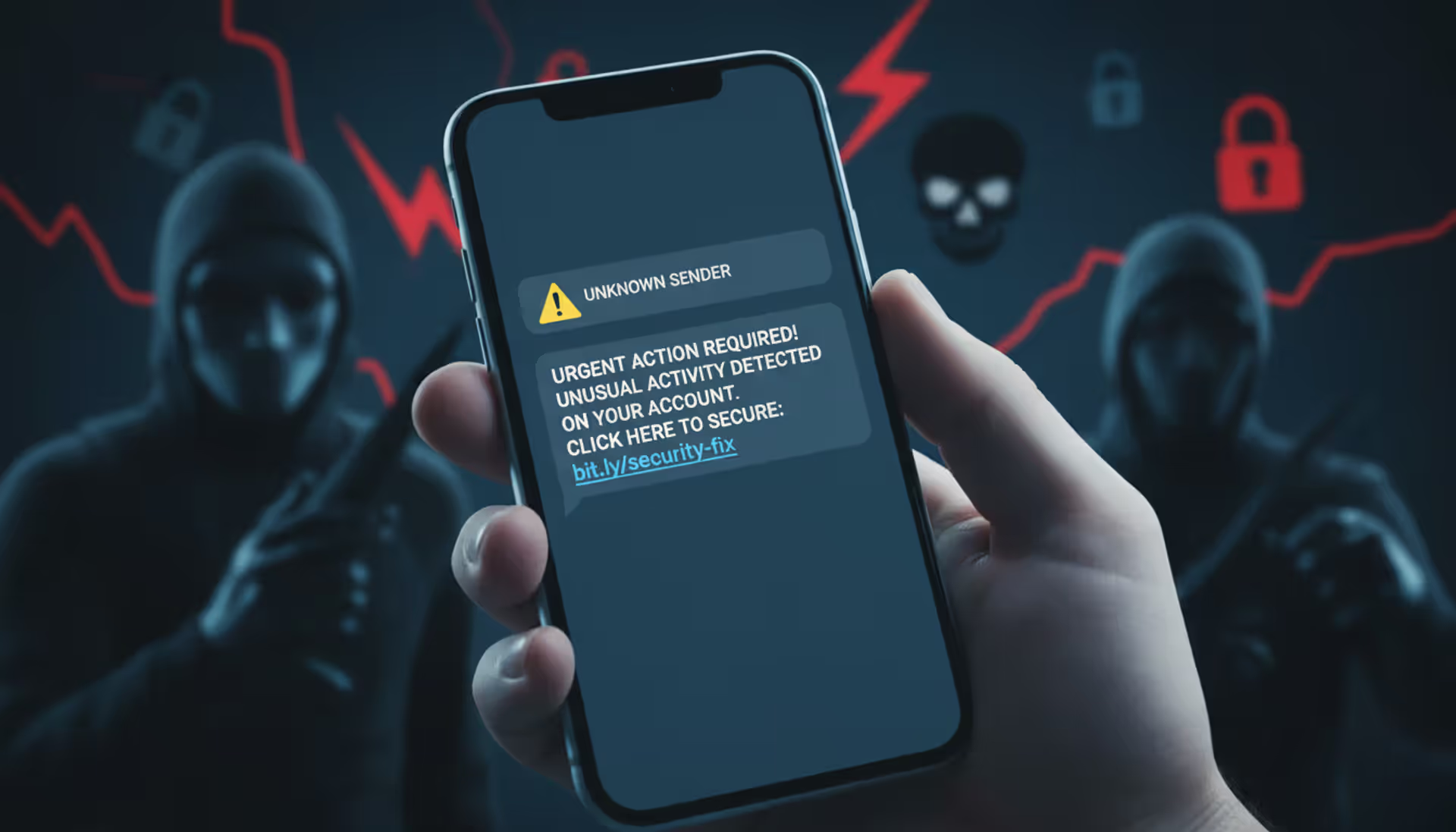
mobile phone with suspicious SMS and warning icon, blurred scammer silhouettes in background
Smishing Cyber Security Guide

Content
Content
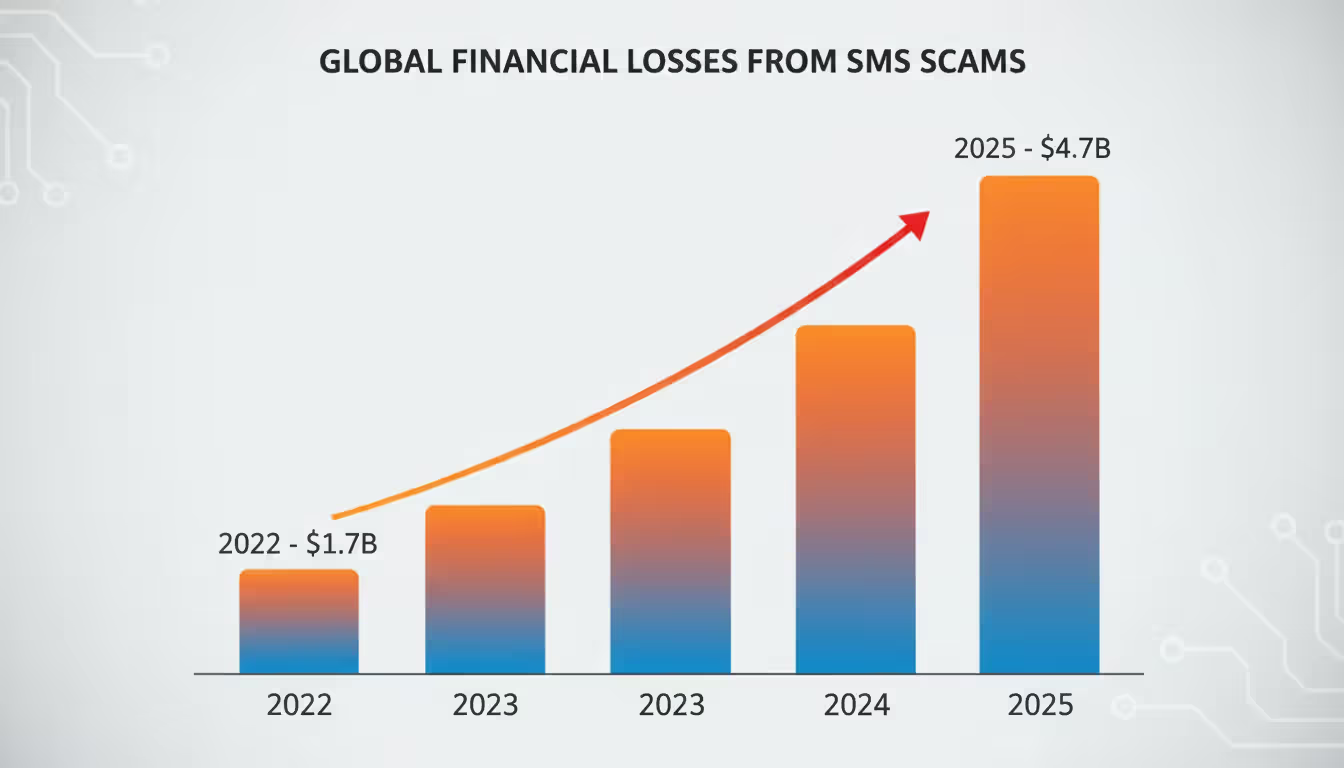
Text message fraud has exploded over the past three years. If you've received suspicious texts about package deliveries, bank alerts, or prize winnings lately—you're not alone. These attacks, called smishing, drained $4.7 billion from American consumers in 2025, according to FTC data. That's up from $1.7 billion just three years earlier.
Here's what makes these scams so effective: you probably open text messages within three minutes of receiving them. Your inbox? Maybe you check that once an hour. Attackers know this. They've also figured out that squinting at links on a 6-inch screen means most people won't notice subtle misspellings in URLs.
This guide breaks down exactly how these criminals operate and what you can do to stop them before they access your accounts.
What Is Smishing in Cyber Security?
Take "SMS" and "phishing," mash them together, and you get smishing—cyberattacks that arrive via text message. Criminals send these messages to steal your passwords, install malware on your phone, or trick you into sending money. The attacks come through regular text messages, but also through WhatsApp, iMessage, and other messaging platforms.
Think of it this way: email phishing went after your inbox. Phone vishing targets your voicemail. Smishing? That's your text messages. Each method uses different psychology. Email users have learned to be suspicious—we've all seen those "Nigerian prince" scams. But texts feel personal and immediate, which is exactly why they work.
The first wave of these attacks hit around 2006. Banks started warning customers about texts claiming their accounts were locked. Back then, the scams were laughably obvious—misspelled words everywhere, messages that said "Dear Valued Customer" instead of your actual name.
Author: Trevor Kingsland;
Source: elegantimagerytv.com
Fast-forward to 2025, and attackers have become disturbingly good at this. They'll spoof your bank's actual phone number so the text appears in the same thread as legitimate messages from that bank. They'll reference your recent Amazon order (information they bought from a data breach). They'll send the message at 2 PM on a Tuesday when you're busy and likely to click without thinking.
Between 2022 and 2025, smishing complaints to the Federal Trade Commission jumped 280%. That's not because people got careless—it's because the attacks got better.
How Smishing Attacks Work
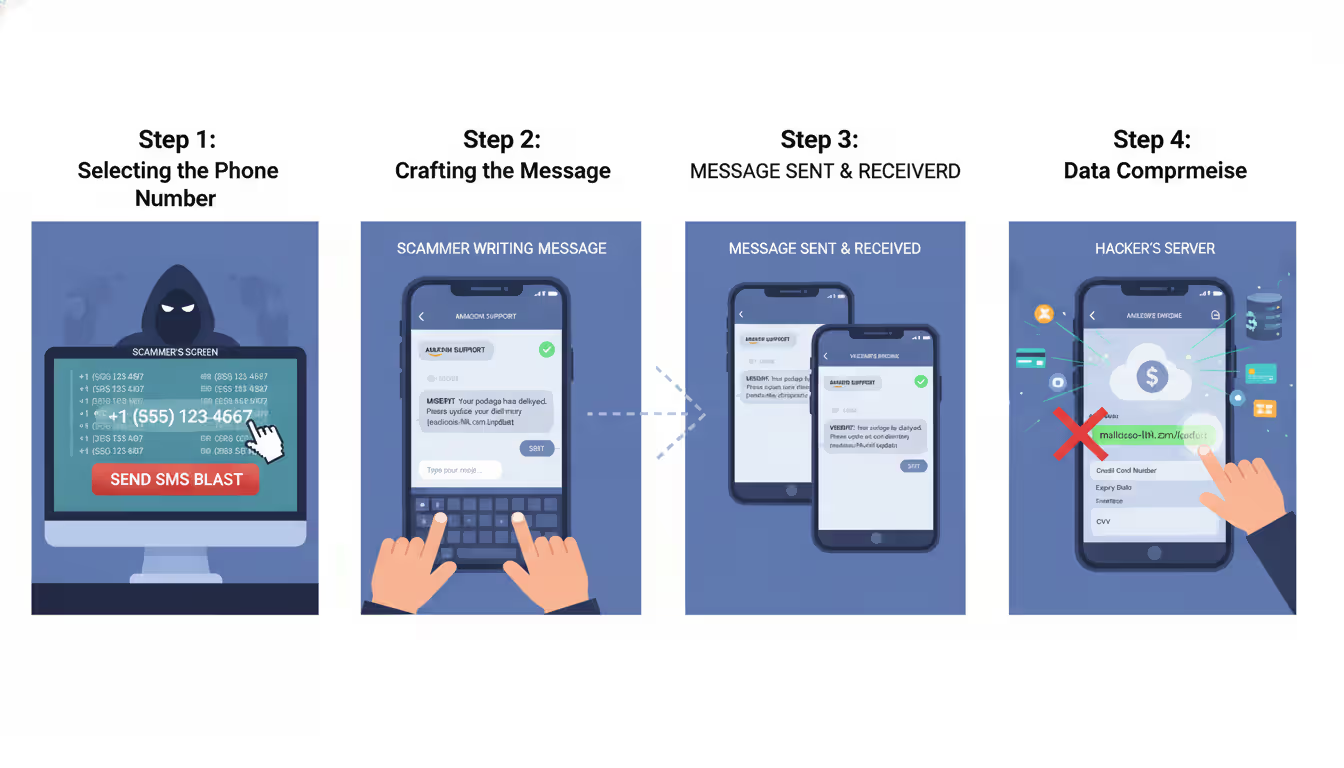
Let me walk you through what happens when criminals launch one of these campaigns.
Step One: Getting Your Number
Attackers need phone numbers first. Sometimes they buy lists from shady data brokers—millions of numbers for a few hundred dollars. Other times they harvest numbers from data breaches. Remember when T-Mobile got hacked? Or that Marriott breach? Your number was probably in there. Some criminals just use software that generates random numbers targeting specific area codes.
Step Two: Crafting the Hook
Now they write a message designed to make you panic or get excited. "Your package couldn't be delivered—pay $2.95 to reschedule." "Unusual activity detected on your Chase account—verify now or we'll freeze it." "You've won a $500 Walmart gift card—claim within 24 hours." Notice the pattern? Every message creates urgency.
Step Three: Delivery
The text hits your phone. It looks like it's from USPS, or your bank, or Amazon. The sender ID shows a company name instead of a number because attackers use services that let them customize how the message appears. Some of these texts land in the same conversation thread as real messages from that company, which makes them even more convincing.
Step Four: The Trap
You click the link. It takes you to a website that looks identical to the real thing—same logo, same colors, same layout. You enter your username and password. Congratulations, you just handed your credentials to criminals. Or maybe the link automatically downloads malware that starts recording everything you type.
Some variations skip the link entirely. The message says "Call this number immediately to resolve your account issue." You call, and a fake customer service rep walks you through "verifying" your account by giving them your full Social Security number, date of birth, and account PIN.
Real-World Scenarios They Exploit:
During tax season, they impersonate the IRS claiming you owe money or have a refund waiting. The real IRS never initiates contact by text—but most people don't know that.
Around holidays, when everyone's ordering gifts online, they send fake delivery notifications. You're expecting three packages anyway, so you don't question it.
At work, they'll pose as your IT department asking you to reset your password through a link. That's how corporate network breaches start.
Author: Trevor Kingsland;
Source: elegantimagerytv.com
Warning Signs of a Smishing Message
You can spot these scams once you know what to look for. Here are the patterns that repeat across almost every smishing campaign:
Time pressure dominates the message. "Respond within 6 hours." "Act now to avoid account closure." "Limited time to claim." Real companies don't impose random deadlines through unsolicited texts. Your bank won't suspend your account if you don't click a link within 24 hours. Think about it—when has any legitimate business ever worked that way?
Links look wrong when you examine them closely. Shortened URLs like bit.ly hide where they actually go. Misspelled domains replace letters with similar-looking characters—"rnicrosoft.com" uses "rn" instead of "m." Some add extra words: "chase-security-verify.com" instead of just "chase.com." Real companies send links from their actual domains, not variations.
The sender doesn't match the claimed source. Your bank texts you from the same 5-digit short code every time—something like 24273. If you suddenly get a "bank alert" from a regular 10-digit number, that's a red flag. Same if the message says it's from Amazon but comes from a Gmail address or random number.
Grammar feels off. Professional companies employ editors. Their messages don't have sentences like "Your account have been compromise" or "Please to verify yourself identity." Awkward phrasing often means the message originated overseas where English isn't the first language.
They want sensitive data via text. No legitimate organization asks for passwords, PINs, Social Security numbers, or full credit card numbers through text messages. Not your bank. Not the IRS. Not your employer. Never. This rule has zero exceptions.
Real Smishing Message Examples
Example 1: Package Delivery Scam
"USPS: Your package has been held due to incomplete address information. Update details within 48hrs: usps-redelivery.com/track?id=9847362"
Why this works: You probably are expecting a package—most people are at any given time. The domain looks USPS-related at first glance. That tracking number seems official. But check the details: USPS uses usps.com, not other domains. Real USPS tracking numbers follow specific formats (usually starting with 9400 or 9205). And USPS doesn't charge for address corrections.
Example 2: Banking Scare
"Wells Fargo Alert: We detected unusual activity on account ending in 4829. Verify your identity immediately to avoid suspension: wellsfargo-secure.net/verify"
Why this works: Even if you don't bank with Wells Fargo, seeing a partial account number makes you think "wait, do I have an old account there?" The domain includes "secure," which sounds official. But look closer—it's .net, not .com. Wells Fargo only uses wellsfargo.com for customer communications and sends alerts through their app, not random links.
Example 3: Government Impersonation
"IRS NOTICE: You have an unclaimed tax refund of $827. Claim within 7 days: irs-refundcenter.org/claim/2026 Case#IR-8847362"
Why this works: Specific dollar amounts and case numbers create false legitimacy. The .org domain mimics government websites. But the IRS uses exclusively irs.gov and never texts about refunds. They mail paper checks or deposit directly. They definitely don't give you seven days to "claim" money that's already yours.
How to Identify and Verify Suspicious Text Messages
When a questionable text arrives, here's your verification process:
Look at who actually sent it. Companies use consistent short codes—those 5 or 6-digit numbers. Your bank always texts from 24273? Then a "bank alert" from 555-0192 isn't really from them. Write down the short codes your real service providers use so you can compare when suspicious texts arrive. That said, criminals can spoof these numbers, so the sender alone won't tell you everything.
Don't click—navigate manually instead. The text says your Netflix payment failed? Open your browser, type netflix.com yourself, and sign in. If there's actually a problem, you'll see it there. This takes 30 seconds longer than clicking the link, but it completely eliminates the risk.
Call the company using a number you already have. Use the phone number on the back of your credit card, on your printed statements, or from their official website—not any number in the suspicious text. Ask their customer service, "Did you send me a text about [whatever]?" They can check immediately.
Reveal links without opening them. On most phones, hold your finger on a link for a second without clicking. The full URL pops up. Look for misspellings, weird domains, or URLs that don't match the company name. PayPal messages should link to paypal.com, not paypal-secure.net or any variation.
Search the number that texted you. Copy the phone number and search it on Google with "scam" or "spam" added. Community websites where people report fraud will show you if others received similar messages from that number. The FCC's Consumer Complaint Center also maintains records.
Cross-reference with known breaches. If you recently shopped somewhere that got hacked, criminals might use that context in messages. Check haveibeenpwned.com to see if your phone number appeared in any data breaches. Knowing which of your data got compromised helps you spot targeted scams.
Author: Trevor Kingsland;
Source: elegantimagerytv.com
How to Protect Yourself from Smishing Attacks
Prevention beats recovery every time. Here's what actually works:
Assume every unexpected text is malicious until proven otherwise. This sounds paranoid, but it's the mindset that keeps you safe. Got a text about a problem with your bank account? Assume it's fake and verify through official channels. This one habit stops most attacks cold.
Clicking links in unsolicited texts should feel as wrong as giving your password to a stranger. Just don't do it. If a message says you need to take action, go to the website or app yourself. Type the URL. Use a bookmark. Call the company. But don't click what they sent you.
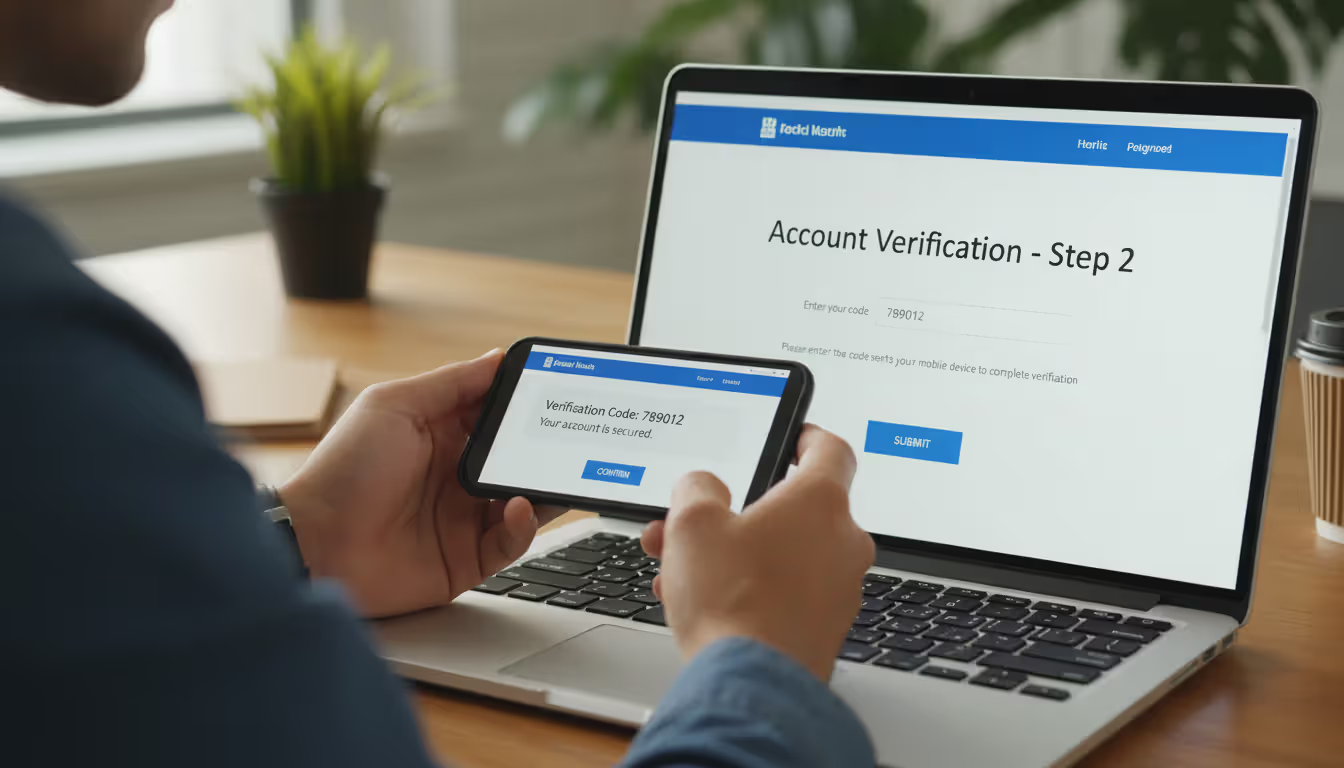
Turn on two-factor authentication everywhere it's available. Banks, email, social media, shopping sites—all of it. Use authenticator apps like Google Authenticator or Authy rather than SMS codes when possible, since criminals can hijack your phone number through SIM swapping. Even if they steal your password through smishing, they still can't get into your account without that second factor.
Activate your carrier's spam blocking. AT&T offers ActiveArmor. T-Mobile has Scam Shield. Verizon provides Call Filter. These services are usually free and filter out known smishing numbers before messages reach you. Dive into your account settings or download your carrier's security app to enable these features.
Install security software on your phone. Apps like Malwarebytes, Norton Mobile Security, or Lookout scan messages for malicious links and can detect malware if you accidentally download something. They're not perfect, but they add another layer of defense.
Put your number on the National Do Not Call Registry. Visit donotcall.gov. This won't stop criminals (they ignore the registry), but it reduces legitimate marketing texts, making it easier to spot suspicious messages.
Report every smishing attempt you receive. Forward the text to 7726 (it spells SPAM)—this works on all major carriers and helps them identify and block these campaigns. Also file complaints at ReportFraud.ftc.gov and the FBI's IC3 website (ic3.gov). Individual reports matter because they help authorities track large-scale operations.
Keep your number off public websites. The more places your number appears online, the more likely it lands on scammer lists. Use disposable numbers from services like Google Voice for sketchy websites or one-time signups.
Update your phone's operating system when prompted. Those annoying update reminders? They patch security holes that malware exploits. Enable automatic updates so you don't have to think about it.
What to Do If You Fall for a Smishing Scam
Smishing represents a particularly insidious threat because it exploits the intimacy of mobile communications. People treat their phones as trusted devices and text messages as personal communications. Attackers leverage this psychological vulnerability alongside technical sophistication—spoofed sender IDs, personalized content from breached data, and timing attacks coordinated with real events. The most effective defense combines technological solutions like carrier filtering with user education emphasizing verification before action. We recommend that anyone receiving an unexpected text requesting action should independently confirm through official channels before clicking any links or providing information
— Dr. Sarah Chen
Clicked a suspicious link? Gave out information? Here's your immediate action plan:
Cut your phone's internet connection right now. Enable airplane mode. If you downloaded malware by clicking that link, disconnecting prevents it from sending your data to attackers or receiving commands to do more damage. This buys you time to respond.
Change passwords immediately—but not on the compromised phone. Use a computer or a different device. Start with your email password (attackers use email access to reset everything else), then banking and financial accounts. Create entirely new passwords, not variations of old ones.
Call your bank and credit card companies. Tell them exactly what happened. They'll watch for fraudulent transactions, can issue new card numbers, and might place fraud alerts that require additional verification for large purchases. Most banks have zero-liability policies if you report quickly, meaning you won't lose money to fraudulent charges.
Save evidence. Screenshot the smishing message before you delete it. Write down what time you clicked, what information you entered, and any unusual activity you notice afterward. This documentation helps with fraud claims and police reports.
Scan your phone for malware. Run a complete scan with security software. If it finds something serious that won't remove, you might need to factory reset your phone—but back up your photos and contacts to cloud storage first (from a clean device, not the infected one).
Watch your accounts like a hawk. Check your bank statements daily for a few weeks. Review credit card charges. Look for small test transactions (criminals often charge $1-$5 first to see if the card works). Set up transaction alerts so you get notified immediately when charges occur.
Consider freezing your credit. If you gave out your Social Security number or enough personal information for someone to open accounts in your name, freeze your credit. Contact Equifax (equifax.com), Experian (experian.com), and TransUnion (transunion.com). Freezing is free, doesn't hurt your credit score, and you can unfreeze temporarily when you need to apply for credit yourself.
File official reports. Visit identitytheft.gov to report identity theft to the FTC. Submit a complaint to the FBI's Internet Crime Complaint Center at ic3.gov. File a police report with your local department (you'll need the report number for some fraud claims). Yes, this takes time, but these reports help track organized crime rings.
Alert people in your contacts. If the malware accessed your messaging apps or contacts, criminals might send smishing messages to your friends and family pretending to be you. Send a warning: "My phone was compromised—ignore any suspicious texts that look like they're from me."
Smishing vs. Phishing vs. Vishing Comparison
| Feature | Smishing | Phishing | Vishing |
| Attack Method | Text messages to mobile devices | Email messages | Voice telephone calls |
| Delivery Channel | SMS, MMS, WhatsApp, iMessage | Email inbox, spam folders | Phone calls, voicemail boxes |
| Common Tactics | Fake delivery alerts, urgent account warnings with malicious links, prize scams | Spoofed sender email addresses, credential theft through fake login pages, fraudulent invoices | Caller ID spoofing to appear as banks or government, fake tech support, IRS impersonation |
| Typical Targets | Anyone with a mobile phone, online shoppers, mobile banking customers | Corporate employees with email access, consumers with online accounts | Elderly individuals, business executives, taxpayers during filing season |
| Detection Difficulty | High—texts feel personal, small screens hide link details, trusted communication channel | Medium—spam filters have improved significantly, more public awareness of email scams | Medium-High—spoofed caller ID appears legitimate, skilled social engineers manipulate emotions |
Frequently Asked Questions About Smishing
Smishing isn't going anywhere. As more of life moves to mobile devices—banking, shopping, work communication—criminals will follow. AI tools now let attackers generate personalized messages at scale, making detection even harder.
Your defense comes down to three core habits: question every unexpected text, verify through official channels before clicking anything, and enable every security feature available on your accounts. Multi-factor authentication alone blocks most credential theft attempts, even if you accidentally give out your password.
When those suspicious texts arrive—and they will arrive—take 30 seconds to verify before you act. Open your browser. Navigate to the website yourself. Call the number on your card. That tiny pause prevents months of identity theft recovery work.
The criminals behind these scams count on you being busy, distracted, and trusting. They engineer messages specifically to bypass your rational thinking and trigger emotional responses—fear your account will close, hope you'll get a refund, anxiety about a failed delivery. Recognizing these manipulation tactics makes you significantly harder to scam.
Your phone is the most powerful tool you own. It manages your money, stores your communications, and holds your personal data. Treat text messages the way you'd treat a stranger knocking on your door at midnight asking for your bank account information—with extreme suspicion until proven otherwise.
Related Stories
Read more
Read more


The content on this website is provided for general informational and educational purposes only. It is intended to explain concepts related to cybersecurity awareness, online threats, phishing attacks, and data protection practices.
All information on this website, including articles, guides, and examples, is presented for general educational purposes. Cybersecurity risks and protection strategies may vary depending on individual behavior, technology usage, and threat environments.
This website does not provide professional cybersecurity, legal, or technical advice, and the information presented should not be used as a substitute for consultation with qualified cybersecurity professionals.
The website and its authors are not responsible for any errors or omissions, or for any outcomes resulting from decisions made based on the information provided on this website.