

Hacker at laptop with padlock icon and digital threat background
Cyber Security Ransomware Guide

Content
Content
In just under a decade, ransomware transformed from a relatively minor digital nuisance into a billion-dollar criminal industry that regularly shuts down hospitals, pipelines, and entire city governments. If you're reading this, you probably want to understand what makes these attacks so devastating—and more importantly, how to avoid becoming the next victim.
What Is Ransomware in Cyber Security
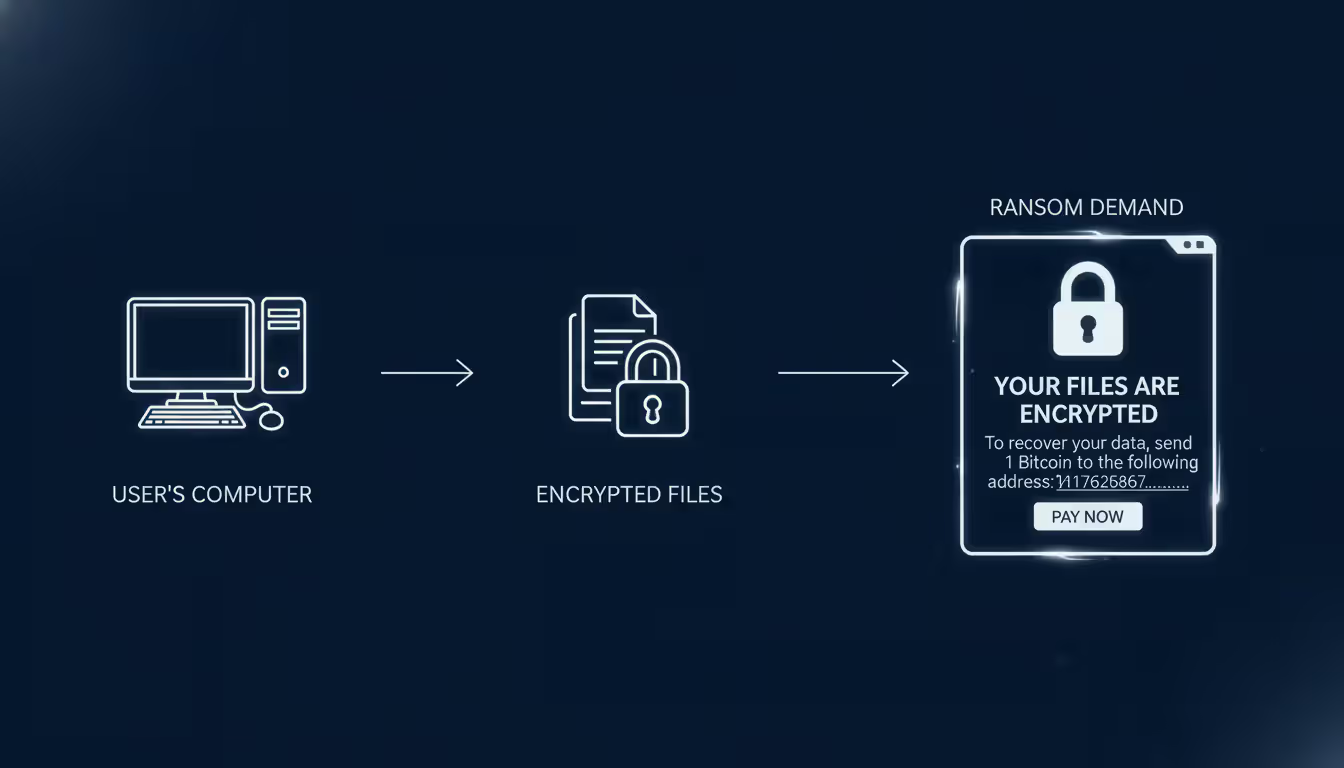
Think of cyber security ransomware as a digital hostage situation. Criminals break into your computer, lock up everything valuable, then demand money to give it back. The software itself encrypts your files, making them completely unreadable unless you have the specific digital key the attackers control.
Here's what makes ransomware different from other cyber threats: it's intentionally obvious. A virus might quietly corrupt files over weeks. Spyware silently steals your passwords for months. But when cyber security ransomware explained in action hits your system, you'll know immediately—often through a bright red screen demanding Bitcoin payment within 72 hours.
The encryption technology behind these attacks uses what cryptographers call asymmetric cryptography. Attackers generate a unique key pair for your files: one key encrypts everything, while only its matched partner can decrypt. They keep that decryption key on their servers. Without it, even supercomputers would need thousands of years to crack modern encryption algorithms. You're either paying the ransom or restoring from backups—those are your options.
Traditional malware works differently. Trojans disguise themselves as legitimate software while quietly stealing credentials over extended periods. Worms replicate themselves across vulnerable systems without requiring users to do anything. Ransomware borrows tactics from both categories while adding its own cruel twist: maximum disruption in minimum time.
Today's ransomware operators didn't stop at simple encryption. Modern variants employ "double extortion" schemes where criminals copy your sensitive data before encrypting it. Now they've got two threats: "Pay up or you'll never access your files again" combined with "Pay up or we'll publish your customer database, financial records, and confidential emails on the dark web." This approach turned ransomware from an IT problem into a potential public relations nightmare and regulatory compliance disaster.
Author: Calvin Roderick;
Source: elegantimagerytv.com
How Ransomware Attacks Work
So how does cyber security ransomware work from initial infection through final ransom demand? The process involves careful planning and multiple stages designed to maximize damage while avoiding detection until it's too late.
Common Infection Methods
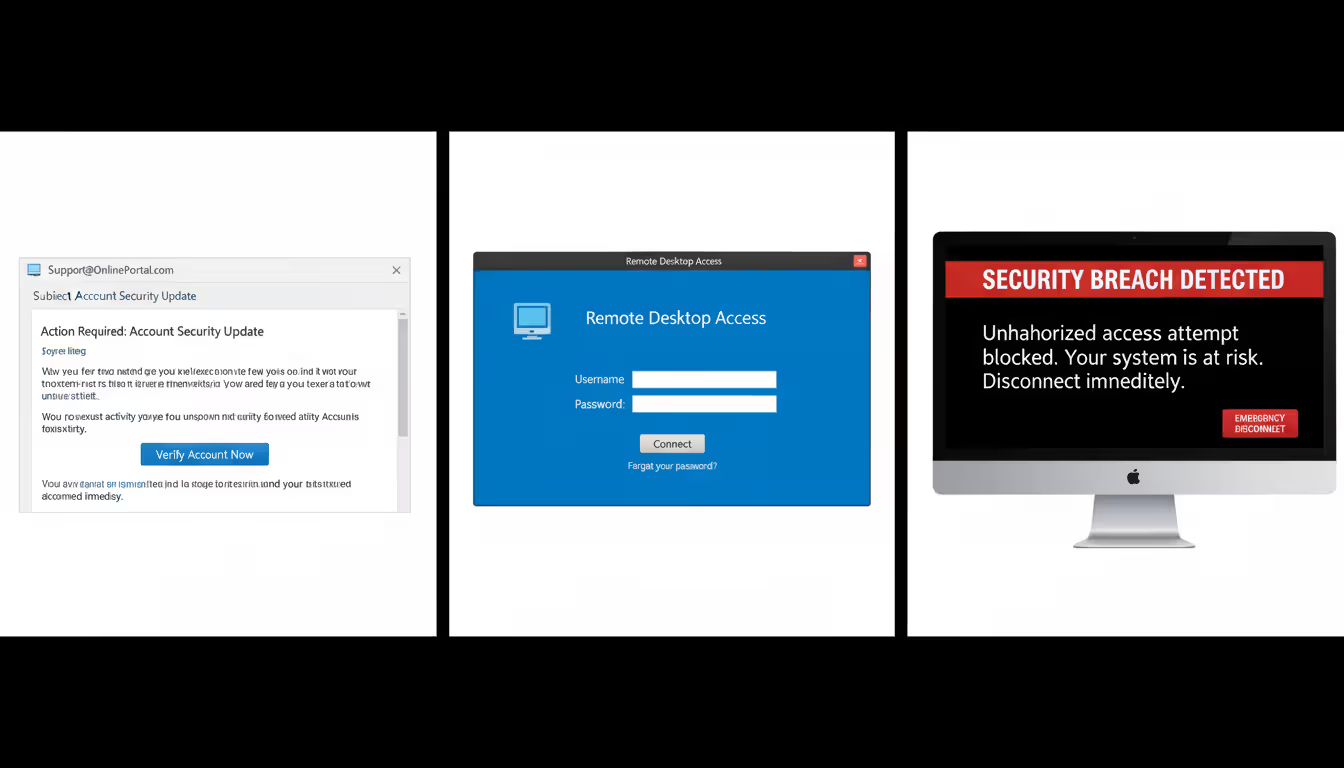
Phishing emails still deliver most ransomware infections, though they've gotten frighteningly convincing. Forget the obvious Nigerian prince scams. Today's phishing campaigns clone your shipping company's exact email format, reference recent purchases you actually made, and attach "invoices" that look completely legitimate. That attachment contains ransomware waiting to execute.
Remote Desktop Protocol exploitation skyrocketed during the pandemic when companies rushed to enable remote work. Attackers continuously scan the internet for computers with RDP exposed to public access. They either brute-force weak passwords through thousands of automated attempts or purchase stolen credentials from underground markets. Once inside with legitimate credentials, they manually explore your network, disable security tools, and strategically deploy ransomware for maximum impact.
Supply chain compromises let criminals hack hundreds or thousands of victims through a single breach. Instead of attacking your company directly, they compromise a software vendor you trust. When you install what looks like a routine update, you're actually installing ransomware. It's devastatingly efficient from an attacker's perspective.
Drive-by downloads represent the most passive infection method. You visit a compromised website—often a legitimate small business site that got hacked. Hidden exploit code on that page checks your browser version, identifies unpatched vulnerabilities, and silently downloads ransomware. You never clicked anything suspicious or opened any attachments.
Author: Calvin Roderick;
Source: elegantimagerytv.com
The Encryption and Ransom Process
After ransomware executes on your computer, it immediately establishes persistence. It modifies Windows registry settings to survive reboots, creates scheduled tasks for redundancy, and most critically, deletes your Volume Shadow Copies—Windows' built-in file recovery feature. This all happens in seconds, before most security software registers a threat.
Next, the malware contacts its command-and-control server to register your infection and receive encryption instructions. Some variants include encryption keys directly in their code as a backup if network connections fail. They're not taking chances that a firewall blocks their operation.
File encryption follows a strategic pattern. The ransomware targets specific extensions: .docx, .xlsx, .pdf, .jpg, .sql, .bak—basically anything valuable while avoiding critical system files. Why? They need your computer functioning enough to display ransom notes and process Bitcoin payments. Some sophisticated variants encrypt files gradually over hours rather than all at once, making them harder for security tools to detect through sudden mass-file-modification patterns.
The ransom note appears everywhere: text files dropped in every encrypted folder, your desktop wallpaper replaced with payment instructions, and pop-up windows that appear on every restart. These notes always include a unique victim ID (so attackers can match your payment to your decryption key), cryptocurrency wallet addresses, specific ransom amounts, and countdown timers adding urgency. Deadlines typically threaten doubled prices or permanent data destruction.
Payment systems rely entirely on cryptocurrency for anonymity. Bitcoin was initially preferred, though many operators switched to Monero for its enhanced privacy features. Professional ransomware operations even provide "customer support" chat systems where victims can negotiate prices, request test decryption of a few files as proof the criminals actually have working keys, or ask for deadline extensions.
Real-World Ransomware Attack Examples
Looking at cyber security ransomware examples from recent years shows how these attacks impact real organizations and real people.
Colonial Pipeline (May 2021) – DarkSide ransomware operators breached the company controlling 45% of the East Coast's fuel supply. The attack didn't even target the pipeline's operational systems—just the billing infrastructure. But Colonial shut down pipeline operations anyway out of caution, triggering panic buying, fuel shortages, and price spikes across seventeen states. The company paid $4.4 million in ransom. The FBI later recovered about $2.3 million by tracking the cryptocurrency wallets. The initial breach? A single compromised password on a VPN account that wasn't protected by multi-factor authentication.
JBS Foods (June 2021) – REvil ransomware targeted the world's largest meat processor, disrupting beef, pork, and poultry production across North America and Australia. The attack threatened significant food supply chain disruptions. JBS paid $11 million in ransom to prevent further operational damage. This case highlighted how ransomware impacts physical goods production, not just digital data.
Universal Health Services (September 2020) – Ryuk ransomware crippled this healthcare network's 400+ facilities across the United States. Doctors and nurses reverted to paper charts and handwritten prescriptions. Ambulances were diverted from emergency rooms because patient records were inaccessible. The disruption lasted weeks. Total financial impact exceeded $67 million in lost revenue and recovery costs. Healthcare ransomware attacks create genuinely life-threatening situations when medical devices and electronic health records go dark.
Baltimore City Government (May 2019) – RobbinHood ransomware paralyzed city services for nearly a month. Residents couldn't pay water bills, complete real estate transactions, or access email communications with city departments. The attackers demanded just $76,000 in ransom. Baltimore refused payment on principle but ultimately spent over $18 million recovering systems and implementing security improvements. This case shows how ransomware disproportionately harms cash-strapped public sector organizations.
Kaseya Supply Chain Attack (July 2021) – REvil operators compromised Kaseya's VSA software, which managed IT services for thousands of businesses. Through this single breach, ransomware deployed to approximately 1,500 downstream companies simultaneously. The attackers demanded $70 million for a universal decryption tool. This attack proved the terrifying efficiency of targeting managed service providers who maintain privileged access to numerous client networks.
These cyber security ransomware examples share predictable patterns: preventable security gaps, delayed detection allowing widespread damage, and agonizing decisions about whether paying ransom makes sense. The financial damage extends far beyond the ransom itself—business interruption, damaged reputation, regulatory fines, legal fees, and mandatory security upgrades that should have been implemented years earlier.

Author: Calvin Roderick;
Source: elegantimagerytv.com
Warning Signs of a Ransomware Attack
Catching cyber security ransomware warning signs early might save you from complete disaster. These indicators should trigger immediate investigation:
File Extension Changes – Your "Quarterly_Report.xlsx" suddenly becomes "Quarterly_Report.xlsx.locked" or "Quarterly_Report.xlsx.STOP" or a random character string. Ransomware often appends distinctive extensions to encrypted files. If you notice this happening, disconnect from the network immediately—encryption may still be in progress.
Unusual File Modifications – Your security monitoring tools detect thousands of files changing simultaneously, especially during hours when nobody's working. Mass file modification events should trigger automatic alerts. Every minute counts because modern ransomware can encrypt thousands of files per minute on fast systems.
System Performance Degradation – Your computer suddenly runs hot. Fans spin loudly. Programs respond sluggishly. Check Task Manager or Activity Monitor—encryption operations consume significant CPU resources. An unfamiliar process maxing out your processor could indicate ransomware executing in the background.
Network Communication Anomalies – Your firewall logs show unexpected outbound connections to IP addresses in countries your business doesn't operate in. DNS queries to recently-registered domains with suspicious names. These could indicate ransomware beaconing to command-and-control servers for encryption keys and instructions.
Disabled Security Tools – Your antivirus software stops running without anyone in IT touching it. Windows Defender shows disabled status. Firewall settings changed unexpectedly. Backup software reports failures. Ransomware disables defensive tools before beginning encryption to avoid interference.
Suspicious Email Activity – You receive multiple emails with urgent subject lines from supposed vendors you've never heard of. Attachments with double extensions like "Invoice.pdf.exe." Legitimate-looking internal emails asking you to review attached documents, except the sender's actual email address doesn't match their supposed name. Report these immediately rather than investigating yourself.
Locked or Inaccessible Files – Files won't open. Applications crash when accessing certain directories. Error messages claim files are corrupted when they were working fine yesterday. At this point, encryption may be substantially complete, making immediate containment essential.
Ransom Notes – Text files titled "README" or "DECRYPT_INSTRUCTIONS" appearing across multiple folders. Desktop wallpaper replaced with payment demands. Pop-up windows displaying ransom amounts and Bitcoin wallet addresses. This confirms active infection beyond any doubt.
Deleted Shadow Copies – Windows Event Viewer shows Volume Shadow Copy Service deletions (Event ID 524) without authorized backup maintenance. Ransomware erases shadow copies to eliminate the easy "restore previous versions" recovery option Windows provides.
Organizations that detect ransomware within the first hour stand a fighting chance of isolating infected systems before the attack spreads network-wide. Once ransomware gets hours to work, you're typically looking at complete network compromise requiring full infrastructure recovery.
How to Prevent Ransomware Attacks
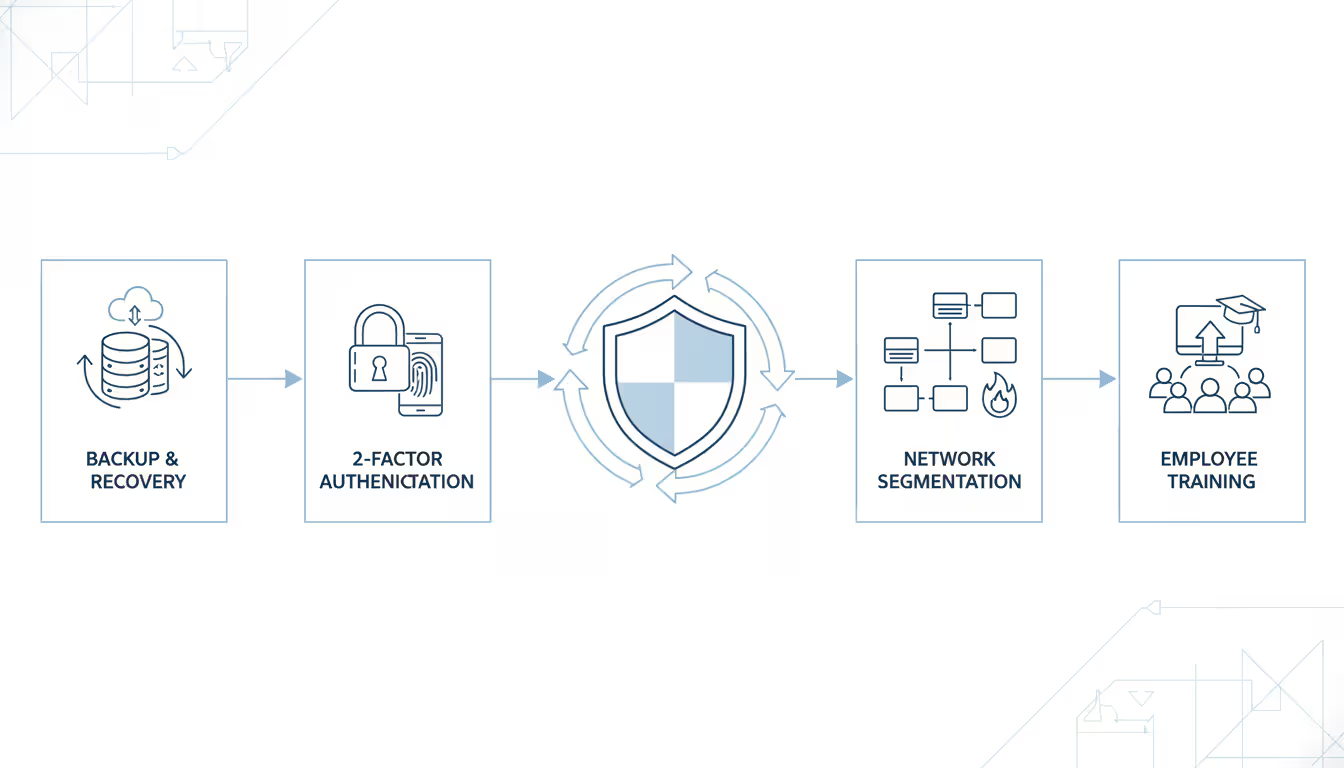
Figuring out how to prevent cyber security ransomware requires layered defenses because no single security measure stops all attacks. You need both technical barriers and trained humans.
Technical Prevention Measures
Backup Strategy – Follow the 3-2-1 approach: three total data copies, stored on two different types of media, with one copy kept completely offline or offsite. Here's the critical addition many companies miss: at least one backup must be immutable or air-gapped. "Immutable" means write-once-read-many storage that can't be modified or deleted even by administrators. "Air-gapped" means physically disconnected from your network after backup completion.
Why? Because ransomware specifically hunts for and encrypts backup repositories. If attackers can encrypt your backups along with production data, you've got no recovery option except paying the ransom.
Test your backup restoration monthly. Many organizations discover their backups don't actually work during a real ransomware crisis when it's too late. Regular restoration drills verify backup integrity and train staff on recovery procedures, dramatically reducing downtime during actual incidents.
Email Filtering and Attachment Controls – Deploy email security solutions that detonate attachments in isolated sandbox environments before delivering them to recipients. Block executable file types (.exe, .scr, .bat, .cmd, .vbs) from external senders by default. Disable macros in Office documents unless explicitly required for business functions.
Configure email authentication protocols—DMARC, SPF, and DKIM—which prevent attackers from forging sender addresses to impersonate your executives or trusted vendors. Also configure email clients to display complete sender addresses rather than just friendly display names. Attackers constantly use display names like "CEO John Smith" while the actual email comes from a random Gmail account.
Patch Management – Ransomware exploits known software vulnerabilities that already have available patches. WannaCry spread globally by exploiting EternalBlue, a Windows vulnerability Microsoft patched two months before the outbreak. Thousands of organizations still got hit because they hadn't applied that update.
Establish a maximum 30-day deployment window for critical security patches. Prioritize internet-facing systems and common attack targets: VPN appliances, web servers, remote access tools, and public-facing databases.
Network Segmentation – Divide your network into isolated security zones with strict controls on communication between segments. Ransomware spreading from a compromised workstation shouldn't easily reach your servers, backup systems, or operational technology networks. Implement VLANs, inter-segment firewalls, and least-privilege access policies that prevent sideways movement through your infrastructure.
Endpoint Detection and Response (EDR) – Traditional antivirus relies on signature matching: "Does this file match known malware?" That approach fails against brand-new ransomware variants. EDR solutions instead monitor behavior patterns: mass file encryption, shadow copy deletion, unusual process execution, suspicious registry modifications. They can automatically quarantine infected endpoints before encryption completes, containing damage to a single computer rather than your entire network.
Application Whitelisting – Configure systems to execute only approved applications. This prevents ransomware from running even if it reaches your computers. Implementation requires effort—you must maintain lists of legitimate applications—but it provides extremely robust protection, especially for static-purpose systems like industrial control workstations or dedicated database servers.
Disable Unnecessary Services – Turn off Remote Desktop Protocol on systems that don't legitimately require remote access. Remove SMBv1, an obsolete file-sharing protocol with well-known security flaws that WannaCry and NotPetya exploited. Every unnecessary service you eliminate reduces your attack surface.
Multi-Factor Authentication (MFA) – Require MFA for all remote access, administrative accounts, and email systems. Stolen credentials become nearly useless when attackers can't provide the second authentication factor. The Colonial Pipeline breach succeeded through a compromised VPN password that lacked MFA protection—a $4.4 million lesson in the importance of this basic security control.
Author: Calvin Roderick;
Source: elegantimagerytv.com
Human-Centered Prevention Strategies
Security Awareness Training – Your employees function as either your weakest vulnerability or your strongest detection system. Conduct regular training covering current phishing tactics, social engineering techniques, and clear reporting procedures. Use simulated phishing campaigns to identify users needing additional coaching and measure overall program effectiveness.
Move beyond annual hour-long training sessions to continuous micro-learning: brief monthly updates on recent threats, emerging attack techniques, or relevant security incidents. Real examples resonate far more than hypothetical scenarios.
Incident Reporting Culture – Create an organizational culture where employees feel comfortable reporting suspicious emails or potential security incidents without fear of punishment. Many ransomware infections worsen dramatically because the employee who clicked a questionable link tried hiding their mistake rather than immediately alerting IT security.
Establish simple reporting mechanisms: a dedicated email address (phishing@yourcompany.com), a Slack channel monitored by security staff, or a one-click "Report Phishing" button built into email clients. Publicly acknowledge and thank employees who report potential threats to reinforce this positive behavior.
Access Control and Least Privilege – Grant users only the minimum permissions necessary for their specific job functions. Your accounts payable clerk doesn't need administrator rights. Your marketing coordinator doesn't need access to engineering databases. Limiting access reduces both ransomware's spread potential and the volume of data it can encrypt.
Conduct quarterly permission audits to identify and remove unnecessary access. Former employees, internally transferred staff, and permissions accumulated over years create excessive access that ransomware exploits during lateral network movement.
Vendor Risk Management – Third-party vendors with network access or data access create potential attack vectors. The Target breach famously occurred through an HVAC vendor's compromised credentials. Assess vendor security practices before granting access, require MFA for all vendor connections, monitor vendor activity for anomalies, and restrict vendor access to only essential systems during explicitly scheduled maintenance windows.
Offline Recovery Documentation – When ransomware strikes, your digital documentation becomes inaccessible precisely when you need it most. Maintain printed copies or offline USB drives containing incident response procedures, critical contact information, backup restoration instructions, network diagrams, and password recovery processes. These resources prove invaluable when your systems are completely dark.
What to Do If You're Hit by Ransomware
Your most effective ransomware defense isn't any single piece of technology—it's the combination of resilient, tested backups, properly segmented networks, and employees trained to spot social engineering attempts. Organizations that regularly test their backup restoration procedures and can fully restore operations within a few hours dramatically reduce ransomware's leverage. At this point, the question isn't whether you'll eventually face a ransomware attempt—it's when it happens, and whether you'll be adequately prepared to recover without funding criminals
— Jen Easterly
Despite your best prevention efforts, ransomware infections happen. Your immediate response determines whether you're down for hours or weeks—and whether you're paying millions in ransom.
Isolate Infected Systems – Disconnect affected computers from your network immediately. Disable Wi-Fi, unplug Ethernet cables, or use network access control systems to quarantine devices. This containment prevents ransomware from spreading to additional systems. Don't shut down infected computers yet—running memory may contain decryption keys or forensic evidence that vanishes upon shutdown.
Assess the Scope – Determine which systems are compromised, what data got encrypted, whether your backups remain intact, and if attackers exfiltrated sensitive information before encryption. Check your backup repositories immediately. If ransomware encrypted your backups too, your recovery options just narrowed significantly.
Activate Incident Response – Notify your incident response team, IT security personnel, and executive management. Contact your cyber insurance provider if you carry coverage—policies often include incident response services, forensic support, and negotiation specialists. Document everything: initial detection time, affected systems, actions you've taken, and all communications. This documentation matters for insurance claims and potential law enforcement investigations.
Contact Law Enforcement – File a report through the FBI's Internet Crime Complaint Center (IC3) or contact your local FBI field office directly. While law enforcement typically can't decrypt your files, they track ransomware campaigns across victims, sometimes possess decryption keys from previous investigations or takedowns, and provide guidance on payment decisions. The Secret Service also investigates ransomware affecting critical infrastructure.
Preserve Evidence – Capture memory dumps, preserve network logs, and create forensic images before recovery actions that might destroy evidence. This information helps investigators identify and track attackers, and may be required for insurance claims or regulatory reporting obligations.
Evaluate Recovery Options – Compare backup restoration against ransom payment. Consider these factors: Do you have viable backups? How critical is the encrypted data? Do regulations prohibit ransom payments in your industry? How long can you tolerate business interruption? Did attackers steal data in addition to encrypting it (paying only gets you a decryption tool, not data deletion guarantees)?
Most cybersecurity professionals and law enforcement strongly advise against paying ransoms. Payment directly funds criminal enterprises, provides zero guarantee of data recovery (decryption tools frequently fail or only partially restore files), and marks your organization as a confirmed payer, practically guaranteeing you'll be targeted again.

Author: Calvin Roderick;
Source: elegantimagerytv.com
However, organizations facing existential threats without functional backups sometimes view payment as their only survival option. If you're seriously considering payment, engage specialized ransomware negotiation firms who can verify decryptor functionality before full payment and potentially negotiate substantially reduced amounts.
Restore from Backups – If you have clean backups, verify they're malware-free before restoration. Scan backup files thoroughly—some ransomware variants hide dormant in backups before activating. Restore to isolated test systems first to confirm functionality before reconnecting to production networks.
Rebuild Compromised Systems – Never simply decrypt infected systems or restore them to operation as-is. Ransomware frequently accompanies backdoors, keyloggers, credential stealers, and other persistent malware. Completely reimage affected systems from verified clean sources, reset all passwords network-wide, and implement additional security controls before returning systems to production.
Conduct Post-Incident Analysis – After recovery stabilizes, perform thorough investigation to determine initial infection vectors, identify which security controls failed, and implement specific improvements addressing those gaps. Update your incident response playbook based on lessons learned during this real-world test.
Notification Requirements – Many jurisdictions legally require breach notification if personal information was potentially accessed. HIPAA for healthcare, GDPR in Europe, state-specific breach notification laws, and SEC regulations for public companies all mandate disclosure within specific timeframes. Consult legal counsel immediately on notification obligations to avoid compounding the crisis with regulatory penalties for delayed notification.
Comparison of Ransomware Types
| Type | How It Works | Typical Targets | Recovery Difficulty |
| Crypto-Ransomware | Encrypts your files using military-grade cryptographic algorithms while leaving your operating system functional. You can see your files listed but cannot open or use them until decrypted. | Businesses of all sizes, healthcare providers, government agencies, individuals with valuable personal data | High – Recovery requires either the attacker's decryption key or restoration from clean backups. The encryption itself is mathematically unbreakable with current technology. |
| Locker Ransomware | Blocks access to your entire device by locking you out of the operating system completely. Your files remain unencrypted but you cannot reach them. Primarily affects mobile devices and individual computers. | Individual consumers, Android smartphones, personal computers | Moderate – Often bypassed by technically knowledgeable users through safe mode access or device resets. Causes less permanent damage than crypto variants. |
| Double Extortion | Combines file encryption with data theft. Criminals copy your sensitive information before encrypting it, then threaten public release on dark web leak sites even if you restore from backups. Creates compliance and reputation risks beyond simple data access loss. | Large enterprises with valuable intellectual property, organizations storing personal information, government agencies with classified data | Very High – Paying ransom only gets you decryption tools, not data deletion guarantees. Reputation damage and regulatory compliance penalties persist regardless of payment decisions. |
| Ransomware-as-a-Service (RaaS) | Ransomware developers lease their sophisticated malware to criminal "affiliates" who execute actual attacks, then split profits. Dramatically lowers technical barriers to entry for aspiring cybercriminals. | All sectors increasingly vulnerable – RaaS enables less technically skilled criminals to launch professionally developed attacks | Varies depending on the underlying ransomware variant deployed, but typically high. RaaS operations are well-funded criminal enterprises that continuously improve their tactics and technologies. |
Frequently Asked Questions About Ransomware
Ransomware stands as one of the most serious cyber threats facing organizations and individuals in 2024. The transformation from simple screen-locking nuisances to sophisticated criminal enterprises running double-extortion campaigns demonstrates attackers' continuous evolution and determination to maximize profits.
Understanding common infection methods, recognizing early warning indicators, and implementing comprehensive layered defenses significantly reduces your risk of becoming a victim. Technical controls—immutable backups, network segmentation, endpoint detection, multi-factor authentication—provide essential protective barriers. Human-centered approaches matter equally: security awareness training, organizational cultures encouraging incident reporting, and access controls limiting ransomware's potential spread.
Can you guarantee complete immunity from ransomware? No. But organizations that prepare thoroughly, test their defenses regularly through tabletop exercises and backup restoration drills, and maintain resilient recovery capabilities transform ransomware from a potential extinction-level event into a manageable incident with limited impact. The upfront investment in prevention and preparation costs dramatically less than ransom payments, extended business interruption, reputation damage, and regulatory fines following successful attacks.
Start with fundamental steps today: verify your backups actually work through test restorations, implement multi-factor authentication across all remote access points, train your employees to recognize and report phishing attempts, and segment your network to limit lateral movement. These foundational measures eliminate the vast majority of ransomware risk and position your organization to successfully weather attacks that do penetrate your defenses.
Related Stories

Read more
Read more



The content on this website is provided for general informational and educational purposes only. It is intended to explain concepts related to cybersecurity awareness, online threats, phishing attacks, and data protection practices.
All information on this website, including articles, guides, and examples, is presented for general educational purposes. Cybersecurity risks and protection strategies may vary depending on individual behavior, technology usage, and threat environments.
This website does not provide professional cybersecurity, legal, or technical advice, and the information presented should not be used as a substitute for consultation with qualified cybersecurity professionals.
The website and its authors are not responsible for any errors or omissions, or for any outcomes resulting from decisions made based on the information provided on this website.