

Modern house front door with a hidden secret entrance in the back wall
What Is a Backdoor in Cyber Security?

Content
Content
Think of your home's front door with its sturdy lock and deadbolt. Now imagine someone secretly cut a hole through your back wall and installed a hidden entrance only they know about. That's essentially what happens with backdoors in cybersecurity—but instead of physical walls, we're talking about digital systems.
In technical terms, these covert access points let someone slip past your usual security checkpoints (passwords, encryption, firewalls) to reach your computer systems, networks, or applications. The scary part? Your regular security tools often can't see them.
Here's what makes backdoors different from typical cyberattacks. Most hackers try smashing through the front door—think brute force password attempts or phishing emails. Backdoors work differently. They're secret passages built or hidden within your infrastructure, sometimes sitting dormant for years while attackers come and go as they please.
Now, not every backdoor starts out malicious. Software companies occasionally build in special access points for technical support or system maintenance. The problems start when these aren't disclosed to users, or worse—when the wrong people discover them.
The backdoor situation has gotten considerably worse heading into 2026. Supply chain attacks have become the preferred method for sophisticated attackers, with nation-state groups embedding backdoors during the manufacturing or development process. By the time software reaches your network, the trap is already set.
How Backdoors Work in Cyber Security
Let's dig into the mechanics of how these digital secret passages actually function. Understanding the backdoor in cyber security meaning starts with looking at what happens during normal login processes.
Typically, when you access a system, you type your username and password. The system checks these credentials against its database, verifies everything matches, and grants access if successful. Straightforward enough, right?
Backdoors throw this entire process out the window. Instead of following the authentication rulebook, they create shortcuts that ignore credential verification entirely.
Backdoors represent one of the most insidious threats in modern cybersecurity because they turn your own infrastructure against you. The system appears to function normally while adversaries operate with the same privileges as administrators
— Kevin Mitnick
Here's what that looks like in practice. Some backdoors use hardcoded credentials—think of them as skeleton keys that always work regardless of what passwords you've set. An attacker types in a specific username and password combination (maybe something like "admin" and "bd_access_2024"), and boom—they're in, even though these credentials don't exist in your legitimate user database.
Other backdoors open hidden network ports. Your firewall might be configured to allow traffic only on specific ports for legitimate services, but a backdoor listens on an obscure port number (say, port 31337) that isn't monitored. When attackers send the right signal to that port, it opens up like a secret knock at a speakeasy.
The backdoor in cyber security explained at its most technical level involves some seriously clever concealment tricks. Sophisticated attackers don't just create new, obvious files labeled "definitely_not_a_backdoor.exe." Instead, they inject malicious code into legitimate processes that are supposed to be running on your system.
Take the Windows Update service, for example. Your system expects to see this process running—it's normal. But what if attackers modified it to also listen for commands from an external server? Your monitoring tools see "Windows Update" and think everything's fine, while attackers are actually using it to maintain access.
Staying power presents another challenge. Backdoors need to survive system reboots, software updates, and even some security scans. They achieve this through various persistence mechanisms:
- Registry modifications that automatically restart the backdoor with Windows
- Scheduled tasks that trigger at specific times or system events
- Startup folder entries that launch during boot
- Kernel-level modifications that operate below where most security tools can see
Advanced backdoors leverage rootkit technology, which operates at the deepest system levels. When your computer lists running processes or files, it asks the operating system for this information. Rootkits intercept these requests and lie—removing themselves from the results. You could be looking directly at your process list while a backdoor runs invisibly.
Communication with attackers typically happens through encrypted channels that look like normal internet traffic. A backdoor might disguise its signals as regular HTTPS web browsing or even DNS queries (which are usually allowed through firewalls). Some use a technique called "beaconing," where they periodically check in with command servers—maybe every 6 hours—to receive new instructions.
The privilege escalation component deserves special attention. Let's say attackers initially compromise your system through a low-privilege user account. That's like getting into the building but only having access to the lobby. Backdoors frequently include exploits that let them elevate to administrator level, giving them the keys to every room.
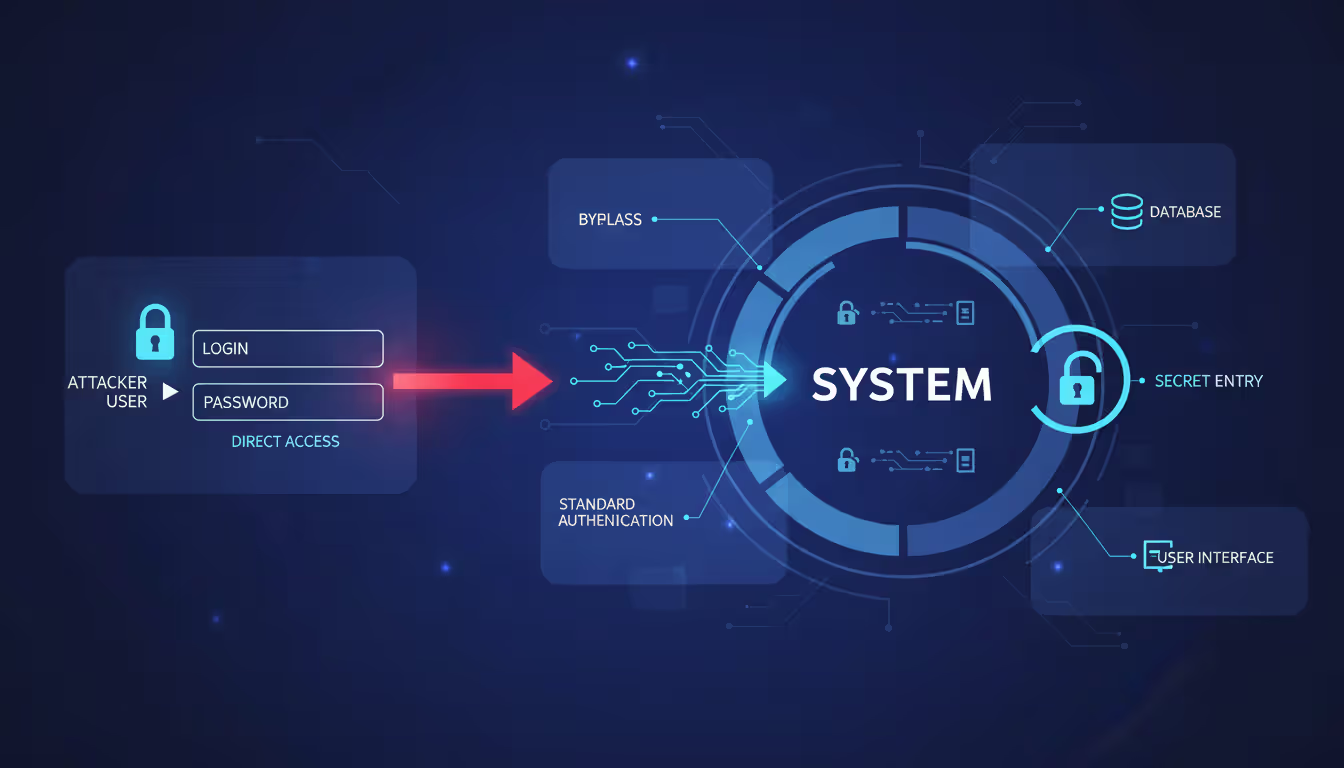
Author: Trevor Kingsland;
Source: elegantimagerytv.com
Types of Backdoors
The backdoor in cyber security definition actually covers several distinct varieties, each presenting unique challenges for security teams. Think of these as different species in a ecosystem of threats—related but requiring different defensive approaches.
Built-In vs. Installed Backdoors
Built-in backdoors come from the factory, so to speak. During the software development process, programmers intentionally include these access mechanisms. Sometimes this happens for legitimate reasons—a tech support team might need a master password to help customers who've locked themselves out.
Cisco routers, for instance, historically included default administrator credentials for initial setup. When properly documented and requiring users to change them during installation, these serve a valid purpose. The problem? Many users never changed these defaults, and attackers knew exactly what to try.
Then you've got the shadier varieties. Some manufacturers include undocumented access points that even legitimate customers don't know about. Whether for surveillance, future exploitation, or "just in case" scenarios, these create massive security holes.
Installed backdoors represent post-deployment compromises. Your system shipped without them, but attackers found a way in—maybe through a phishing email, an unpatched vulnerability, or a malicious USB drive someone plugged in. Once inside, they install their own backdoor to ensure they can return anytime.
The PlugX malware family provides a great example. Attackers typically deliver it through phishing campaigns. Once executed, it installs a backdoor with extensive capabilities: remote file access, keylogging, screen capture, and command execution. The initial infection might get detected and cleaned up, but the backdoor often survives.
Hardware vs. Software Backdoors
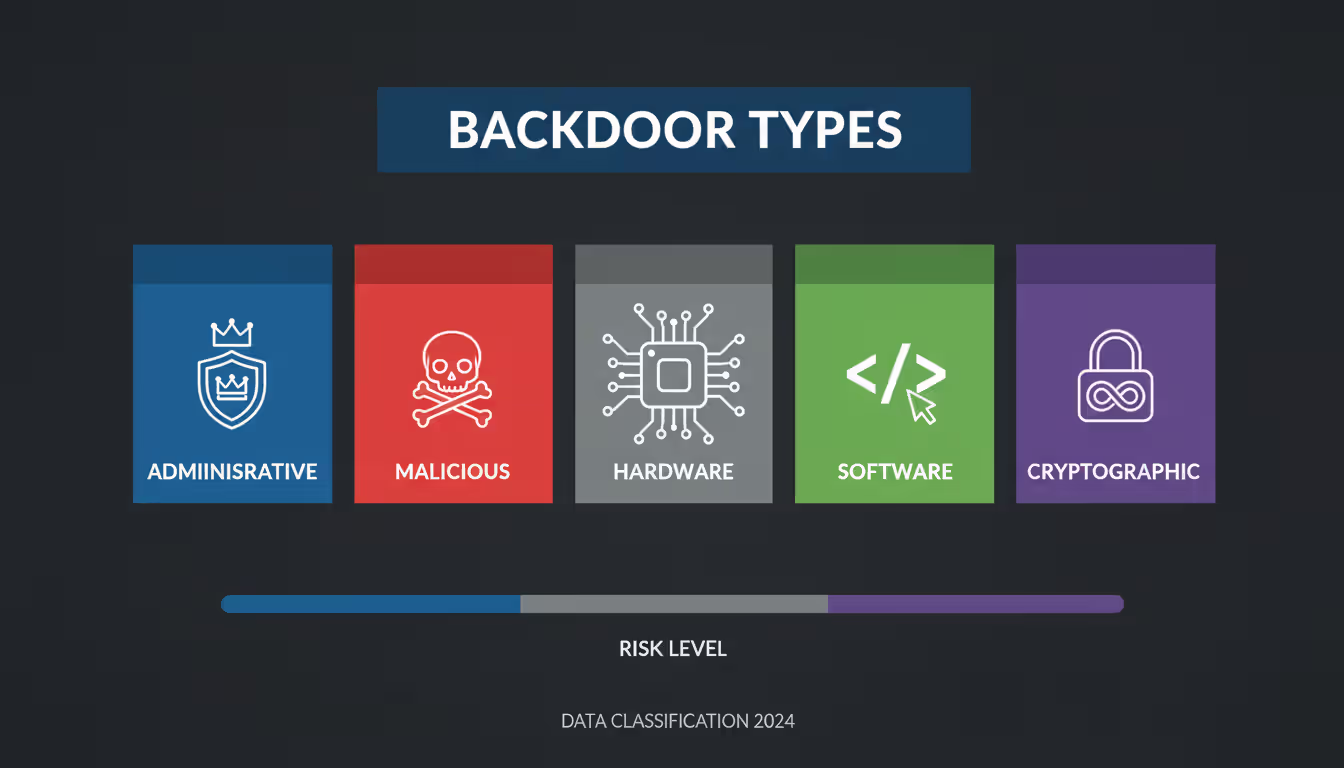
Author: Trevor Kingsland;
Source: elegantimagerytv.com
Hardware backdoors live in physical components—processors, network interface cards, firmware chips, or USB devices. These represent the nightmare scenario for security professionals because they operate below the operating system level where security software can see.
Imagine a network card with modified firmware that secretly copies certain traffic to an attacker's server. Your operating system, antivirus software, and firewall all trust the network card implicitly. They can't easily examine what's happening at that hardware level.
The 2018 Bloomberg report on alleged compromised Supermicro server motherboards (though disputed by the companies involved) illustrated this threat's potential scope. The claim suggested tiny chips smaller than a grain of rice could provide network access to attackers. Whether that specific case was accurate or not, the technical possibility is very real.
Software backdoors exist as code within applications, operating systems, or network services. While theoretically easier to detect since they operate in the software layer, modern obfuscation techniques make identification challenging. Attackers can encrypt their backdoor code, hide it within legitimate files, or use fileless techniques that only exist in memory.
Web shells represent a common software backdoor type. After compromising a web server, attackers upload a small script (PHP, ASP, or JSP) that provides a web-based interface for remote control. Accessing a specific URL on the compromised server gives them full command execution capabilities.
| Backdoor Type | Origin | Intent | Detection Difficulty | Risk Level | Common Examples |
| Built-In Administrative | Developer/Manufacturer | Maintenance & Support | Medium | Medium-High | Default credentials (admin/admin), debugging interfaces left enabled in production |
| Installed Malicious | External Attacker | Unauthorized Access | High | Critical | Remote Access Trojans (RATs), web shells on compromised servers |
| Hardware-Based | Supply Chain Compromise | Espionage/Sabotage | Very High | Critical | Modified firmware, compromised chips, malicious USB controllers |
| Software-Based | Various Sources | Mixed | Medium-High | High | Trojaned applications, kernel modules, modified system libraries |
| Cryptographic | Developer/State Actor | Surveillance | Very High | High | Dual_EC_DRBG weaknesses, key escrow systems, weakened SSL/TLS |
Common Backdoor Attack Methods
Attackers have developed numerous techniques for establishing backdoors, each exploiting different weaknesses in how we build, distribute, and use technology. Let's walk through the major approaches you're likely to encounter.
Trojan-based backdoors arrive wearing a disguise. Remember the ancient Greek story of the Trojan Horse? Same concept here. Users download what appears to be legitimate software—maybe a free PDF converter, a game, or a system optimization tool. The software actually performs its advertised function, which reinforces the user's trust. Meanwhile, it's also installing backdoor components in the background.
Back in 2019, the Scranos rootkit spread through cracked software and fake Android apps. Users thought they were getting free premium applications. Instead, they got working apps plus a sophisticated backdoor that could steal credentials, spy on browsing activity, and install additional malware. Over 700,000 infections were detected across Windows and mobile platforms.
Rootkit backdoors take things deeper—literally. These operate at the kernel or bootloader level, which is essentially the foundation of your operating system. Gaining this level of access gives attackers almost godlike control over the system.
The Zacinlo malware, discovered by Bitdefender researchers, spent over five years in the wild before detection. It combined rootkit and advertising fraud capabilities, remaining hidden through an incredibly complex architecture with over 10,000 different files. The rootkit component let it survive operating system reinstallations by infecting the boot sector.
What makes rootkits particularly nasty? They can modify the operating system itself to hide their presence. When antivirus software asks "what processes are running?" the compromised OS lies and omits the rootkit from the list. Detection requires booting from external media and examining the system from outside the compromised environment.
Cryptographic backdoors represent a more subtle approach. Rather than installing visible malware, attackers weaken the encryption protecting your data. This might involve deliberately flawed random number generators, mathematical weaknesses in encryption algorithms, or key escrow systems that provide special access.
The Dual_EC_DRBG random number generator, standardized by NIST, contained alleged weaknesses that could allow those with knowledge of specific parameters to break encryption. The NSA's involvement in its development raised suspicions that these weren't accidental flaws. While technical debates continue about exploitation difficulty, the incident highlighted how cryptographic backdoors can hide in plain sight for years.
Supply chain compromises target the software development and distribution process. Why break into thousands of individual targets when you can infect the software millions of them will voluntarily install?
Attackers might compromise a software company's build servers, injecting malicious code during the compilation process. Or they could hack update servers to distribute backdoored updates. Users download software from official sources, verify digital signatures that check out, and install what appears to be legitimate updates—completely unaware they're deploying backdoors.
The NotPetya attack in 2017 spread initially through compromised updates for M.E.Doc, Ukrainian accounting software. Attackers breached the company's infrastructure and pushed out a malicious update that looked completely legitimate. Organizations that applied the update got hit with destructive malware that caused over $10 billion in global damages.
Developer-inserted backdoors involve someone with legitimate access intentionally creating hidden entry points. The motivations vary widely. Sometimes it's a disgruntled employee creating "insurance" in case they're fired. Other times it's deliberate sabotage or plans for future unauthorized access.
In 2015, a systems administrator at Shionogi Pharma in New Jersey planted backdoors in the company's network after learning his position might be eliminated. He created domain administrator accounts with privileged access, planning to use them after his departure. Fortunately, his actions were discovered before he could exploit the backdoors, and he received a two-year prison sentence.
Nation-states have also been known to coerce developers working for software companies, either through blackmail or appeals to patriotism, to insert backdoors into commercial products. These cases rarely become public, but security researchers occasionally discover suspicious code that suggests deliberate insertion rather than typical malware infection.
Real-World Backdoor Examples
Looking at actual backdoor incidents helps move this from abstract concepts to concrete understanding of what can go wrong. These backdoor in cyber security examples demonstrate the real-world impact on organizations, governments, and individuals.
SolarWinds Supply Chain Attack (2020) stands as one of the most sophisticated and far-reaching backdoor incidents ever discovered. Between March and June 2020, attackers compromised SolarWinds' build system for their Orion network management platform. They inserted a backdoor called SUNBURST into legitimate software updates.
Approximately 18,000 organizations installed the compromised updates, though attackers only activated the backdoor for roughly 100 high-value targets. The selection process itself was sophisticated—SUNBURST would remain dormant for up to two weeks, then begin fingerprinting the victim's environment to determine if they were interesting enough for further exploitation.
Victims included multiple US government agencies (Treasury, Commerce, Homeland Security), Fortune 500 companies, and technology firms. The backdoor allowed attackers to steal emails, deploy additional malware, and conduct extensive espionage operations. FireEye discovered the breach in December 2020 while investigating a compromise of their own systems.
The financial impact on SolarWinds alone exceeded $90 million in direct response costs. The broader implications—lost trust in software supply chains, thousands of organizations conducting time-consuming investigations, potential intelligence losses—remain incalculable. Three years later, security teams still discuss SolarWinds when assessing third-party software risks.
Juniper Networks Backdoor (2015) revealed unauthorized code in ScreenOS, the firmware running on NetScreen firewalls and VPN appliances. Two separate backdoors were discovered. The first allowed attackers who knew a specific password to gain administrative access. The second backdoor involved modifications to the Dual_EC_DRBG random number generator (yes, the same one with suspected NSA involvement) that potentially enabled decryption of VPN traffic.
The code appeared in releases from August 2012 through September 2015—three years of potential exploitation. Government agencies, financial institutions, and corporations worldwide used these devices to protect sensitive networks. Whoever inserted these backdoors could potentially decrypt VPN communications that were supposed to be secure.
Juniper issued emergency patches, but questions remained. Who inserted the backdoors? How did unauthorized code get into production firmware? Were the two backdoors related or from different actors? These questions were never fully answered publicly, though many security experts suspected nation-state involvement.
NSA ANT Catalog became public through documents leaked by Edward Snowden, revealing an entire catalog of sophisticated hardware and software backdoors developed for intelligence operations. While intended for targeted surveillance of specific individuals and organizations, their existence raised uncomfortable questions about security vulnerability creation by government agencies.
COTTONMOUTH was a USB hardware implant that looked like a normal connector but included a tiny computer capable of providing remote access. IRATEMONK targeted hard drive firmware across multiple manufacturers, installing backdoors that could survive drive reformatting and operating system reinstallation.
The catalog demonstrated nation-state capabilities for hardware-level backdoors that most organizations would have no ability to detect. It also sparked debates about whether governments should develop these capabilities, given the risk that adversaries might discover and exploit the same weaknesses.
CCleaner Compromise (2017) affected over 2.3 million users of the popular system optimization software. Attackers breached Piriform (CCleaner's developer) and modified the CCleaner installer to include the Floxif malware. For about a month, users downloading CCleaner from the official website received backdoored versions.
The initial backdoor collected system information (computer name, installed software, network adapter details, running processes) and sent it to command-and-control servers. Security researchers who analyzed the second-stage payloads discovered that attackers had compiled a target list of major technology companies. If the backdoor found itself on systems belonging to these companies, it would deploy additional tools for deeper compromise.
Cisco Talos discovered the compromise and worked with Avast (which had acquired Piriform) to address the issue. The incident highlighted that even security-conscious users who download only from official sources face supply chain risks.
ASUS Live Update Attack (2019) showed incredible precision in supply chain targeting. Attackers compromised ASUS's update servers and distributed backdoored Live Update Utility versions signed with legitimate ASUS certificates. Approximately 500,000 users received the malicious updates between June and November 2018.
Here's where it gets interesting—while half a million users got infected, attackers were only targeting about 600 specific systems based on their MAC addresses. The backdoor would check the infected system's MAC address against a hardcoded list. If it matched, the backdoor downloaded additional payloads for further exploitation. For everyone else, it did nothing.
This precision suggested advanced persistent threat (APT) operations with specific intelligence collection goals. Distributing widely while only activating for specific targets helped avoid detection—most infected systems showed no suspicious behavior. Kaspersky Lab uncovered the campaign and dubbed it ShadowHammer.

Author: Trevor Kingsland;
Source: elegantimagerytv.com
Warning Signs Your System May Have a Backdoor
Detecting backdoors requires attention to subtle anomalies that suggest someone else is using your systems. This backdoor in cyber security guide section focuses on practical warning signs that don't require advanced security tools.
Unusual network traffic patterns often provide the first clue. Set up basic network monitoring and watch for connections that don't make sense. Does your computer connect to IP addresses in countries where your organization doesn't operate? Are there encrypted outbound connections to unfamiliar domains?
Pay special attention to off-hours activity. If your file server is uploading gigabytes of data at 3 AM when nobody should be working, that's suspicious. Backdoors frequently exhibit beaconing behavior—regular check-ins with command servers at consistent intervals. You might see connections every 6 hours, or every 24 hours, creating patterns that stand out once you know to look for them.
DNS queries can reveal backdoors too. Some backdoors tunnel commands through DNS requests to bypass firewall restrictions. If you see an unusually high volume of DNS queries, especially to domains that look randomly generated (like "8j3hd9skkd.example.com"), investigate further.
Unknown processes and services running on your systems warrant immediate investigation. Pull up your task manager or process list right now. Do you recognize everything running? Can you identify what each process does and why it's running?
Backdoors often create new processes or inject code into existing legitimate processes. Check for processes lacking proper digital signatures—legitimate software from reputable vendors should be signed. Look for processes that consume resources inconsistently—maybe they spike CPU usage periodically when communicating with attackers, then go quiet.
Services set to start automatically that you don't remember installing deserve scrutiny. On Windows, open services.msc and review the startup type for each service. On Linux, check systemd units or init scripts. If you find unfamiliar services, especially those with vague names like "System Process" or "Update Service," dig deeper.
Unauthorized access attempts appearing in logs indicate potential backdoor exploitation. Start reviewing your authentication logs regularly. You should see login attempts and patterns that match your organization's legitimate activity.
Red flags include successful logins from impossible locations—if your user account logged in from New York at 2 PM and Tokyo at 2:05 PM, something's wrong. Access during unusual hours might indicate compromised accounts or backdoor usage. Authentication using accounts that should be inactive (former employees, test accounts that should be disabled) suggests compromise.
Even failed login attempts provide valuable intelligence. Multiple failures using valid usernames but incorrect passwords might show attackers testing backdoor credentials or conducting reconnaissance.
Performance degradation sometimes accompanies backdoor activity, though sophisticated threats minimize their footprint to avoid detection. Modern backdoors try to be "good neighbors" that don't interfere with normal system operation.
That said, unexplained performance issues deserve investigation. If your network bandwidth gets saturated during times when usage should be low, someone might be exfiltrating data. Unusual disk activity—especially writes to system directories or programs trying to modify protected files—could indicate backdoor installation or operation.
Memory usage that doesn't match running applications suggests hidden processes. If Task Manager shows 80% memory utilization but your visible applications shouldn't be using nearly that much, something's consuming resources invisibly.
Configuration changes you didn't authorize signal potential compromise. New user accounts appearing mysteriously, modified firewall rules that open unexpected ports, disabled security software, or altered system settings all indicate someone else has been making changes.
Check your Windows Registry or Linux system configurations for modifications. Backdoors often add startup entries, create new services, or modify security settings. If you maintain configuration baselines (saved copies of known-good configurations), comparing current settings against baselines quickly reveals unauthorized changes.
File integrity monitoring helps here too. Tools that create cryptographic hashes of system files can alert you when something changes. A modified system library or altered configuration file might indicate backdoor installation.
Security tool interference occurs when backdoors attempt self-preservation. If your antivirus software suddenly won't update, logging functions stop working mysteriously, or security tools crash when performing scans, consider the possibility of active interference from malware protecting a backdoor.
Some backdoors specifically target security software, disabling real-time protection or adding themselves to exclusion lists. If you notice your endpoint protection agent isn't running when it should be, or Windows Defender is disabled and you can't re-enable it, investigate immediately.
How to Prevent and Remove Backdoors
Effective backdoor defense requires multiple overlapping security controls. No single solution provides complete protection, so we're building layers that make successful backdoor attacks increasingly difficult. This backdoor in cyber security guide to protection emphasizes actionable steps you can implement.
Prevention Best Practices
Implement least privilege access throughout your environment. Every user account, service account, and application should run with the absolute minimum permissions necessary to perform its function. Nothing more.
Why does this matter for backdoors? If attackers compromise a low-privilege account, they can't install backdoors in system directories or create persistent mechanisms without first escalating privileges. This adds an extra hurdle and creates opportunities for detection.
Conduct quarterly access reviews. Export your user accounts and their assigned privileges. Ask: Does Sarah in accounting really need local administrator rights? Should the backup service account have permissions to modify system files? Revoke unnecessary privileges.
For high-risk administrative activities, implement privileged access management (PAM) solutions. Instead of giving users permanent admin rights, they request elevated access when needed, use it for the specific task, then automatically lose those privileges. This time-boxing limits the window attackers have to exploit elevated permissions.
Maintain rigorous patch management because unpatched vulnerabilities provide the easiest path for initial compromise. Attackers need to get in before they can install backdoors. If you close the vulnerability doors, they can't reach the point of backdoor installation.
Focus first on internet-facing systems and applications processing untrusted data. Web servers, email gateways, VPN appliances—these face constant attack attempts. Make sure operating systems, applications, and firmware all stay current. Don't forget firmware updates for network devices, which frequently receive less attention than operating systems.
Build a testing process so patches don't break production systems. Use a staging environment that mirrors production, deploy patches there first, verify functionality, then roll out to production with a rollback plan ready. Automated patch deployment tools help maintain consistency across large environments.
For critical systems requiring high availability, plan maintenance windows for patching. I know downtime feels painful, but it's less painful than the backdoor you'll discover after running vulnerable software for months.
Secure the software supply chain through careful vendor assessment and verification processes. Every third-party software package represents a potential backdoor vector, so treat software acquisition with appropriate caution.
Download software only from official sources—not random download sites or torrent repositories. Verify digital signatures on executables before installation. Most operating systems can check signatures automatically, but actually configure your systems to enforce signature verification.
For critical applications, consider requesting security audit reports from vendors. SOC 2 reports, penetration test results, or security certifications provide some assurance about vendor security practices. Organizations with higher risk tolerances might conduct their own code audits or engage third-party security firms to review commercial software before deployment.
Maintain an inventory of all third-party components and their versions. When news breaks about a compromised software component (like Log4Shell or SolarWinds), you need to know immediately whether you're affected. Tools like software composition analysis (SCA) help track dependencies in custom applications.
Deploy network segmentation to contain potential backdoor impact. If attackers establish a backdoor in one network segment, proper segmentation prevents them from easily pivoting to other areas.
Separate your network into zones based on data sensitivity and function. Guest WiFi shouldn't reach internal corporate networks. Corporate networks shouldn't directly access production servers. Critical infrastructure should be isolated from general-purpose systems.
Implement strict firewall rules between segments with default-deny policies. Only explicitly allowed traffic should cross segment boundaries. Monitor inter-segment traffic for anomalies—successful backdoor compromise in one segment often shows up as unusual traffic patterns when attackers attempt lateral movement.
Consider implementing zero trust network access (ZTNA) principles. Rather than trusting anything inside the network perimeter, verify every access request based on identity, device health, and context regardless of network location.
Enable comprehensive logging across systems, applications, and network devices. Logs provide the forensic evidence needed to detect backdoors and investigate compromises. Without logs, backdoors operate invisibly.
Configure logging for authentication attempts (successful and failed), privilege escalation, system configuration changes, network connections, file access to sensitive resources, and administrative actions. These categories cover most backdoor-related activities.
Send logs to a centralized SIEM or log management platform rather than storing them locally. Attackers who compromise systems often delete local logs to cover their tracks. Remote log storage preserves evidence even if the compromised system gets wiped.
Retain logs for at least 90 days, longer for compliance or high-risk environments. Some sophisticated backdoors remain dormant for weeks before activating, so short retention periods miss critical detection opportunities.
Implement log integrity controls like write-once storage or cryptographic signing. This prevents attackers from modifying logs to erase evidence of their activities.
Conduct regular security assessments including vulnerability scans, penetration testing, and code audits. Fresh eyes examining your environment often spot things internal teams miss.
Schedule annual penetration tests that specifically include backdoor detection in the scope. Ask testers to attempt installing backdoors and see whether your security controls detect them. This provides realistic validation of your defensive capabilities.
Vulnerability scanning should happen at least monthly, with critical systems scanned weekly. Automated scanners identify missing patches, configuration weaknesses, and known vulnerable software versions that attackers could exploit.
For custom applications, implement secure code review processes. Have developers review each other's code looking for security issues. Consider static application security testing (SAST) tools that automatically scan source code for vulnerabilities and suspicious patterns.
Detection and Removal Steps
Perform baseline comparisons of system configurations, installed software, and running processes. If you don't know what "normal" looks like, detecting "abnormal" becomes nearly impossible.
Create cryptographic hashes of all system files in a known-good state. Store these baselines securely—preferably offline or in write-protected storage. Periodically compare current system state against baselines to identify unauthorized modifications.
Document standard system configurations including services that should be running, typical network connections, and installed software. When investigating potential backdoors, having reference documentation makes anomalies obvious.
For critical systems, implement continuous file integrity monitoring that automatically alerts when protected files change. This provides real-time detection of backdoor installation attempts rather than discovering compromises weeks later.
Use specialized backdoor detection tools that examine systems for indicators of compromise. While general-purpose antivirus provides some protection, dedicated tools often catch sophisticated backdoors that bypass traditional signatures.
Rootkit scanners like GMER, Rootkit Revealer, or Chkrootkit specifically look for rootkit-level backdoors by examining kernel modifications and hidden processes. Run these from bootable media when investigating suspected compromises, since rootkits running on the host can hide from tools running within the compromised OS.
Memory forensics tools like Volatility analyze RAM dumps to detect fileless backdoors and injected code. These find threats that never write to disk, making them invisible to file-based scanners.
Behavioral analysis platforms establish baseline behavior for systems and applications, then flag deviations. Unusual network connections, unexpected process creation, or atypical file access patterns all generate alerts.
Analyze network traffic for command-and-control communication patterns that indicate active backdoors. This often provides the most reliable detection mechanism since even sophisticated backdoors need to communicate.
Deploy network traffic analysis tools that perform deep packet inspection, not just examining connection metadata but analyzing packet contents. Look for encrypted connections to suspicious destinations, unusual protocols, or data encoding schemes that might indicate tunneling.
Compare outbound connections against threat intelligence feeds. Many backdoor families use known command-and-control infrastructure that threat intelligence providers track. Automatically flagging connections to known-bad IP addresses or domains helps identify active backdoors.
Watch for data exfiltration patterns—large uploads to cloud storage services, FTP connections to external servers, or gradual data transfers designed to avoid triggering bandwidth thresholds. Backdoors often serve as conduits for data theft.
Conduct memory analysis to detect fileless backdoors that avoid writing to disk. Traditional forensics examines hard drives, but fileless malware lives entirely in RAM, making it invisible to standard investigation techniques.
Capture memory dumps from suspected compromised systems using tools like FTK Imager, DumpIt, or built-in OS capabilities. Analyze these dumps with Volatility or Rekall to examine running processes, loaded drivers, network connections, and injected code.
Look for process hollowing (where malware replaces legitimate process memory with malicious code), DLL injection, and hook detection (where backdoors intercept system function calls). These techniques all indicate sophisticated malware that might include backdoor capabilities.
Memory analysis requires specialized skills, so consider engaging incident response firms or security consultants if you lack in-house expertise. The investment pays off when dealing with advanced persistent threats using fileless techniques.
Implement incident response procedures when backdoors are discovered. How you respond determines whether a backdoor becomes a minor incident or a major breach.
Immediately isolate affected systems from the network to prevent further compromise, lateral movement, or data exfiltration. Don't shut systems down yet—you'll lose valuable volatile memory that contains forensic evidence.
Capture memory dumps and create forensic disk images before taking any remediation actions. These provide evidence for investigation and potential legal proceedings. Document everything you observe—timestamps, system state, network connections, running processes.
Assemble your incident response team or engage external help if needed. Determine the backdoor's scope by examining similar systems for indicators of compromise. Assess what data the backdoor could access and whether exfiltration occurred.
Contain the incident by blocking command-and-control infrastructure at firewalls, disabling compromised accounts, and isolating affected network segments. This prevents attackers from maintaining access while you work on remediation.
Rebuild compromised systems from scratch rather than attempting to clean infections. This proves controversial because rebuilding takes more time initially, but it's the only way to ensure complete backdoor removal.
Why rebuild? Sophisticated backdoors install multiple persistence mechanisms. You might remove the obvious backdoor but miss the secondary access method the attacker hid for exactly this scenario. Cleaning tools occasionally leave artifacts that attackers can reactivate. Rootkits can hide components that even removal tools miss.
Rebuilding means wiping drives, reinstalling operating systems from trusted media, reinstalling applications, and restoring data from clean backups. Yes, this takes longer than running a cleaning tool. But you know with certainty that the backdoor is gone.
Restore data only from backups verified as predating the compromise. If you restore from backups created after backdoor installation, you might be restoring the backdoor itself.
Strengthen defenses post-incident by addressing how the backdoor got installed initially. Learning from incidents prevents recurrence.
If attackers entered through phishing, implement additional email security controls and conduct user security awareness training. If they exploited an unpatched vulnerability, review and improve patch management processes. If they leveraged supply chain compromise, enhance vendor security assessment and software verification procedures.
Document lessons learned and share them with relevant teams. Update incident response playbooks based on what worked well and what didn't during your response. Consider sharing indicators of compromise with information sharing groups to help protect the broader community.
Frequently Asked Questions About Backdoors in Cyber Security
Backdoors rank among cybersecurity's most persistent challenges precisely because they turn your own infrastructure into the threat. Unlike external attacks that must break through defensive barriers, backdoors operate from within, exploiting the trust we place in our systems and software.
The evolving threat landscape heading into late 2026 shows no signs of backdoor risks diminishing. Supply chain attacks continue their upward trajectory as attackers recognize that compromising one software vendor provides access to thousands of downstream targets. Nation-state groups grow more sophisticated in their backdoor development, deployment, and operational security. Even cybercriminal operations have adopted advanced persistent techniques previously associated only with state-sponsored actors.
What makes backdoors particularly insidious? They weaponize patience. Unlike ransomware that announces itself immediately or defacement attacks with obvious visual impact, backdoors can operate silently for years. Attackers gather intelligence, map networks, steal data gradually, and maintain access through security upgrades and system replacements. By the time discovery happens, the damage is often extensive.
Your defensive strategy needs to match this threat with similar depth and persistence. Prevention through least privilege, robust patch management, supply chain security, and network segmentation reduces initial compromise opportunities. Detection capabilities using behavioral monitoring, network traffic analysis, and specialized scanning tools identify backdoors that slip through preventive controls. Incident response procedures ensure rapid containment and thorough remediation when backdoors surface.
But here's the hard truth—you can't prevent all backdoors. The combination of sophisticated attackers, complex software supply chains, and human factors means some risk persists regardless of security investments. That's not pessimism, it's realism. Accept that prevention isn't perfect, which makes detection and response capabilities even more critical.
Focus on visibility throughout your environment. You can't defend against what you can't see. Comprehensive logging, network traffic monitoring, endpoint telemetry, and configuration management all contribute to the visibility needed for backdoor detection. Invest in tools and processes that illuminate system and network activity.
Security teams should prioritize continuous improvement over perfection. Each incident provides learning opportunities for strengthening defenses. Regular security assessments, penetration testing, and purple team exercises identify gaps before attackers do. Stay informed about emerging backdoor techniques through threat intelligence sharing, security research, and industry forums.
Remember that backdoor defense isn't purely technical—it involves people and processes too. User awareness training reduces phishing success rates that often precede backdoor installation. Vendor security assessments address supply chain risks. Incident response planning ensures coordinated action when backdoors surface.
Related Stories
Read more

Read more



The content on this website is provided for general informational and educational purposes only. It is intended to explain concepts related to cybersecurity awareness, online threats, phishing attacks, and data protection practices.
All information on this website, including articles, guides, and examples, is presented for general educational purposes. Cybersecurity risks and protection strategies may vary depending on individual behavior, technology usage, and threat environments.
This website does not provide professional cybersecurity, legal, or technical advice, and the information presented should not be used as a substitute for consultation with qualified cybersecurity professionals.
The website and its authors are not responsible for any errors or omissions, or for any outcomes resulting from decisions made based on the information provided on this website.