

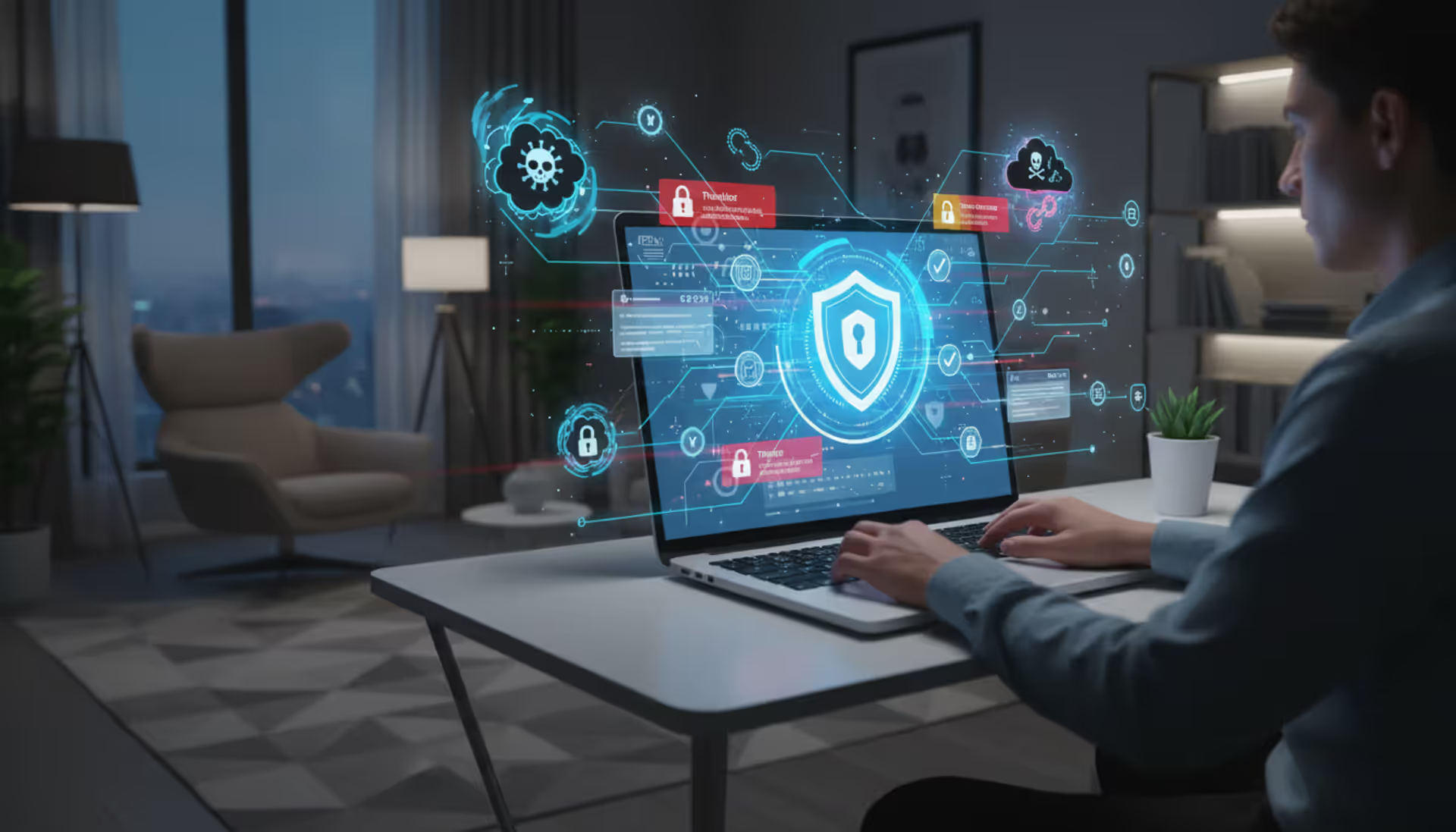
Cybercriminal at computer with digital threats backdrop
Malware Cyber Security Guide

Cybercriminals aren't slowing down. Every day, they're cooking up new ways to break into systems, swipe sensitive information, and bring operations to a grinding halt. If you use any digital device—from your laptop at home to servers managing enterprise data—you need to understand how these threats work and what stops them.
Here's what you'll learn: how infections happen, what to watch for, and defenses that actually hold up in the real world.
What Is Malware in Cyber Security
Think of malware cyber security as your complete defense strategy against hostile programs built to harm your systems. We're talking about software designed from the ground up to break things, steal information, or give attackers control they shouldn't have.
"Malware" combines "malicious" with "software"—pretty straightforward. But here's the tricky part: it's not a static problem you can solve once and forget about. Attack methods shift constantly. Patch a vulnerability today, and threat actors are already testing a different angle tomorrow.
One infection can spiral fast. Maybe it starts with stolen credentials. Then comes data exfiltration. Before you know it, entire network segments are compromised. The malware cyber security explained framework recognizes this—it's not just about running antivirus software and calling it done.
Attackers exploit two main weaknesses: technical gaps and human mistakes. Your software might have an unpatched hole. Or maybe someone clicks a sketchy link in an email that looked legitimate. Sometimes both happen together, which is when things get really messy.
Once malware gets running, its capabilities depend on what the attacker designed it to do. Some variants log every keystroke you type. Others lock up your files and demand ransom payments. More sophisticated ones create hidden backdoors, letting criminals return whenever they want. And some recruit your device into massive botnet networks without you noticing anything wrong.
Defense requires layers. Network monitoring catches suspicious traffic patterns. User training stops social engineering before it starts. Access controls limit damage if someone does click the wrong thing. Regular updates close known security gaps. Incident response plans tell everyone what to do when—not if—something gets through.
Why do attackers do this? Follow the money in most cases. Ransomware operators and banking trojan developers pull in billions every year. State-sponsored groups have different goals—they want intelligence and the ability to disrupt critical infrastructure. A few attackers just want to prove they can break things or watch systems burn.
How Malware Works in Cyber Security Systems
Author: Monica Ellery;
Source: elegantimagerytv.com
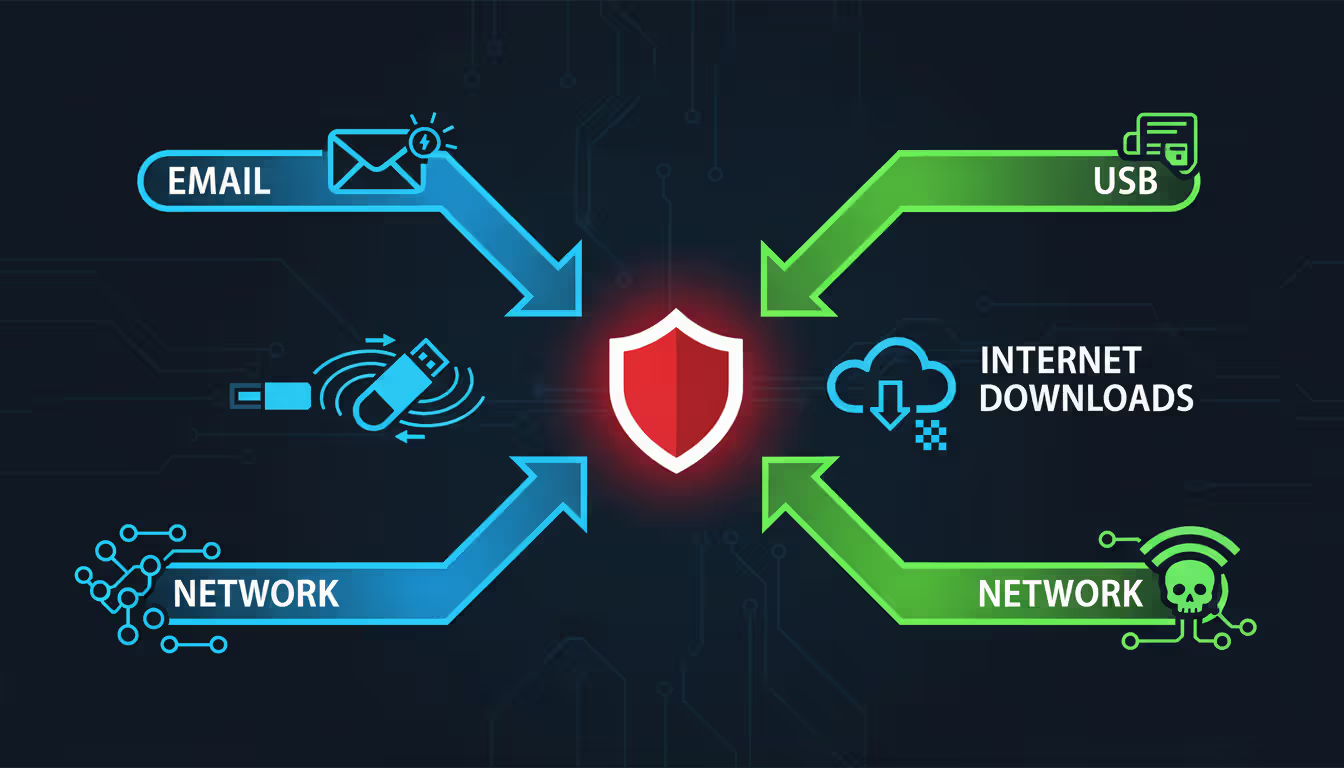
Understanding how malware cyber security works means tracking the infection from first contact through persistence mechanisms that keep it alive.
Getting Inside
Email remains the favorite entry point. Attackers dress up executables as invoices, package tracking notices, or urgent security warnings. Someone opens the attachment, thinking it's legitimate, and boom—the infection starts. Phishing links work similarly, redirecting victims to compromised websites that either exploit browser weaknesses or trick people into downloading infected files.
Drive-by downloads are sneakier. Just visiting a hacked website can trigger automatic malware downloads if your browser or plugins have unpatched vulnerabilities. Even legitimate sites sometimes serve malicious advertisements that attackers slipped past ad network screening.
USB drives spread infections too. Plug an infected thumb drive into your computer, and malware can autorun before you even open any files. Software vulnerabilities offer another path in. Attackers scan the internet for systems running outdated programs with known security holes, then exploit those weaknesses remotely. Zero-day exploits—attacks against vulnerabilities nobody knew existed—are the worst because patches don't exist yet.
Running the Attack
Getting onto a system is only step one. The malware needs to execute before it causes damage. Simple variants run immediately. Sophisticated ones hide first, checking whether they're in a security researcher's sandbox environment. Polymorphic malware rewrites its own code with each infection, making signature detection nearly useless. Fileless variants run completely from memory, barely touching the hard drive where security scans typically look.
Modern attacks often use staged delivery. The initial dropper is tiny and relatively harmless-looking. It downloads the real payload only after confirming the environment looks like a genuine target rather than a honeypot. This two-stage approach helps bypass security scans that might catch bigger, more obviously malicious files.
Staying Power
Smart malware doesn't just infect—it digs in. Persistence mechanisms ensure the malware survives reboots and removal attempts. Common tactics include modifying registry entries to launch at startup, creating scheduled tasks that re-run the malware periodically, or installing rootkits that hide processes from the operating system itself.
Advanced persistent threats use redundancy. They create multiple backdoors so removing one still leaves others active. Some monitor the system for removal attempts and reinstall themselves from hidden copies. Removing this stuff requires thorough forensic work, not just a quick antivirus scan.
Common Types of Malware and Real-World Examples
Author: Monica Ellery;
Source: elegantimagerytv.com
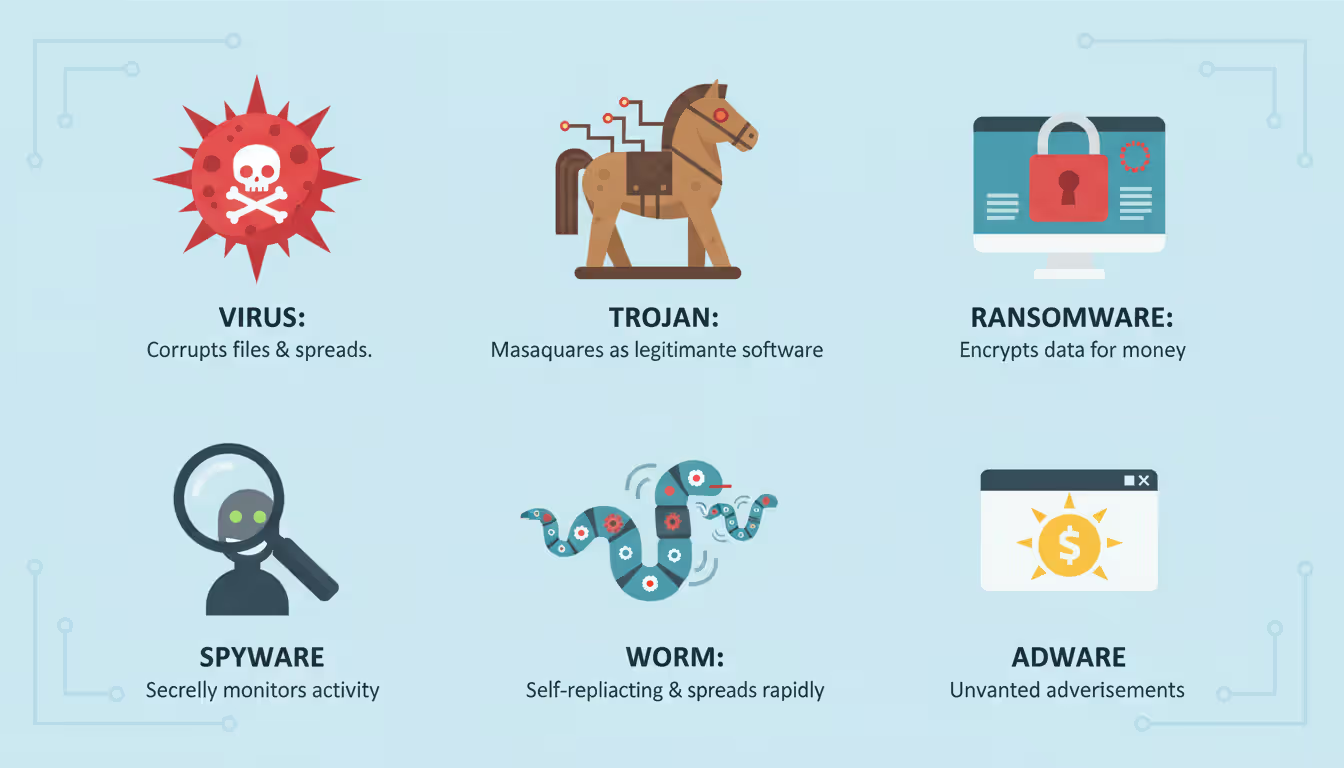
The malware cyber security examples catalog includes several distinct families, each with unique behavior patterns.
Viruses
Classic viruses attach to legitimate files and copy themselves when that file runs. They spread through file sharing, email attachments, or infected software downloads. Remember ILOVEYOU from 2000? That virus disguised itself as a love letter and infected millions of systems worldwide. It proved that social engineering multiplies the impact of technical exploits.
Ransomware
This category encrypts your files and demands payment for the decryption key. WannaCry hit in 2017, exploiting a Windows vulnerability to spread globally within hours. Hospitals couldn't access patient records. Businesses shut down. Government agencies went offline. It showed what happens when organizations skip patch management.
REvil operated as ransomware-as-a-service, letting affiliates use their platform for a cut of the profits. They specifically targeted managed service providers, compromising one MSP to reach dozens of clients simultaneously. When DarkSide hit Colonial Pipeline in 2021, gas stations across the eastern U.S. ran dry. That attack made it crystal clear that digital threats create physical-world consequences.
Trojans
Trojans pretend to be legitimate software while secretly doing something malicious. Emotet started as a banking trojan but evolved into a malware delivery platform that dropped additional payloads like ransomware or credential stealers. Its modular design let operators customize attacks, and its polymorphic capabilities made detection extremely difficult. Law enforcement finally coordinated a takedown in 2021.
Spyware
This software monitors what you're doing and collects sensitive information without permission. Keyloggers capture every keystroke—passwords, credit card numbers, private messages, all of it. FinFisher was sold as a law enforcement tool but ended up used for unauthorized surveillance of journalists and activists worldwide.
Worms
Worms replicate themselves across networks without needing any user interaction. The Mirai botnet infected hundreds of thousands of IoT devices in 2016 by trying default credentials that users never changed. Then it launched massive DDoS attacks that knocked major websites offline. Stuxnet, discovered in 2010, specifically targeted industrial control systems at Iranian nuclear facilities—a cyber weapon designed to cause physical damage.
Adware
Less destructive but still annoying, adware injects unwanted advertisements, tracks where you browse, and slows down your system. Some adware technically gets consent by burying disclosure in lengthy terms-of-service agreements that nobody actually reads.
| Malware Type | How It Spreads | Primary Goal | Notable Example |
| Virus | Infected files shared via email or downloads | Self-replication and causing system damage | ILOVEYOU |
| Ransomware | Phishing campaigns, exploit kits, compromised RDP connections | Extorting payment by encrypting victim files | WannaCry, REvil |
| Trojan | Masquerading as useful or legitimate programs | Creating backdoor access or stealing data | Emotet |
| Spyware | Bundled with free software or malicious downloads | Gathering information and monitoring activity | FinFisher |
| Worm | Exploiting network vulnerabilities and self-propagating | Spreading rapidly to build botnets | Mirai, Stuxnet |
| Adware | Software bundles and browser extensions | Generating revenue through forced advertisements | Fireball |
Warning Signs Your Device Has Malware
Catching malware cyber security warning signs early limits the damage and makes cleanup easier. Sophisticated malware sometimes hides completely, but most infections leave clues.
Sluggish Performance
Sudden slowdowns often mean malware is hogging system resources. Your computer takes forever to boot? Applications lag for no obvious reason? Simple tasks become frustratingly slow? Malware might be running background processes you can't see. Cryptocurrency miners are resource hogs—they'll max out your CPU even when you're not actively using the machine.
Strange Network Behavior
Unusual data usage patterns suggest malware communicating with command servers or sending your data somewhere it shouldn't go. Check network monitoring tools for connections to unfamiliar IP addresses. Watch for unexpected spikes in upload traffic. Some ransomware sends encryption keys back to attacker servers before locking your files.
Security Software Won't Run
Malware frequently tries disabling antivirus programs and firewalls to avoid detection. If your security software turns off by itself, refuses to update, or throws error messages when you try running scans, investigate immediately. Don't assume it's just a glitch.
Pop-ups Everywhere
Browser hijackers generate constant pop-up ads, redirect your searches to sketchy sites, or change your homepage without asking. These symptoms usually indicate adware or potentially unwanted programs. Sometimes they accompany more serious infections hiding underneath.
Unexplained Changes
New programs appearing in your startup folder? Unfamiliar browser toolbars? System settings changed without your input? Files created that you don't recognize? All red flags. Some ransomware modifies your desktop background to display ransom demands.
Account Weirdness
Friends saying they received spam from your email? Password changes you didn't make? Unauthorized transactions on your accounts? These point to credential-stealing malware. Banking trojans specifically watch for financial login pages and capture your credentials in real-time.
Security Alerts (Real or Fake)
Legitimate antivirus alerts deserve immediate attention. But watch out—some malware generates fake security warnings to scare you into downloading additional malicious software or paying for fraudulent "cleanup" services.
How to Prevent Malware Infections
Learning how to prevent malware cyber security threats means building multiple defensive layers. No single solution stops everything, but combining technical controls with smart habits dramatically cuts your risk.
Update Everything
Patch management is your foundation. Turn on automatic updates for your operating system, browsers, and all applications. Attackers constantly exploit known vulnerabilities in outdated software—vulnerabilities that patches already fix. WannaCry primarily hit systems that hadn't installed a Windows update released two months before the outbreak.
Don't postpone update notifications. Many people delay updates because they're inconvenient, creating vulnerability windows. Schedule updates during off-hours if they disrupt work, but don't ignore them indefinitely.
Use Real Security Software
Modern antivirus goes way beyond signature matching. Look for solutions incorporating behavioral analysis, machine learning, and cloud-based threat intelligence. Choose reputable security suites offering real-time protection, web filtering, and email scanning.
Just remember—antivirus isn't perfect. Brand new malware variants might slip past initially. Sophisticated attackers test their creations against popular security products before deployment. Security software substantially reduces risk but shouldn't make you overconfident.
Treat Email Carefully
Scrutinize unexpected emails, especially ones pushing urgency or requesting sensitive information. Check sender addresses closely—attackers use domains mimicking legitimate ones (swapping "l" for "1" or adding extra letters). Before clicking any link, hover your mouse over it to preview where it actually goes.
Never open attachments from strangers. Even when emails appear from people you know, verify through a separate channel if something seems off. Compromised accounts frequently spam malware to entire contact lists.
Browse Smart
Stick with reputable websites and avoid clicking ads promising free software, prizes, or system scans. Use browser extensions blocking malicious sites and ads. HTTPS encryption doesn't guarantee safety—attackers can obtain legitimate certificates for phishing sites.
Download software only from official sources. Third-party download sites often bundle legitimate programs with unwanted extras. Choose custom installation when installing software and deselect additional programs or toolbars.
Control Access
Run a standard user account for daily activities rather than an administrator account. This limits malware's ability to make system-wide changes. Apply least privilege principles—users and applications should only have permissions they genuinely need.
Create strong, unique passwords for every account to prevent credential-stuffing attacks. Password managers generate and store complex passwords, eliminating the temptation to reuse the same password everywhere. Turn on multi-factor authentication whenever available. It adds crucial protection beyond just passwords.
Back Up Consistently
Keep offline backups of critical data. Ransomware can encrypt network-connected backup drives, but offline or cloud backups with versioning let you recover without paying ransoms. Test your restoration procedures periodically—backups are useless if you can't actually restore from them when disaster strikes.
The 3-2-1 backup rule works: keep three data copies on two different media types with one copy stored offsite.
Author: Monica Ellery;
Source: elegantimagerytv.com
Essential Security Tools and Practices
Beyond basic antivirus, consider these additional protections:
Firewalls watch incoming and outgoing network traffic, blocking unauthorized connections. Modern operating systems include built-in firewalls—make sure yours is enabled and configured correctly.
DNS filtering stops connections to known malicious domains, blocking malware command servers and phishing sites before they even load.
Email authentication technologies like SPF, DKIM, and DMARC help identify spoofed emails, though your email administrator needs to configure them properly.
Network segmentation isolates critical systems from general-use networks, limiting how far malware can spread if one segment gets compromised.
What to Do If You Suspect Malware
Act quickly but don't panic. Disconnect the affected device from all networks to prevent spreading and stop ongoing data theft. Don't immediately shut down the system—some malware triggers destructive payloads when powered off, plus running processes provide valuable forensic evidence.
Run a complete system scan with updated security software. If your installed antivirus is disabled or compromised, boot from a clean USB drive containing security tools. Many antivirus vendors offer bootable rescue disks specifically for cleaning infected systems.
Change all passwords from a clean device after removing malware. Assume every credential entered on the infected system was compromised.
For severe infections or when sensitive data is involved, get professional help. Incident response specialists can perform forensic analysis, determine what data was accessed, and ensure complete malware removal.
Malware Protection for Businesses vs. Individuals
Core security principles apply everywhere, but businesses face different threats and deploy more sophisticated defenses than individual users.
Different Threat Landscapes
Businesses make juicier targets. Ransomware operators demand higher payments from organizations because they know downtime costs thousands per hour and businesses can afford substantial ransoms. Advanced persistent threat groups target businesses for intellectual property, trade secrets, and customer databases.
Individuals typically face opportunistic attacks—mass-distributed malware hoping some percentage of recipients bite. Targeted attacks against individuals are rare unless they're high-value targets like executives or celebrities.
Different Security Tools
Enterprise security includes endpoint detection and response (EDR) platforms monitoring all endpoints for suspicious behavior and providing centralized visibility and response capabilities. Security information and event management (SIEM) systems aggregate logs from across the infrastructure, identifying patterns indicating compromise.
Businesses deploy email gateways scanning attachments in sandboxed environments before delivery, web proxies filtering internet access, and data loss prevention tools preventing sensitive information from leaving the network.
Individual users primarily rely on endpoint antivirus, operating system defenses, and safe practices. Consumer-grade security tools effectively stop common threats but lack the centralized management and advanced detection capabilities of enterprise solutions.
Organizational Factors
Businesses must address the human element through security awareness training, teaching employees to spot phishing attempts and follow security policies. Regular training significantly cuts successful social engineering attacks.
Incident response plans outline specific procedures when malware is detected, defining roles, communication channels, and recovery steps. You can't improvise during active incidents.
Regulations often require specific security controls. Healthcare organizations must comply with HIPAA. Financial institutions need PCI DSS compliance. Many businesses fall under GDPR or CCPA requirements. These regulations drive security investments beyond what pure risk analysis might justify.
Resource Considerations
Organizations employ dedicated security teams while individuals self-manage their security. This expertise gap means businesses can implement more complex solutions, but individuals need simpler, more automated protections.
Budget differences are massive. Enterprise security platforms cost thousands to millions annually. Effective individual protection costs under $100 per year or is even free through built-in operating system features.
The weakest link in cybersecurity is often the human element. Attackers know that exploiting human psychology is frequently easier than breaking technical defenses. Education and awareness are as critical as firewalls and antivirus software
— Jen Easterly
Frequently Asked Questions About Malware Cyber Security
Malware isn't disappearing. Cybercriminals continuously refine their techniques, exploiting fresh vulnerabilities and adapting to security improvements. But understanding how malware operates, recognizing warning signs, and implementing layered defenses puts you in a strong position to dodge infections and minimize damage when they occur.
The most effective security combines technical controls with informed behavior. Keep systems current, run reputable security software, maintain healthy skepticism toward unexpected emails and downloads, and back up irreplaceable data. These fundamentals prevent the vast majority of infections.
For businesses, security demands organizational commitment beyond purchasing tools. Employee training, incident response planning, and security-conscious culture make the difference between minor incidents and catastrophic breaches.
Malware will keep advancing, but so will defenses. Stay informed about emerging threats, maintain security hygiene, and take warnings seriously. You'll stay ahead of most attacks. Perfect security doesn't exist, but practical security is achievable for anyone willing to implement basic protections and remain vigilant.
Related Stories

Read more
Read more


The content on this website is provided for general informational and educational purposes only. It is intended to explain concepts related to cybersecurity awareness, online threats, phishing attacks, and data protection practices.
All information on this website, including articles, guides, and examples, is presented for general educational purposes. Cybersecurity risks and protection strategies may vary depending on individual behavior, technology usage, and threat environments.
This website does not provide professional cybersecurity, legal, or technical advice, and the information presented should not be used as a substitute for consultation with qualified cybersecurity professionals.
The website and its authors are not responsible for any errors or omissions, or for any outcomes resulting from decisions made based on the information provided on this website.